
Google search ads with Copilot
Connect your Google Ads account and see your Google results in AdPlay. On Pro, Copilot writes a search ad for your website and launches it when you approve.
Every plan can now connect a Google Ads account. Campaigns and Insights show your Google campaigns with their spend and results, including campaigns you made in Google Ads, and the searches that brought you orders.
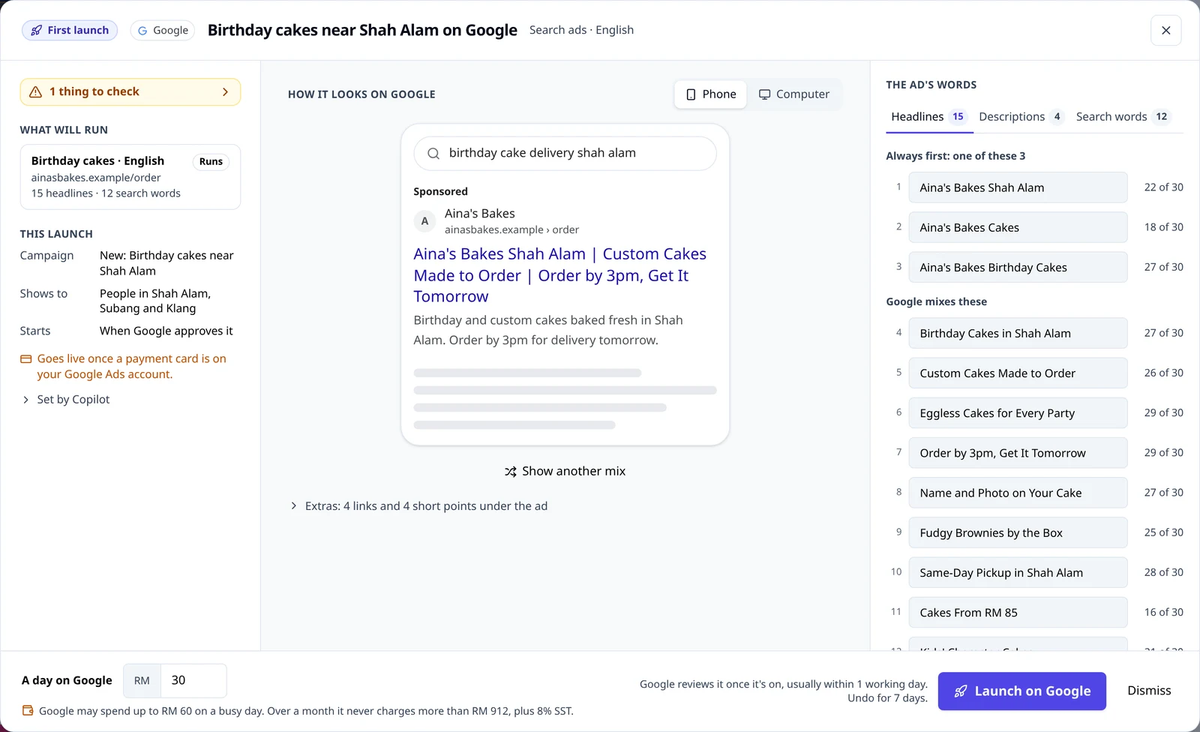
On Pro, tell Copilot what you sell, which page on your website to send people to, and how much to spend a day (from RM 20). Copilot writes the ad and picks the search words. You see the ad as Google shows it before you click Launch on Google. Google checks it, usually within 1 working day, and Copilot tells you when it goes live. If your Google Ads account has no payment card yet, Copilot keeps the ad paused for up to 7 days and turns it on once you add one.
After the launch:
- Copilot checks your Google ads every morning and suggests changes as cards you approve, such as blocking a search that wastes money. Each change has Undo for 7 days.
- See the ad shows its numbers for the last full week. From there you can change the daily budget, pause the campaign and turn it on again.
- Set a monthly cap for Google in Copilot settings. Copilot warns you when your Google spend is on track to pass it.
- Copilot helps you add the Google tag to your website, so Google can count your orders, and tells you once it works.
Plans you make with AdGPT can run on Google too, on Google alone or beside Meta. Google ads cost no credits: you pay Google for your ad spend.