
Launch and improve
Run a Google search ad
Connect your Google Ads account to AdPlay.ai, let Copilot write a search ad for your own website, launch it, and manage it after: numbers, budget, pause and tracking.
Updated November 2026 · AdPlay.ai Team
Open Campaigns and click Connect on the Google row. Sign in on Google's own page, pick your Google Ads account, then tell Copilot what you sell, your page and how much a day (RM 20 a day is the lowest). Copilot writes the ad and you review it before you click Launch on Google. Google checks the ad, usually within 1 working day, and then it runs. Connecting works on every plan. Building the ad, launching it and Copilot's cards need Pro or above.
A Google search ad shows your business to people who are already searching for what you sell. In AdPlay.ai, Copilot writes the ad from your own page, you check it, and it runs in your own Google Ads account.
Before you start
- A Google Ads account with a card on it. You make it yourself on Google. No account yet? In the connect window, click No Google Ads account yet? for the steps. It takes about 15 minutes. You pay Google directly:
- Google asks you to set up a first campaign before it opens the account. Give it the smallest budget and finish the steps. Pause that first campaign right away, or it spends money. Copilot makes your real ad after you connect.
- Pick your country, currency and time zone. For a shop in Malaysia, that is Malaysia, Malaysian Ringgit and Kuala Lumpur time. Google never lets you change these later.
- Add a credit or debit card for automatic payments. Prepaid cards don't work.
- A page on your own website. Google ads can't send people to a marketplace or a chat app, so a Shopee, Lazada or WhatsApp link won't work.
- The Owner, Admin or Ad Manager role on your AdPlay.ai team.
- The right plan for what you want. Every plan can connect Google and see its numbers. Building the ad, launching it and Copilot's cards need Pro or above. Below Pro, the connect ends on Google is connected, with the line "On Pro, Copilot writes your Google ad and launches it when you approve."
Google ads cost no credits. Google charges your ad spend to the card on your Google Ads account.
Connect Google
- Open Campaigns in the sidebar. With no ad account connected yet, click Connect on the Google row (marked Google Search ads). If Meta is already connected, on Pro click Settings at the top of the page, open Accounts and click Connect on the Google row. On any plan, the same row is in the account menu at the bottom of the sidebar: click Settings, then the Integrations tab.
- Connect Google opens with its steps: Sign in, Ad account and, on Pro, Your ad. It says "This opens Google's sign-in, then brings you back here. Google asks you to let AdPlay manage your Google Ads. Copilot changes nothing in your ads until you approve each change." Click Continue to Google.
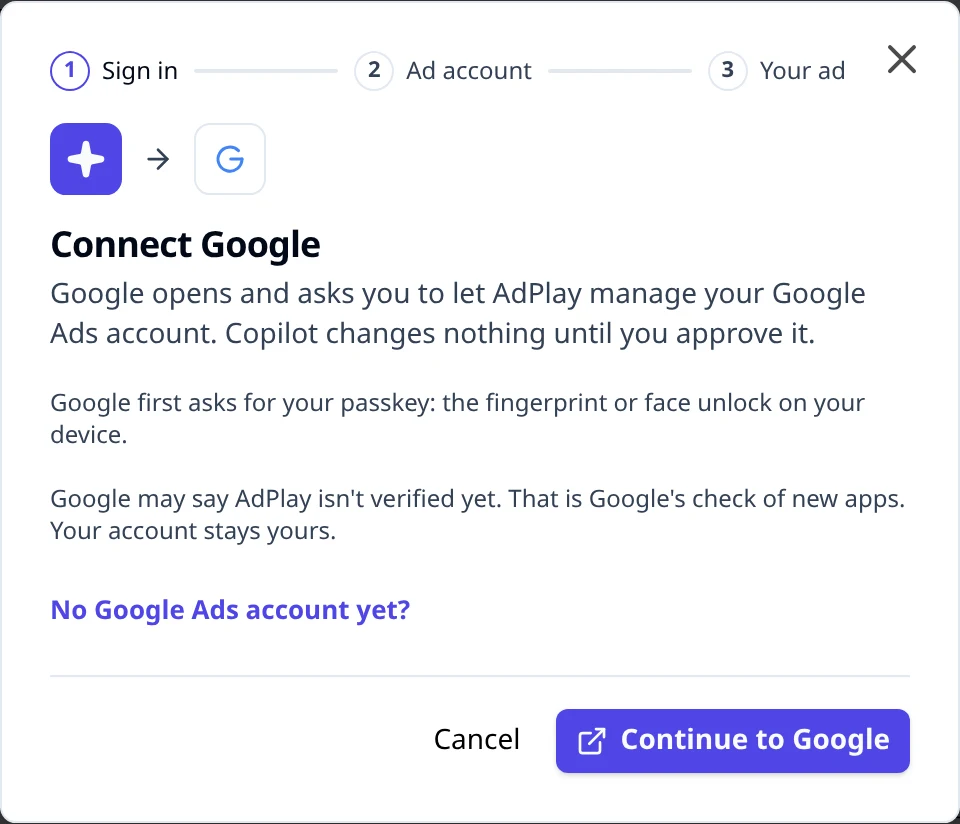
- Sign in on Google's own page. Google first asks for your passkey (your fingerprint or face unlock). When Google asks what AdPlay.ai may do, tick the Google Ads box. Without it, AdPlay.ai cannot connect.
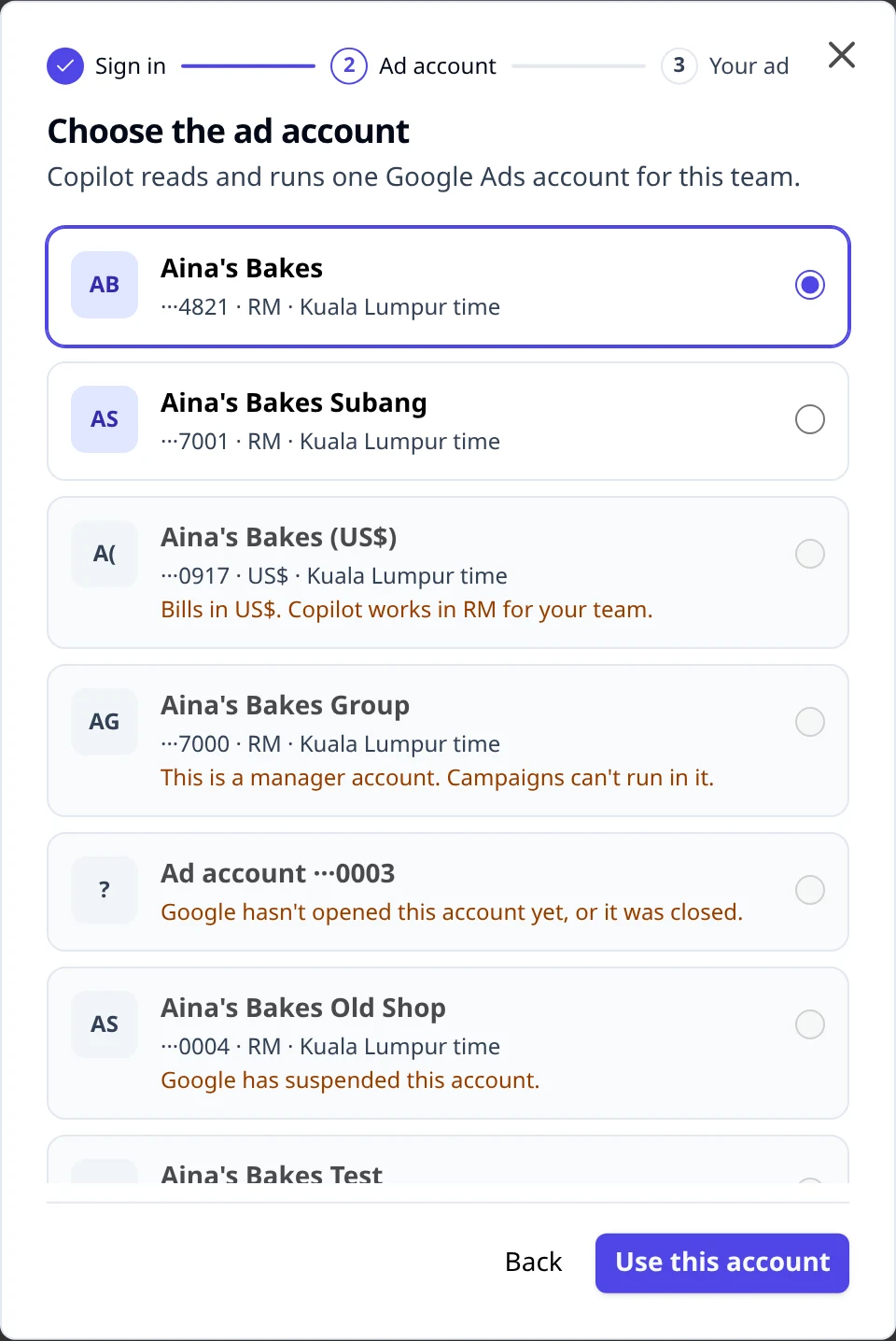
- Back in AdPlay.ai you see Choose the ad account. Each team uses one Google Ads account. Pick yours and click Use this account.
If Google stops you
If you come back without connecting, AdPlay.ai shows Google didn't finish connecting. It says what it knows and that nothing changed on your ads. If the Google Ads box on Google's permission screen was left unticked, it says so: click Try again and tick that box. If Copilot can't see why it stopped, it asks "What happened?"
- Google asked me for a passkey. Google can take up to 7 days to accept a new passkey. AdPlay.ai shows Google is checking your new passkey with the day to try again. A reminder stays on Campaigns until you connect. On Pro, Set up my ad lets Copilot draft your ad while you wait. Nothing goes to Google until you connect.
- I don't have a Google Ads account. This opens the steps to make one.
- Something else. If it keeps stopping, sign in once at ads.google.com, then come back and click Try again.
Accounts you cannot pick
Some rows are greyed, with the reason under the name:
- "Google has suspended this account, so it can't run ads. Google Ads shows why and how to appeal."
- "This account was cancelled in Google Ads, so it can't run ads. An admin can turn it back on there."
- "This account is closed for good in Google Ads, so it can't run ads."
- "This is a manager account. It holds other accounts and can't run ads itself. Pick an account it manages."
- "This account bills in US$ and your team uses RM, so Copilot can't use it. Pick an account that bills in RM."
If no account can be picked, click Make your account, or Sign in again with another Google login.
Switch to another account later
Connect again and pick the other account. The account you use now is marked Connected now. Before anything changes, AdPlay.ai asks Switch to (the account's name)? and lists what happens:
- Launches waiting there are cancelled.
- Its cards leave To do.
- Its live campaigns keep running. You can pause them only in Google Ads.
Click Switch account to go ahead, or Back to keep the account you have.
Tell Copilot about your ad
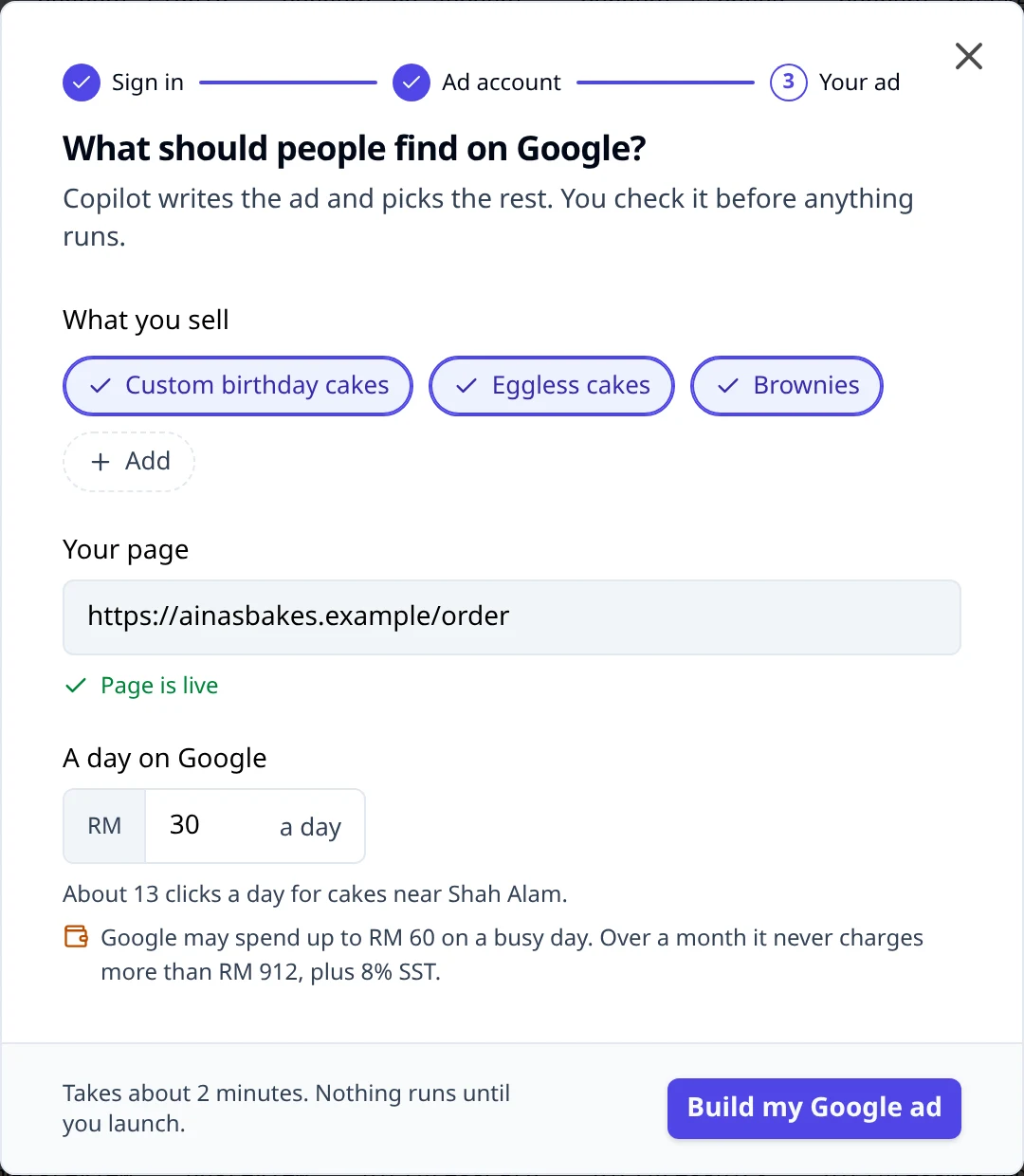
On Pro and above, the last step is What should people find on Google? Copilot writes the ad and picks the search words and areas. You check the ad in To do before it runs.
- What you sell. Copilot fills this in from your products. Tap a product to leave it out, or click Add to type another.
- Your page. The page people land on. A good link shows Page is live. A marketplace or chat link shows, for example, "This is a Shopee link. Google ads can only send people to a page on your own website."
- A day on Google. Type how much to spend a day. The lowest is RM 20 a day. If your amount is low for your kind of search, the app offers Copilot's suggestion as a button, for example Use RM 30 a day. The choice stays yours.
- Read the line under the amount, for example "Google may charge up to RM 40 on a busy day. Over a month it never charges more than RM 608, plus 8% SST." A daily budget is an average: Google can charge up to twice it on a busy day and less on a quiet one, but never more than that monthly amount. If a day costs a little more than twice, Google gives the extra back on your invoice.
- Click Build my Google ad. Building takes about 2 minutes. You check the ad in To do before it runs.
While it builds, Campaigns shows "Building your Google ad. About 2 minutes. Nothing runs until you launch it." Then a card appears in To do with the button Review Google ad.
Review and launch
Click Review Google ad. The large view has three parts.
- What will run and This launch: the campaign's name, who it shows to and when it starts ("When Google approves it"). Set by Copilot opens the settings Copilot picked, such as "Most clicks" bidding, people in the area, and Google's partner sites turned off.
- How it looks on Google: the ad as a search result, on Phone or Computer. Google mixes your lines, so Show another mix draws a different one.
- Your words, in three tabs: Headlines, Descriptions and Search words. Under Headlines, the lines that always show first carry your business name, and "Google mixes these" are the rest. Search words are the searches your ad shows for. Never shows for lists the searches it stays away from. You can edit any line. A headline takes up to 30 characters and a description up to 90.
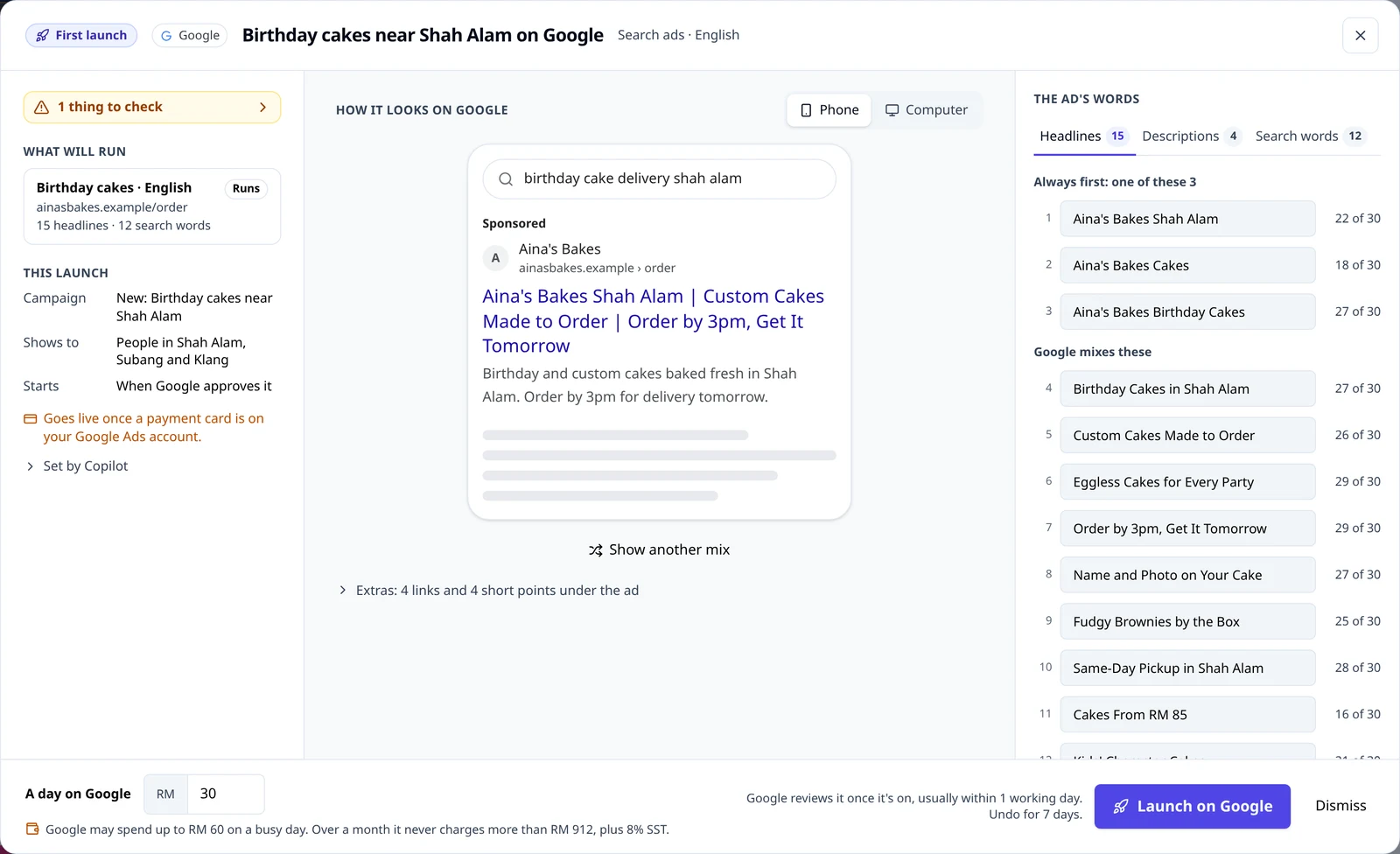
If Copilot found something in the words, a button at the top reads, for example, 2 things to check. Open it to see each one. Use the fix takes Copilot's wording and Keep mine leaves yours. A line marked Fix before launch holds the launch until it is fixed.
At the bottom, check A day on Google, then click Launch on Google. The line beside the button reads "Google reviews it first, usually within 1 working day. Spending starts once it is approved. Undo for 7 days."
If your Google Ads account has no payment card yet, the review says "Your Google Ads account has no payment card yet. Google reviews the ad once you add one." You can still launch. The campaign is made paused and the row reads Waiting for a payment card: "Copilot turns it on once a payment card is on your Google Ads account. Google then reviews it." A card in To do asks you to add one in Google Ads. If Copilot can't check your billing, click A payment card is added once it is done.
After you launch
In review, then Live
To do shows In review at Google. Google checks new ads, usually within 1 working day. When Google approves the ad, its status turns Live and the bell tells you: "(your campaign) is live on Google. Google approved your ad."
If Google rejects the ad, the campaign's row reads Rejected with Google's reason under the name, and the bell says "Google rejected 1 ad". On Pro, Copilot can suggest a card with fixed words: its button is Send fix. It sends a new ad to Google and pauses the old one.
See the ad
On Campaigns, open the All campaigns tab. Your Google campaigns are under Google. Each one made by AdPlay.ai is tagged Made by AdPlay and has See the ad. The same link is on the launch's row in Activity.
See the ad opens the launch, read only:
- The week's numbers, under its dates (for example "11 to 17 Nov"): spend, clicks, orders (or leads) and the cost of each. The week ends two days ago. Spend after that shows on a line under the numbers. Before the first numbers come in, it says "No numbers yet. A new campaign's numbers show here from the morning after it starts."
- "This is the ad as launched on" and the day. The words shown are the ones you launched. Changed since lists what Copilot changed after that, newest first.
- At the bottom: where the ad stands, its daily budget, and the buttons below.
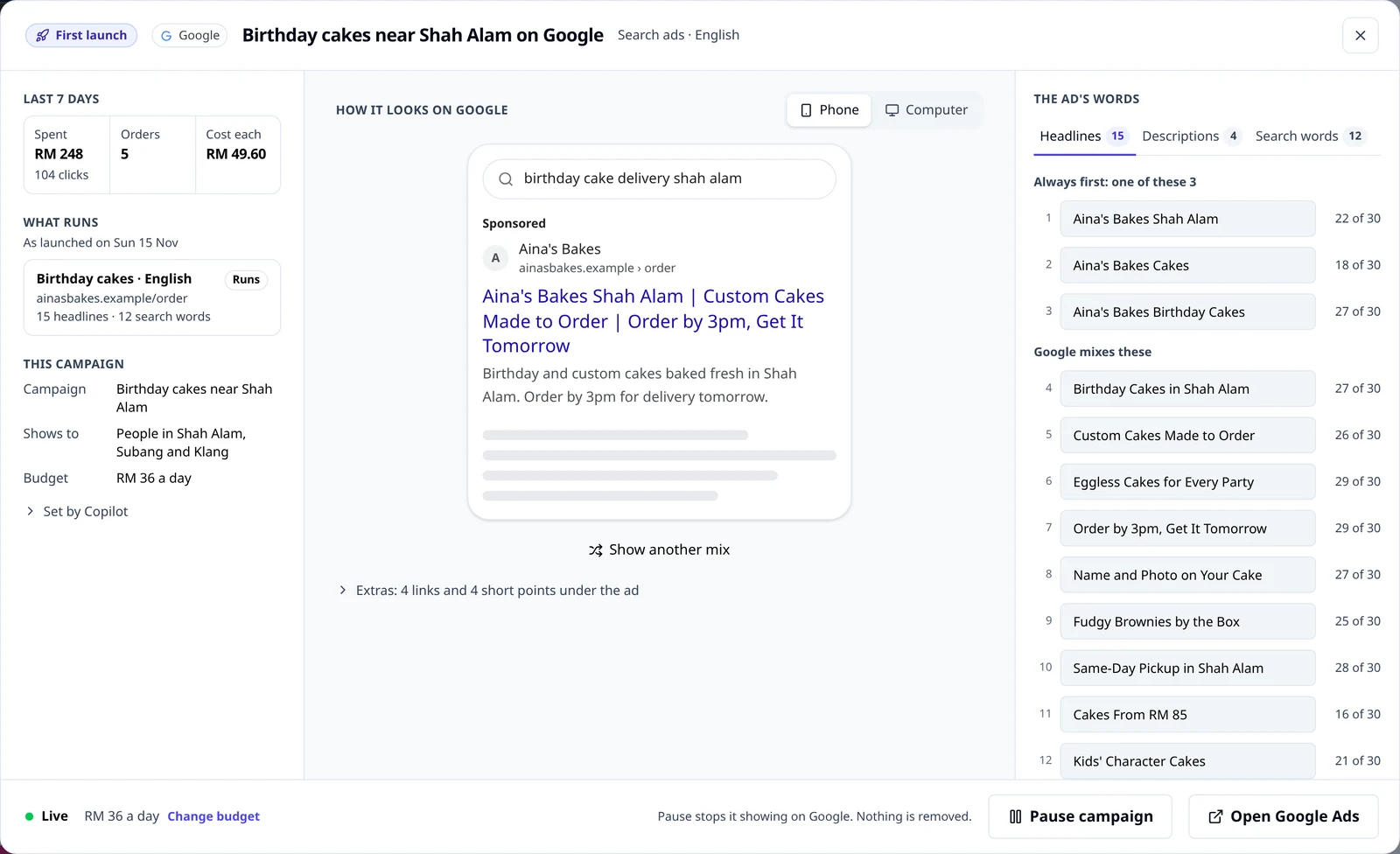
Change the budget
In See the ad, click Change budget. Type the New budget and click Make a card. You see "A card is in To do. Nothing changes until you approve it." Approve the card to change the budget on Google. You can undo it for 7 days.
The limits:
- A cut works on any day, down to RM 10 a day, and by half at most in one step.
- A raise waits until the ad has been live for 7 days, and goes up by 20% at most in one step.
- After one budget change, the next one waits 3 days.
- Change budget shows once Copilot has read the new campaign from Google. Until then, the line says "You can change the budget tomorrow, once Copilot reads the new campaign from Google."
Pause, and turn on again
In See the ad, click Pause campaign. The line beside it says "Pause stops it showing on Google. Nothing is removed." It works on any day.
A paused campaign reads Paused on All campaigns. Open See the ad again and click Turn on again. That puts a card in To do. Nothing runs until you approve it.
Ads and search words
On All campaigns, click Ads and search words on a campaign made by AdPlay.ai. It opens:
- Ads, for the same week as the table: each ad group and its ads, with clicks, spend and results.
- Your search words, for the last 14 days: each search word, how it matches ("Only this search" or "This search and close ones"), and its clicks, spend and results.
The line under the Google heading says which week the numbers cover and when Copilot checked them, for example "Numbers for 11 to 17 Nov, checked today." The week ends two days ago, because Google needs time to finish counting. A campaign that ran after that week has a line under its name, for example "RM 42.63 spent and 9 clicks on 18 Nov. Google is still counting that day, so the week's numbers leave it out for now."
Insights
Open Insights. With more than one app connected, pick Google in the filter at the top. You see what people typed before they ordered, under Searches that brought orders, and Searches that cost money. On Pro, Add, Block and Pause beside a search each make a card in To do. Nothing changes on Google until you approve it. See Insights for the rest of the page.
Copilot's cards for Google
On Pro and above, Copilot checks your Google account every morning and can suggest cards. The button names the change, for example Block 4 searches, Add 2 words, Pause word, Lower to RM 30 a day or Aim for orders. Each card changes Google only when you tap its button, and each has Undo for 7 days. Run your ads with Copilot explains how cards work.
The monthly cap on Google
On Pro and above, click Settings on Campaigns and open Goal and money. Under Monthly caps, turn on Monthly cap on Google, type the amount and click Save.
The cap is Copilot's limit, not Google's. Copilot won't add ads or raise budgets past it. Google doesn't know about this cap, so it won't stop your ads there. If the month is on track to pass it, a card in To do says so, for example "Google will pass your RM 500 cap". To spend less, lower a budget or pause a campaign.
Track orders from your Google ads
Until you set up tracking, a card in To do says Google can't see your orders yet. The line under it says why, for example "Tracking isn't installed yet. Copilot found no Google tag on your site." Click Set up tracking. It opens Track orders from your Google ads.
- Under What should Google track?, pick Most sales, Most leads or Most chats.
- On Shopify or WooCommerce, for sales, the window sends you to Google's own app. It tracks orders for you, so there is no code to paste. Google's app tracks orders only, so leads and chats can't be tracked on these stores yet.
- On any other website, click Get my code. Copilot adds a tracking action to your Google Ads and shows the code. Nothing is spent. Paste the first code on every page, in the top part of the page code (before
</head>). For sales and leads, paste the second code only on the thank-you page people see after they order or send a form. - For sales, change two parts of the second code. Put the order total after
'value'. Put the order number between the quotes after'transaction_id'. - Click Check my site. If someone else runs your website, Send these steps to the person who runs your site copies the steps for WhatsApp or email.
Your ad runs without tracking, but Google can't tell which clicks led to orders. After 15 orders in 30 days, Copilot asks you before Google goes for orders.
If Google stops seeing your orders later, the card turns red: "Google stopped seeing your orders." Its title is Check the Google tag on your site, and Check tracking opens the same window.
What AdPlay.ai can and cannot do on Google
It reads your campaigns, ads, search words, searches, spend and results, to show your numbers and to suggest the next change.
It changes your account only when you approve. Every campaign is made paused and turned on last, after you click Launch on Google. Every later change is a card you approve.
Campaigns you made in Google Ads stay read only. The Campaigns page says it: "Copilot only changes campaigns made by AdPlay." Those rows have Open in Google Ads.
It never removes your campaigns, ad groups, ads or search words. A pause is a pause.
It never changes your billing and never makes Google Ads accounts. It only reads whether your account has a way to pay.
Disconnect
On Pro, click Settings on Campaigns, open Accounts and click Disconnect on the Google row. On any plan, the same row is in the account menu's Settings, on the Integrations tab. AdPlay.ai asks "Disconnect Google?" and says what happens: "Your campaigns keep running. AdPlay deletes its copy of your Google data. Copilot closes its Google cards." Click Disconnect Google to confirm, or Keep connected.
A campaign that keeps running still spends. Pause it first if you want it to stop.
Common mistakes
- Leaving Google's first campaign on. The campaign Google makes you create to open the account spends until you pause it.
- A marketplace link as your page. Google needs your own website.
- Waiting on the passkey. Add a passkey to your Google account today. Google can take up to 7 days to accept it.
- Reading the cap as a stop. The monthly cap stops Copilot, not Google.
- Pasting the tracking code unchanged. Without the order's total and order number, every order counts as the same amount.
What to do next
Your search ad is running. Read Run your ads with Copilot to work through its cards, and Insights to see which searches bring orders.
Frequently asked questions
Which plan do I need for Google search ads?
Every plan can connect a Google Ads account and see its campaigns, spend and searches on Campaigns and Insights. Building the ad, launching it and Copilot's cards need Pro or above.
Does a Google search ad cost credits?
No. Connecting Google, building the ad and launching it cost no credits. Google charges your ad spend to the card on your Google Ads account, plus 8% SST.
What is the smallest daily budget?
RM 20 a day to start an ad. Under that, the app says "Copilot launches Google ads from RM 20 a day. Type that or more." and does not build the ad. Once an ad is running you can cut it down to RM 10 a day.
Can my ad send people to Shopee or WhatsApp?
No. Google needs a page on your own website. A marketplace link or a chat link does not work as the ad's page.
Google says it cannot find a passkey. What do I do?
Come back to AdPlay.ai. On "Google didn't finish connecting", click "Google asked me for a passkey". Google can take up to 7 days to accept a new passkey. AdPlay.ai shows the day to try again and keeps a reminder on Campaigns.
Can AdPlay.ai change my Google ads without asking?
No. Copilot only writes cards. Budgets, search words and ads change only when you tap the button on a card. Campaigns you made in Google Ads stay read only.
How do I stop a Google ad?
Open Campaigns, go to All campaigns and click See the ad on the campaign's row. Click Pause campaign. It stops showing on Google and nothing is removed. Turn on again brings it back through a card you approve.
Can I raise or lower the budget myself?
Yes. In See the ad, click Change budget, type the new amount and click Make a card. A cut works on any day, down to RM 10 a day. A raise waits until the ad has been live for 7 days.
Does the monthly cap stop Google from spending?
No. Google doesn't know about this cap, so it won't stop your ads there. Copilot won't add ads or raise budgets past it, and if the month is on track to pass it, Copilot warns you in To do. To spend less, lower a budget or pause a campaign.
What happens when I disconnect Google?
Your campaigns keep running in Google Ads. AdPlay.ai deletes its copy of your Google data and ends its access at Google. Copilot closes its Google cards.
Keep exploring
Turn ad research into winning ads
See what 16,000 Malaysian brands advertise, then generate on-brand creative, all in one tool.
7-day free trial · No credit card required