
How to Set Up a Facebook Ad Campaign (2026)
Where each decision lives in a Facebook campaign: the ODAX objective, Advantage+ Sales vs manual, CBO vs ad set budgets, the ad-set screen, naming, and the structure mistakes to avoid.
Updated June 2026 · Likit Sae Lee, CTO
A Facebook ad campaign has three levels: the campaign sets the objective, the ad set controls budget, audience, placements, the conversion event, the attribution window, and the bid strategy, and the ad carries the creative. For most ecommerce advertisers in 2026 the reliable starting structure is one Sales campaign with a campaign-level budget, one or two broad ad sets optimizing for the Purchase event off a working pixel, and three to five ads in each, with Advantage+ automation left on. Meta's Advantage+ products passed a $20 billion annual run rate in 2025, and consolidated structures that let each ad set gather about 50 optimization events a week exit the learning phase fastest. The structure takes an afternoon to settle; results then depend on the creative you feed it.
Open Ads Manager to build a campaign and the structure questions arrive before any creative does: which objective, where the conversion fires, one budget or several, which bid strategy, how many ad sets, what to name everything so the reports still make sense in August. Those decisions feel heavy because they are hard to see past, but they follow a short set of rules, and most of them you make once. This is the structure layer: campaign, ad set, ad, which decision lives at which level, and where Meta's automation has genuinely earned the right to decide for you. Settle it cleanly and the recurring work narrows to the one thing structure cannot do for you, the ads themselves.
Campaign, ad set, ad: which decision lives where
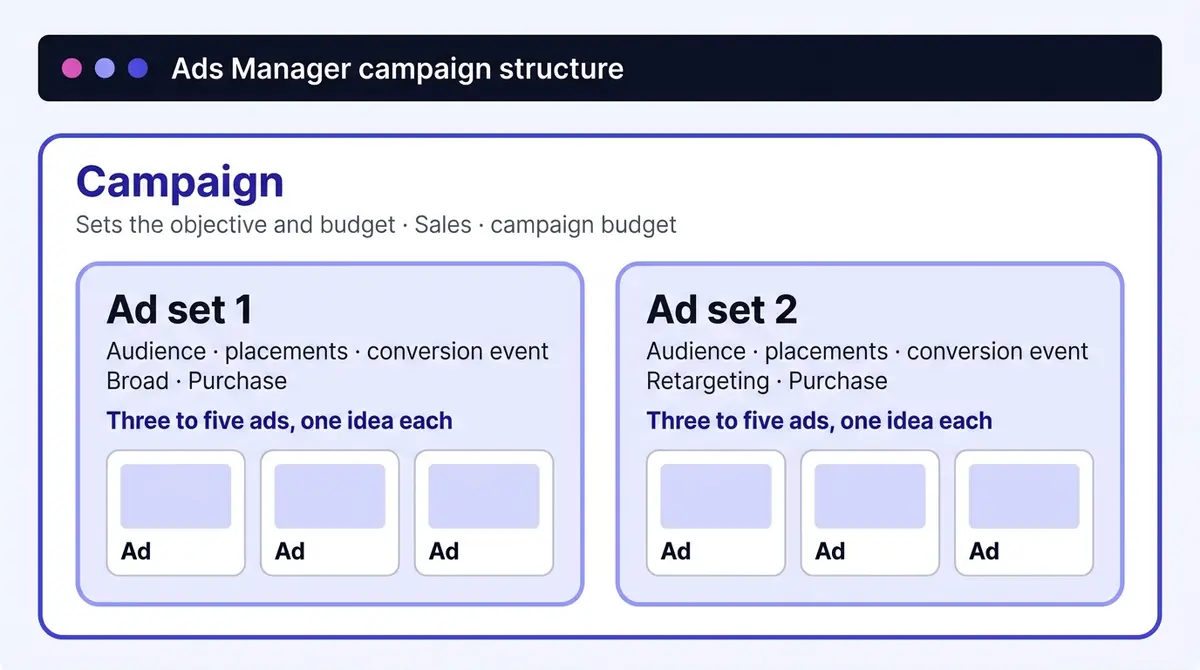
Every campaign you build in Ads Manager is the same three-level hierarchy, and most setup mistakes are really a decision sitting at the wrong level. The shorthand worth memorizing: the campaign decides what you are buying, the ad set decides who sees it and for how much, and the ad decides what they see. That separation tells you where every future change belongs: a new audience means duplicating an ad set, a new hook means adding an ad, and a different outcome means a new campaign, because the objective is fixed once a campaign is live.
| Level | Decides | What you change here |
|---|---|---|
| Campaign | The objective and (with a campaign budget) the spend | Objective, campaign budget, bid strategy |
| Ad set | Who sees it, for how much, and what event it chases | Audience, placements, conversion location and event, attribution window, ad-set budget |
| Ad | What the person sees | Format, creative, copy, link, call to action |
Before you open Ads Manager: account and compliance
A campaign assumes a few things already exist: a Meta Business account holding the assets and billing, an ad account inside it, and a Facebook Page (ideally a linked Instagram account) to run from. One ad account is plenty to start, and the ceilings are generous: a standard account allows up to 5,000 campaigns, 5,000 ad sets, and 5,000 active ads, 50 ads per ad set (Armada Growth, 2025). What bites first is your budget, not the account.
One setup screen can quietly get an account restricted: the Special Ad Category declaration. If your ad relates to credit or finance, employment, housing, or social issues, elections, and politics, Meta requires you to declare it, which strips out age, gender, and tight location targeting (Take Flyte, 2025). The trap runs both ways: sell a financial product or job listing without declaring and the account risks suspension; tick the box for a skincare ad and you have handicapped your targeting for nothing. For most ecommerce stores the answer is "none", but read the four categories once and answer honestly.
The six objectives, and how to pick one
Since 2022 Meta has run on six objectives, the Outcome-Driven Ad Experiences (ODAX) set, consolidated from the 11 legacy options older guides still describe (Social Media Examiner, 2025). The old labels did not vanish; they collapsed into the six as optimization choices and conversion locations underneath. So Conversions and Catalog Sales both live inside Sales now, Video Views and Messages live inside Engagement, and you pick the outcome first, then the specific event below it.
The objective is not a label, it is the instruction Meta optimizes toward, and each one exposes a different set of optimization events and conversion locations. Reading the table below as a menu, rather than picking the first thing that sounds right, is how you avoid paying for the wrong action.
| Objective | Optimize for | Conversion location | Pick it when |
|---|---|---|---|
| Awareness | Reach, impressions, ad recall lift | None (no action tracked) | The goal is being seen, not a measurable action |
| Traffic | Link clicks or landing-page views | Website, app, Messenger, WhatsApp | You want visits and the pixel has no conversion data yet |
| Engagement | Messages, video views, post engagement, event responses | On the ad, messaging apps, website, app, Facebook Page | You want interaction: replies, views, RSVPs, comments |
| Leads | Instant forms, website, calls, Messenger, app | Website, instant forms, Messenger, calls, app | The sale closes off-platform through a conversation |
| App Promotion | Installs, app events, value | Mobile app | You are driving installs or in-app actions |
| Sales | Conversions (purchase, add to cart), catalog sales, value | Website, app, website and app, Messenger or WhatsApp | A measurable purchase is the point |
For an ecommerce store the honest choice is Sales, optimized for purchases, though each result costs far more than a click. You are paying for the one event that pays you back. The numbers make the trap in the cheaper objectives visible: a Facebook traffic click averaged $0.70 in 2025 (WordStream). Cheap clicks look great in a report, and they are cheap because clicking is easy. A thousand $0.70 clicks that never reach checkout cost more than a handful of purchases, while training the account on the wrong people. Choose Leads when the sale closes off-platform through a conversation, Awareness when reach itself is the point, and Sales the rest of the time.
Advantage+ Sales or a manual campaign
Once you choose Sales, Ads Manager asks a second, bigger question that older guides miss: Advantage+ Sales or a manual campaign. These are not two checkboxes inside one flow, they are two different campaign types with real trade-offs. Meta renamed its Advantage+ Shopping product to Advantage+ Sales in early 2025 (Social Media Today, 2025), and the automation behind it performs because it searches further than any hand-built setup can. Meta reported its Advantage+ products crossing a $20 billion annual run rate, up 70% year over year (AdExchanger, 2025), and Facebook ads could reach 2.28 billion people as of January 2025 (DataReportal). A manual interest stack covers a sliver of that.
What you gain with Advantage+ Sales is reach and hands-off optimization. What you give up is control. In an Advantage+ Sales campaign you cannot set specific age, gender, or interest targeting; you cannot select or exclude individual placements; and geography is broadly country-level. Your audience inputs become "Audience suggestions", treated as a hint Meta may overshoot, not a fence it stays inside. A manual Sales campaign keeps all of that in your hands: the precise audience, placement selection and exclusion, and the customer-list exclusions a prospecting budget needs so it stops paying to reach people who already bought.
The decision is rarely all or nothing. Pick Advantage+ Sales for broad prospecting, for scaling a proven offer, and when a small team has no time to hand-tune. Pick manual when you sell to a niche the automation cannot infer, when a hard age or geographic constraint applies, or when ring-fencing existing customers and controlling placements is non-negotiable. Plenty of accounts run one of each in parallel.
Inside the ad set: audience, placements, optimisation, attribution
The ad set is where most of the campaign actually gets built, and the screen reads top to bottom as one connected instruction. Fill it in that order and the dependencies make sense.
Conversion location and event. First you tell Meta where the conversion happens (Website for most stores) and which event counts (Purchase for a store that already gets sales). This is the most consequential setting in the build. Without a pixel firing real purchase events, a Sales campaign is inert: Meta optimizes blind, and your reports cannot separate a winning ad from a lucky one (Shopify, 2026). Install it and confirm the event registers in Events Manager before you spend. A brand new pixel with no conversion history starts learning from scratch, so if purchases are too rare to feed the system, optimize for a more frequent upstream event (Add to Cart or Initiate Checkout) while volume builds, then graduate to Purchase.
Audience. If you went manual, this is where you build it: custom audiences (a list you own, your customer file or pixel visitors), lookalikes (Meta finds new people resembling a seed, usually a 1% lookalike of recent purchasers, widening to 3% to 5% as you scale), and the control that quietly saves the most, exclusion. A prospecting ad set pays to find new buyers, so exclude your customer list and active retargeting audiences, or the two ad sets bid against each other for the same person.
Placements. Below the audience sits placements: Advantage+ placements (the default) runs the ad across Facebook, Instagram, Messenger, and the Audience Network and shifts spend toward whatever delivers. Manual placements lets you pick and exclude each one. Keep the default unless you have a real reason, a brand-safety rule or a creative built only for vertical feeds, since narrowing placements shrinks the auction.
Attribution and optimisation. The optimization event you set above is what delivery chases. The attribution window decides which conversions get credited: the default 7-day click plus 1-day view credits a sale to an ad clicked up to a week earlier. Hold that wider window while volume is thin, tighten to 1-day click once daily sales are dense, and keep it consistent when you compare campaigns, since it changes only which sales the report credits, not what happened.
The rule for taking any control back from Advantage+ is one sentence: you must be able to finish "manual, because". A hard geographic or age constraint the automation cannot infer finishes it; a retargeting message that would make no sense to a cold audience finishes it. "Because I like control" does not.
Budget and bidding: where to put the money and how to bid it
Three settings decide how spend flows: budget at the campaign or ad set level, daily or lifetime, and which bid strategy governs the auction. All three turn on the learning phase.
One budget or many, and how wide to build
Advantage+ campaign budget (still widely called CBO) puts one budget at the campaign level and lets Meta distribute spend in real time toward whichever ad set performs; with ad set budgets, you fix the split yourself. The campaign budget is the better default: your ad sets are usually peers chasing the same outcome, and a fixed split just preserves your guess after the data has outvoted it. Ad set budgets earn their place when spend must be guaranteed: a structured test where each audience needs even delivery, or a small retargeting ad set a big prospecting one would starve.
The common objection to CBO is "I lose control of the split", and Meta answers it directly: under a campaign budget you can set a minimum or maximum spend per ad set, so a small but valuable ad set (say retargeting) is not starved while a broad prospecting one soaks up everything (Meta for Business, 2026). Two eligibility rules come with the campaign budget: every ad set must share the same budget type and the same bid strategy, on standard delivery (Meta for Business, 2026).
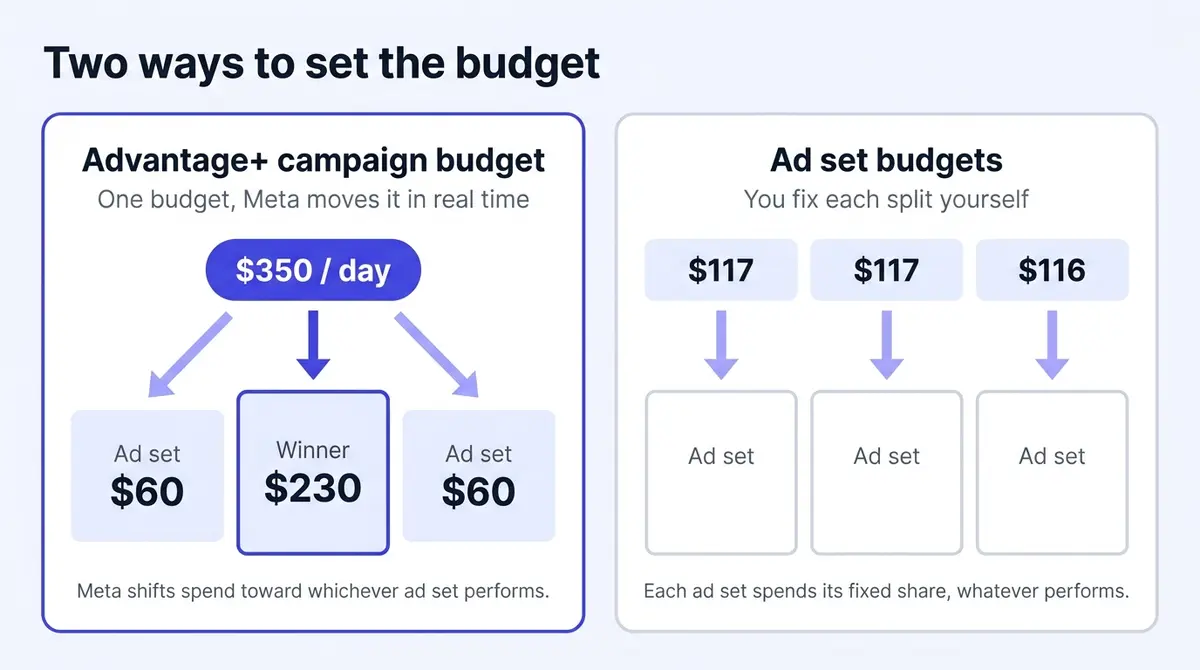
The budget question and the how-many question are the same. Every ad set runs its own count toward those roughly 50 weekly events Meta has long advised (Search Engine Land, 2025), so consolidation is not a style preference, it is arithmetic. Picture a budget that buys about 50 purchases a week in one ad set at a $40 cost per acquisition. Split that same spend across ten lookalike and interest ad sets and each buys roughly five purchases a week: none clears that threshold, so all ten sit in Learning Limited at once, and you have paid for ten unstable ad sets instead of one stable one. Pool the spend back into one campaign with one or two broad ad sets and the conversions pool with it. Day one for most stores is one campaign, campaign budget on, one or two broad ad sets, three to five genuinely different ads apiece.
Daily or lifetime, and the number to actually type
Above the budget box sits a second toggle: daily or lifetime. A daily budget spends roughly that amount each day until you stop it, averaging over the week. A lifetime budget sets one total across a fixed start and end date for Meta to distribute, and it unlocks ad scheduling, the dayparting control (chosen days and hours only) a daily budget lacks, so pick it for a time-boxed promotion. For an always-on store, a daily budget is the simpler default.
Then the question every guide dodges: what number goes in the box. Anchor it to the learning phase. To buy roughly 50 conversions a week, a workable floor is your target cost per acquisition times 50, divided by 7, close to seven times that cost (Top Growth Marketing, 2025). Most ad sets clear the phase inside that 7-day window, though thin volume can stretch it to two weeks or more (Modern Marketing Institute, 2026). Budget below the floor and the ad set may sit in Learning Limited. The arithmetic works in any currency; here it is in dollars.
| Target cost per purchase | Daily floor to clear learning (CPA x 7) |
|---|---|
| $5 | $35 |
| $12 | $84 |
| $25 | $175 |
These assume one prospecting ad set carrying the full signal; split the budget across several and each runs its own slower count.
Bid strategy: what to pick from that dropdown
A campaign budget forces every ad set to share one bid strategy, so this is a structure decision. Highest Volume (Highest Value when you optimize for purchase value) is the default and the right first choice: it spends your budget to win as many conversions, or as much value, as the auction allows, with no cost ceiling to choke delivery. Cost per Result Goal lets you name a target average cost and asks Meta to stay near it while still chasing volume; ROAS Goal does the same against a return target; Bid Cap is the manual extreme, a hard ceiling on each auction bid for margin-sensitive hands. The costliest mistake is reaching for a goal or cap on day one: set the target too tight and the system, told it may not pay above it, stops spending and never escapes learning. Launch on Highest Volume, learn your real cost, then add a guardrail.
Naming that keeps Ads Manager reporting readable
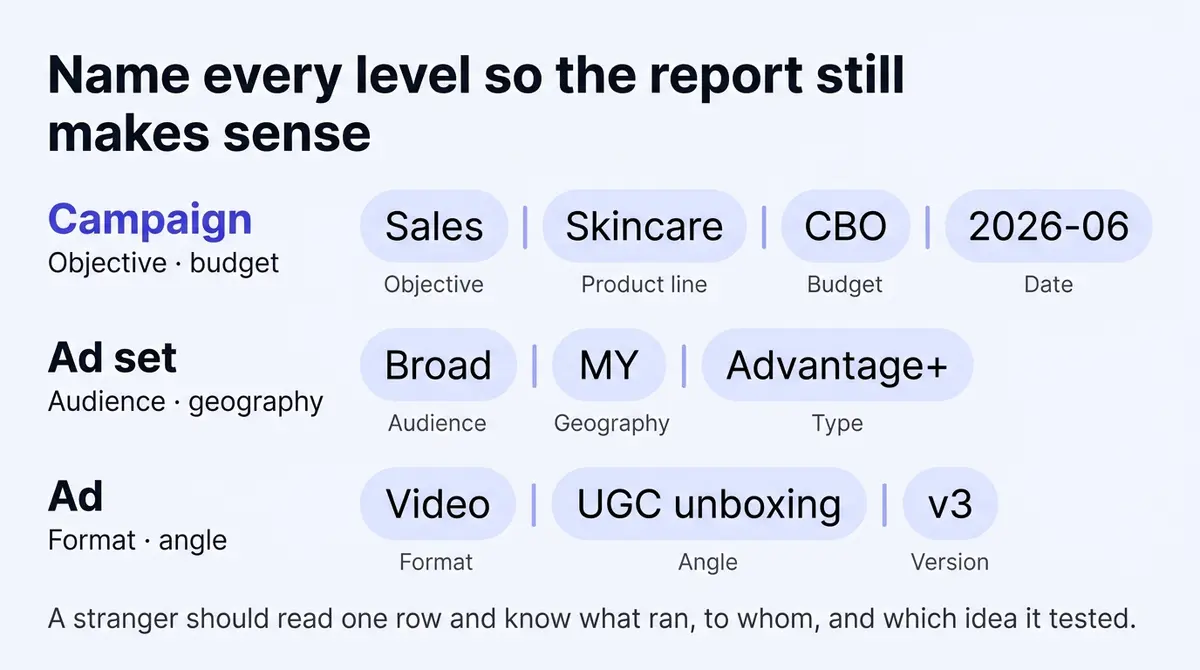
Naming feels like trivia until week six, when "New campaign (copy) (copy)" sits above "Test 2 FINAL" in a results export and nobody remembers which one held the broad audience. The fix is a convention where every level answers its own question. Campaigns carry the objective, product line, structure, and a date stamp (Sales | Skincare | CBO | 2026-06). Ad sets carry audience and geography (Broad | US | Advantage+, or Retargeting | 30d site visitors). Ads carry format and angle (Video | UGC unboxing | v3, or Static | price anchor | v1). Two habits make it stick: decide the pattern before launch, and name the idea, not the file (testimonial-mom-skin-v2 says something, FINAL_export_4 says nothing). The test is whether a stranger to your account can read one row and know what ran, to whom, and which idea it tested. Renaming never resets the learning phase, so a tidy convention costs you nothing.
The top-down build, click by click
Every decision above falls into one click order, campaign down to ad. This is the sequence Ads Manager actually walks you through:
- Create a campaign and pick the objective. Sales for a store; the choice sets everything downstream.
- Declare the Special Ad Category. "None" for most ecommerce; declare honestly if credit, employment, housing, or social or political issues apply.
- Choose Advantage+ Sales or manual. Advantage+ for broad prospecting and scaling; manual when you need exclusions, niche targeting, or placement control.
- Name the campaign. Objective, product, structure, date (Sales | Skincare | CBO | 2026-06).
- Set the campaign budget and bid strategy. Campaign budget on, daily, Highest Volume to start. Add ad set spend minimums or maximums if one ad set must not be starved.
- Drop into the ad set. Conversion location and event (Website, Purchase), audience, placements (Advantage+ unless you have a reason), attribution window, and the optimization event.
- Build three to five ads. Genuinely different arguments, not crops of one photo.
That order keeps you from a common reversal: people set the budget last, after the ad set, then discover the floor they need was set by the learning phase math all along.
A worked setup: a skincare store at $12 a sale
Every decision above, in one build: a store selling a moisturizer at a $12 target cost per purchase, off a working pixel.
| Screen | Decision | Why |
|---|---|---|
| Objective | Sales | The one event that pays back. |
| Special Ad Category | None | Skincare touches none of the four. |
| Conversion location and event | Website, Purchase | Optimize for what earns money, off the live pixel. |
| Attribution | 7-day click, 1-day view | The default; keep it until sales are dense. |
| Budget | Campaign budget, daily, $84 | $12 per sale x 7 to clear ~50 weekly events. |
| Bid strategy | Highest Volume | No cost ceiling on day one. |
| Ad sets | One broad, Advantage+ on | Consolidated signal exits learning fastest. |
| Ads | Four distinct creatives | Demo, testimonial, before-and-after, price anchor. |
Four distinct creatives means four different arguments, not four crops of one photo, and skincare gives each angle a clear shape. A demo shows the product absorbing into skin, the routine a viewer would actually follow. A testimonial puts a real customer on camera describing the change, carrying the trust a brand claim cannot. A before-and-after leads with the visible result, the proof a skincare buyer scans for first. A price anchor states the offer plainly, a bundle or a launch discount, for the shopper who only needs a reason to act. Those four cover the table.
Launch it and leave it alone through the first volatile week. Once the ad set clears learning and a creative pulls ahead, scale that winner in budget steps of no more than about 20% so the change does not reset learning (AdMetrics, 2025), retire the weakest ad, and add retargeting when prospecting is healthy.
Where structures go wrong
Most underperforming accounts are not beaten by the creative, they are beaten by the structure around it. The mistakes repeat, and each has a one-line fix.
- Too many ad sets splitting the budget. The fragmentation math above is the cause: every ad set you add divides the conversion signal, and below the learning floor none stabilizes. Fix: consolidate into one or two broad ad sets and let the budget pool.
- Audience overlap from too-similar ad sets. Run a 1% lookalike beside a 2% lookalike beside a broad interest set and you bid against yourself in the same auction, inflating your own cost. Fix: keep ad sets distinct, and check the audience overlap before launch.
- Prospecting that does not exclude buyers. A cold ad set with no exclusions keeps paying to reach existing customers and your active retargeting pool. Fix: exclude the customer list and warm audiences from every prospecting ad set.
- Editing a live ad set into a learning reset. Significant edits, the audience, the optimization event, placements, the creative, or a budget jump over about 20%, send the ad set back into learning (Search Engine Land, 2025). Fix: batch necessary changes into one edit, and never tweak during the volatile first week.
- Duplicating a winner instead of scaling it. Cloning a proven ad set spawns a fresh learning phase and competes with the original. Fix: raise the original's budget in ~20% steps.
- A cost cap or bid cap on day one. Set a ceiling before you know your real cost and Meta, forbidden to bid past it, simply stops spending. Fix: start on Highest Volume, learn the number, then add a guardrail.
- Judging performance mid-learning. The first days are deliberately erratic. Fix: wait until the ad set clears the phase.
Settle the structure, then go build
Run the decisions in order and the whole structure layer closes in an afternoon. None of these choices will be the reason the campaign wins; they are the container, what fills it decides. Once the structure stands, every hour you might have spent rearranging it pays better as an hour making the next ad: a sharper hook, a different format, a fresh angle to replace whatever fatigues. A platform like AdPlay.ai keeps that production loop (research what is running, generate on-brand creative, edit it, launch to Meta) in one place, but the cadence matters more than the tool. If you have not taken an ad live before, the click-by-click walkthrough is in how to run a Facebook ad. The structure is settled. Go make the ads.
By the numbers
Frequently asked questions
What is the difference between a campaign, an ad set, and an ad in Ads Manager?
A campaign is the top level and holds the objective, the outcome you are asking Meta to optimize toward, plus the budget if you set it at campaign level. Ad sets sit inside the campaign and control delivery: budget (when it is not set above), audience, placements, and the optimization event. Ads sit inside ad sets and carry what people actually see: the creative, the copy, the link, and the call to action. A useful shorthand: the campaign decides what you are buying, the ad set decides who sees it and for how much, and the ad decides what they see.
How many objectives does Facebook have now, and what happened to the old ones?
Six. Meta consolidated 11 legacy objectives into the six Outcome-Driven Ad Experiences (ODAX) objectives starting in 2022: Awareness, Traffic, Engagement, Leads, App Promotion, and Sales (Social Media Examiner, 2025). The old labels you may remember (Conversions, Catalog Sales, Brand Awareness, Reach, Video Views, Messages, and so on) did not disappear, they folded into one of the six as optimization options or conversion locations. So Catalog Sales is now a choice inside Sales, and Video Views is a choice inside Engagement. You pick the outcome first, then the specific event underneath it.
What is the difference between Advantage+ Sales and a manual sales campaign?
Advantage+ Sales is an automated campaign type where Meta handles the audience, placements, and budget split for you, treating your inputs as suggestions and going broad across its full network. A manual Sales campaign keeps those controls in your hands: specific age, gender, and interest targeting, the ability to select or exclude placements, and audience exclusions you define. Advantage+ Sales suits broad prospecting, scaling, and time-poor teams; a manual campaign suits a niche segment, a hard constraint the automation cannot infer, or a setup where exclusions and placement control are non-negotiable. Many accounts run both side by side.
Should I use CBO or set budgets at the ad set level?
Use Advantage+ campaign budget (the feature long known as CBO) when your ad sets are interchangeable peers chasing the same outcome, because Meta shifts spend in real time toward whichever ad set is delivering best. Set budgets at the ad set level when spend must be guaranteed: a structured test where every audience needs even delivery, or a small retargeting ad set that a big prospecting ad set would otherwise starve. If you like CBO but fear losing control of the split, set ad set minimum and maximum spend limits so a small but valuable ad set is not starved. One eligibility rule: under a campaign budget, every ad set must share the same budget type and the same bid strategy, with standard delivery (Meta for Business, 2026).
Which edits reset the Facebook learning phase, and which are safe?
Significant edits that re-enter an ad set into learning include changing the audience, changing the optimization event, changing placements, swapping the creative or adding new ads, and large budget or bid-amount changes (a single jump of roughly more than 20%). Safe edits that do not reset learning include renaming, pausing and unpausing within about seven days, and small budget steps. When you must make several significant changes, batch them into one edit rather than spacing them out, because you reset learning once either way (Search Engine Land, 2025). Renaming never resets it, so a clean naming convention costs nothing.
How long does the learning phase take, and what is Learning Limited?
An ad set typically exits learning once it gathers about 50 optimization events within a 7-day window, but when conversion volume is thin it can drag on for two weeks or more. Learning Limited is the distinct status Meta shows when it has decided the current setup cannot reach that volume, so the ad set never fully stabilizes and delivery stays erratic. That is a structural signal, not something to wait out: the usual fixes are a bigger budget, fewer ad sets sharing the conversion signal, a broader audience, or optimizing for a more frequent event. Judge performance only after an ad set has cleared the phase, not in its volatile first days.
How do I scale a campaign without resetting the learning phase?
Raise the budget in small steps. A large single edit, roughly doubling spend overnight, resets the affected ad set's learning and throws away its progress toward the roughly 50 weekly events Meta long advised. The widely used guardrail is to increase the budget by no more than about 20% per edit, every few days, so the system absorbs the change without re-entering learning. Make changes one at a time, give each a few days to settle before the next, and scale a proven winner rather than chasing one that has not exited learning. Editing audience, optimization event, or bid strategy resets learning too; renaming does not.
What is a good naming convention for Facebook campaigns?
Make every level answer its own question. Campaign names carry the objective, product line, and budget structure (Sales | Skincare | CBO | 2026-06). Ad set names carry the audience and geography (Broad | US | Advantage+). Ad names carry the format and creative angle (Video | UGC unboxing | v3). The test is whether someone who has never opened your account can read a results export and know what each row was. Date stamps keep versions sortable, and consistent separators make filtering in Ads Manager painless.
Sources
- 1.AdExchanger, Meta Q4 Earnings and Advantage+ Growth (2025)
- 2.WordStream, Facebook Ads Benchmarks 2025 (2025)
- 3.Search Engine Land, Rethinking Meta Ads AI Best Practices (2025)
- 4.DataReportal, Essential Facebook Statistics and Trends (2025)
- 5.Social Media Examiner, How to Create Facebook Ad Campaigns With ODAX (2025)
- 6.Social Media Today, Meta Rolls Out Updates to Advantage+ AI Ad Targeting Tools (2025)
- 7.Meta for Business, Advantage+ Campaign Budget (2026)
- 8.Modern Marketing Institute, Exit the Meta Ads Learning Phase (2026)
- 9.Take Flyte, Guide to the 4 Facebook Special Ad Categories (2025)
- 10.Top Growth Marketing, How to Set Your Facebook Ads Budget (2025)
- 11.AdMetrics, How to Scale Facebook Ads (2025)
- 12.Shopify, Meta Pixel Setup Guide for Facebook Ads (2026)
- 13.Armada Growth, Meta Ads Advertising Limits Guide (2025)
Keep exploring
Turn ad research into winning ads
Research the ads that work, generate the creative on-brand, and launch to Meta, all in one tool.
7-day free trial · No credit card required