
How to Create a Carousel Ad on Facebook (2026)
When a carousel beats a single image, the 2-10 card specs and copy limits, supported objectives, card order, and the steps to build one in Meta Ads Manager.
Updated June 2026 · Likit Sae Lee, CTO
A Facebook carousel ad packs 2-10 cards into one ad unit, each card with its own image or video, headline, description, and link. You build it in Meta Ads Manager: choose a campaign objective, set the ad set, then pick the Carousel format at the ad level and add cards at a minimum of 1080 x 1080 pixels (Meta's 2026 spec). Use the format when the message splits naturally into parts: several products, a step-by-step demo, a feature tour, or a before-and-after sequence. The first card decides whether anyone swipes, so it carries the hook.
You have more to show than one image can hold: a product line, a process, a transformation that only reads in sequence. The carousel is the Facebook format built for that, 2-10 swipeable cards in a single ad, each with its own creative, copy, and destination link. Built well, one carousel does the work of several ads. Built lazily, it is a stack of disconnected images nobody swipes past. The difference comes down to a handful of decisions: whether the format fits the message at all, how each card is specced and written, which card goes first, and whether Meta or you controls the order.
When carousel ads beat a single image
A carousel earns its place when the message has parts. Four jobs fit it naturally. A multi-product ad gives each bestseller its own card, headline, and landing page, so one ad unit works like a shelf. A step-by-step ad walks through how the product works, one step per card. A feature tour shows one product from several angles: the material, the fit, the detail shot, the lifestyle frame. And a before-and-after sequence spreads a transformation across cards, so the viewer swipes through the change instead of squinting at a split image.
Real ad examples make the fit obvious. Tudung Ruffle, a hijab label, runs the shelf version: a showcase carousel giving four lace tudung a card each, picked for a Raya outfit, so the shopper swipes the rack. Desire Gym runs the transformation version, a before-and-after carousel that opens on an empty room and ends on a fully equipped gym. Different categories, same logic: the message has parts, so each part gets a card.
The counter-case matters just as much. If the ad has one idea (a discount, a launch date, a single hero shot), a carousel dilutes it: five cards repeating one message is the same ad five times at five times the production cost. A single image is also faster and cheaper to make and iterate, which makes it the right call when you are testing a brand-new hook, working from a tight budget, or selling one product on one clear promise.
The cleanest way to choose is to match the format to the job:
| The message you have | Better format | Why |
|---|---|---|
| One product, one offer, one hero shot | Single image | Nothing to swipe through; concentrate the budget on one frame |
| A new hook you want to test fast | Single image | Cheap to produce, easy to swap, isolates one variable |
| A product range or collection | Carousel | One card per product, each with its own link |
| A process, recipe, or how-to | Carousel | One step per card, in order |
| A before-and-after or a story | Carousel | The transformation reads in sequence, not in a split frame |
| Retargeting people who browsed specific items | Carousel (catalog) | Shows each viewer the products they already looked at |
Cost should not drive the choice either way. A carousel enters the same auction as every format; WordStream's 2025 benchmarks put the average Facebook traffic campaign at a $0.70 cost per click and a 1.71% click-through rate across formats. The format changes what you can say, not what you pay to say it. Hootsuite's 2025 guide makes the engagement case: a viewer who swipes has already invested attention and arrives at the click better informed than one who glanced at a static image.
Carousel vs single image, by the numbers
If you have searched "carousel vs single image" you have probably seen the cost-efficiency claim quoted everywhere. It traces to one place: Meta's own developer blog in 2015, which reported that "advertisers have seen carousel link ads drive 30 to 50% lower cost per conversion and 20 to 30% lower cost per click than single-image link ads." That is the original source, posted when Facebook extended the carousel to mobile app ads, and it is worth reading for exactly what it is. It is Meta's own directional benchmark, not an independent study, and it averages across advertisers who used the format where it fit. So treat it as a reason the format can earn its keep, not a guarantee that wrapping any single ad in five cards cuts your cost in half.
The honest read is the same rule with a number attached. The carousel wins on cost when the message genuinely splits into cards, because then each card does real work and the swipers self-qualify. The format also gives Meta more to optimize: more cards means more creative the auction can favour, which is part of why the cost-per-conversion gap shows up at all. Stack five cards that all repeat one offer and the efficiency disappears, because you have paid for five creatives to say what one image said. It helps that this is settled ground rather than a 2026 novelty: Facebook introduced the carousel in 2014 and extended it to mobile app ads in 2015, so the finding has roughly a decade of auction data behind it, which is why it has held up as a Meta talking point for years instead of a one-quarter blip.
The specs, card by card
Meta's current carousel spec allows 2-10 cards per ad. Each card holds its own image or video, headline, description, and destination URL. The ad as a whole shares one block of primary text and, importantly, one call-to-action button: the label (Shop Now, Learn More, Sign Up) is set once and applies to every card. You vary the destination per card with a different link on each, not a different button.
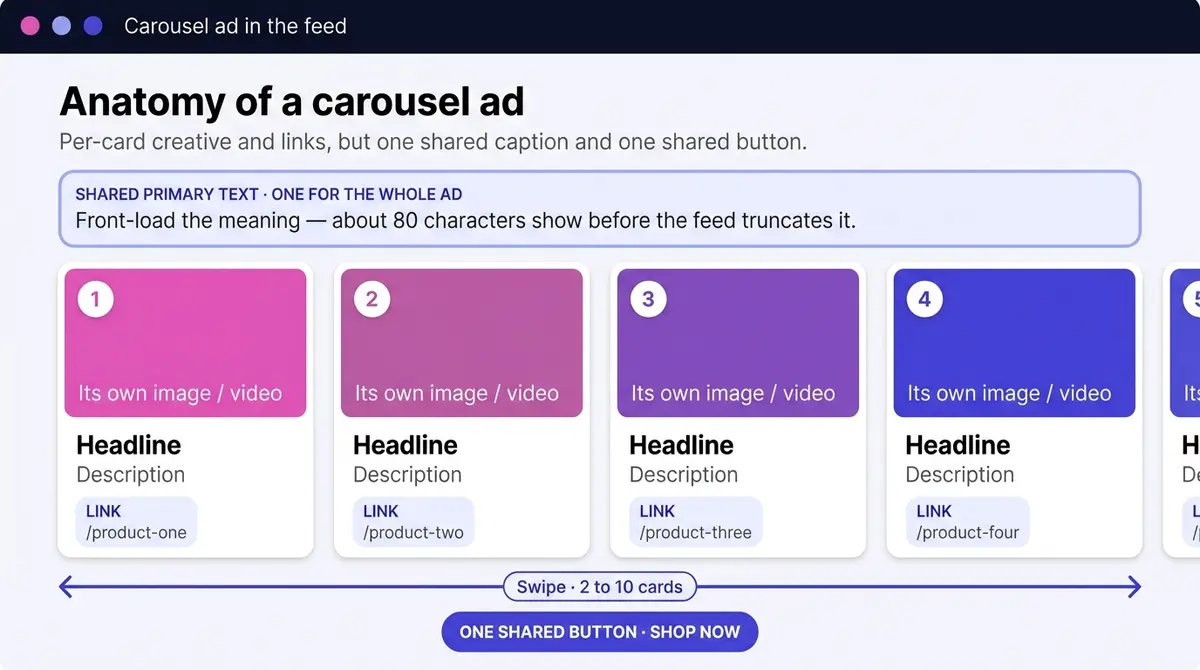
Here is the full creative brief in one place:
| Spec | Carousel value |
|---|---|
| Cards per ad | 2 to 10 |
| Minimum image resolution | 1080 x 1080 px |
| Supported aspect ratios | 1:1 and 4:5 |
| Image file types | JPG, PNG (up to 30 MB per card) |
| Video file types | MP4, MOV, GIF (up to 4 GB per card) |
| Video length | 1 second to 240 minutes (keep cards short in practice) |
| Primary text (shared) | ~80 characters before truncation |
| Headline (per card) | ~45 characters |
| Description (per card) | ~18 characters |
| Call-to-action button | One shared button for the whole ad |
Square (1:1) is the safest ratio because it renders predictably across every placement; 4:5 gives more vertical room in the feed but can be cropped on some surfaces, so preview it first. Keep every card in the same aspect ratio either way, so the unit reads as one ad rather than a collage.
Copy is tighter than most teams expect. Meta's ads guide for the Facebook feed recommends roughly 80 characters of primary text, 45 per headline, and 18 per description before truncation trims them. Write each headline to work alone, because most screens show one card at a time, and front-load the primary text so the meaning survives the cut.
Text on the card versus text in the copy block
Most people scrolling a feed never expand the primary text and never read past a headline, so a few words baked onto the image often do more work than the caption underneath. A short overlay (a price, a benefit, a step number) still carries the message when the copy collapses behind an ellipsis. Furniture sellers lean on this: Jù Home Concept puts the offer straight on the card, a full queen bedroom set at RM698 with 0% instalment, so the price survives even when nobody expands the caption. Keep that overlay large, away from the edges, and sparse: Meta serves these ads to a feed that rewards clean, legible creative, and dense text reads as noise on a phone.
Before you build: the pre-flight checklist
Most carousel builds stall not in Ads Manager but in the missing pieces a team discovers halfway through. Sort these before you open the ad level:
- Access. A Facebook Page and an ad account inside a Meta Business account, with permission to publish from both. The carousel runs from the Page, so it has to be connected.
- The full creative set. Every card's image or video, exported at 1080 x 1080 (or 4:5) in the same ratio, finished and named in swipe order.
- A destination for each card. The product or landing-page URL each card points to, live and loading, so card three does not send people to a 404.
- Measurement plumbing. A Meta Pixel firing on the site (with the Conversions API alongside it) so the events you optimize for actually register. Without it, Meta optimizes half-blind and your report cannot tell a winning card from a lucky one.
- Per-card UTMs. A tracking parameter on each card's URL (a distinct campaign or content value per card) so your analytics can tell which card drove the session and the sale. The per-card breakdown shows clicks; UTMs let you attribute revenue downstream. Add them before you publish, not after.
Which objectives and placements support carousel ads
Meta runs on six campaign objectives in its current outcome-driven setup: Awareness, Traffic, Engagement, Leads, App Promotion, and Sales. Carousel fits the ones built around a click or a conversion. For an ecommerce store that is almost always Sales (the objective that absorbed the old Conversions and Catalog Sales goals); Traffic and Leads work when the job is a click or a form, and App Promotion supports carousel for installs. Inside an Awareness or Engagement campaign, confirm the format is offered for the performance goal you pick, because not every optimization path includes it. Choose the objective by the action that makes you money, then build the carousel underneath it.
One build covers a lot of surface area: a carousel you create once serves across Facebook, Instagram, Messenger, and the Audience Network (both feeds, Stories, Reels, Marketplace, and partner apps), with Meta reshaping the unit for each. The catch is that one creative has to survive very different crops. Preview every placement before publishing, because the visible slice of an image and the amount of text shown shift surface to surface, and a card that looks balanced in the feed can lose its key detail in a Story.
What carousel cards cost to run in 2026
The carousel pays the same auction price as any format. Here is what that auction costs right now, and the number you should expect depends entirely on the objective you picked above, not on the format. LocaliQ's 2025 benchmark study, which spans 20 industries and was last updated in October 2025, splits the two paths a carousel usually runs under.
| Objective | Average CTR | Average CPC | What it tells you |
|---|---|---|---|
| Traffic | 1.71% (up from 1.57% in 2024) | $0.70 (down from $0.77) | Cheap clicks; you pay per visit, conversion happens on your site |
| Leads | 2.59% | $1.92 | Pricier clicks, but a higher click rate and a form filled in-app |
The lead path costs more per click because you are buying a completed action, not a visit, and 2025 made that more expensive across the board. Facebook's average cost per lead climbed 21% year over year to $27.66, even as the traffic cost per click fell 6.7% to $0.70 over the same period. Part of that lead-cost rise tracks a softer conversion rate (7.72% in 2025, down from 8.67% the year before), alongside tighter budgets and rising competition in the auction. The takeaway is not "carousels got expensive," it is "leads got expensive, in any format," so set the objective by the action that makes you money and read your own results against these as a sanity check.
The math is easy to plan around. A traffic carousel running near the $0.70 benchmark turns a few hundred dollars of test budget into roughly 500 clicks, enough delivery to see which cards collect impressions and which die in the per-card breakdown. A lead carousel near the $1.92 figure buys fewer clicks for the same spend, but each one is a step closer to a form fill, so you judge it on cost per lead, not cost per visit. Treat the global average as a starting expectation, not your guaranteed rate.
One thing these numbers never show: the carousel's real extra cost is not media. You pay the same per impression or per result as a single image, never per card, so ad spend is identical. The line item that grows is production, up to ten finished creatives plus per-card copy, which is design time, not budget.
The first card does most of the work
Carousel exposure is a funnel by construction. Everyone the ad reaches sees card one; only the people it convinces see card two, and the audience thins with each swipe after that. However many cards you upload, the first one decides whether the rest exist.
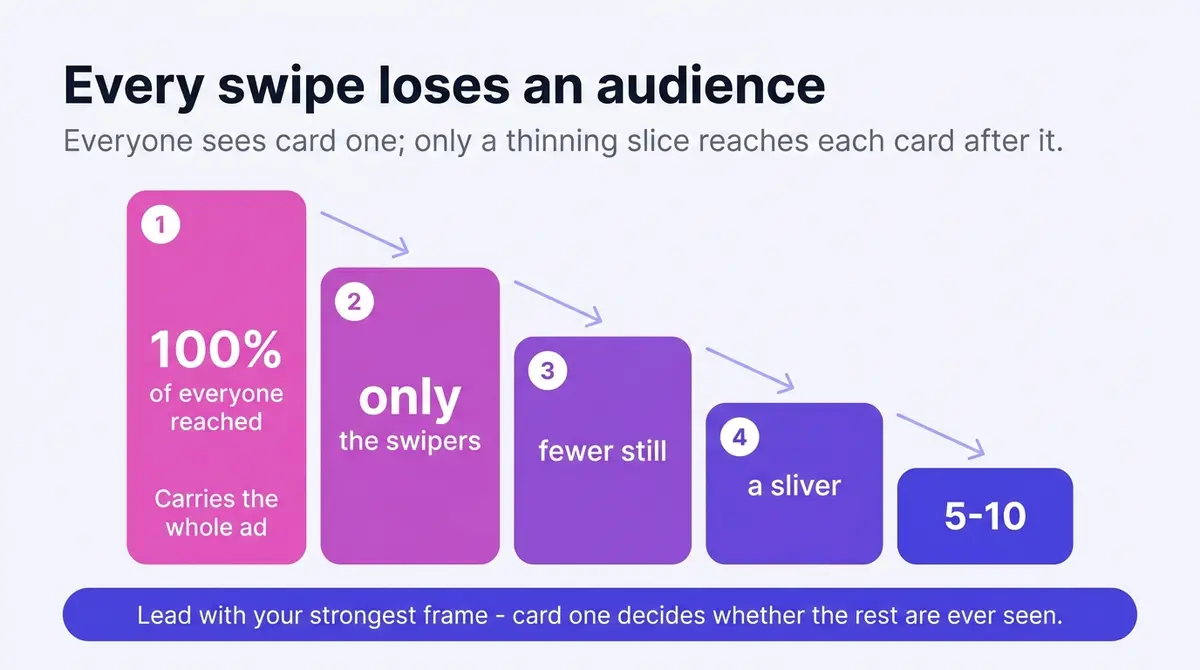
So the first card follows the same rule as any single-image ad: lead with the strongest frame you have, the best product, the boldest claim, the after shot rather than the before. A common mistake is treating card one as a cover page, a logo and a title that only make sense once you have seen the rest. Nobody swipes a cover page. Card one has to land on its own and still invite the swipe, which is why well-built carousels run visual continuity across cards: an image that bleeds off the right edge, a numbered sequence, an arrow pointing to what comes next.
You do not have to guess how far people get. Ads Manager breaks results down by card, showing impressions and clicks for each, which tells you exactly where attention dies and which card to fix first.
The panoramic split, and three other patterns worth stealing
A few carousel-specific techniques come up again and again because they exploit the swipe instead of ignoring it:
- The panoramic split. Design one wide image and slice it across two or three cards so the picture continues off the right edge of the frame. The cut is the hook: a viewer sees half a scene and swipes to complete it. This trick exists only in a carousel, and it is the single most format-native thing you can do.
- The product grid. One card per item in a collection, each shot the same way on the same background, each linking to its own page. The consistency makes the set read as a curated shelf, not a pile of stock.
- The numbered sequence. Steps, tips, or reasons labelled 1 through 5, so the count itself promises an end and pulls the swipe. It suits explainers and how-tos where order carries meaning.
- The data card. A single statistic, chart, or comparison per card, big enough to read at a glance. It works for proof-heavy offers (results, savings, before-and-after numbers) that land harder as a clean visual than a sentence in the caption.
None of these need a clever twist. They need a matched set: same ratio, same type treatment, same visual language across every card, so the swipe feels like one piece moving, not four unrelated ads stitched together.
Dynamic or fixed card order
Ads Manager includes a checkbox, ticked by default, that automatically shows the best-performing cards first. Meta watches which cards earn engagement and quietly reorders the deck per viewer, so a weak third card stops dragging the ad down.
Whether to leave it on is a one-question test: do the cards depend on each other? A multi-product carousel says yes to optimization, since the cards are interchangeable and the algorithm guesses which product hooks which viewer better than you can. A sequence says no. A step-by-step demo that opens on step four, or a before-and-after that leads with the before, stops making sense, so fixed order wins there even at some cost to efficiency.
Dynamic carousel: Advantage+ catalog ads
A third mode changes who builds the cards. Where a regular carousel is a fixed set you design and order yourself, an Advantage+ catalog ad looks like a carousel but assembles itself from a product feed. Meta's own description is precise: these ads "look like other single image, carousel or collection ads, but the products shown are dynamically displayed for each person using events data from your Meta Pixel or app SDK." So the shopper who viewed three sofas sees those sofas, the cart-abandoner sees what they left behind, and you never hand-pick a single card. The catalog and the Pixel do the picking.
That makes it the right tool for two jobs the hand-built carousel cannot scale to. The first is a large inventory: when you sell hundreds of products, no human can build a relevant five-card set for every audience, but a feed can show each person the items they are most likely to buy. The second is retargeting, especially cart abandoners, where the dynamic ad re-shows the exact products a shopper browsed and dropped. For a store with a deep catalog, a dynamic carousel retargeting seasonal browsers who did not check out is usually a stronger spend than any static set you could design by hand.
There is a 2025 setup change worth knowing before you build one. In January 2025, Meta removed the manual "Audience Types" selector for Advantage+ catalog ads on the sales objective, pushing the format toward fully automated targeting rather than manual audience selection. You can still retarget deliberately by building catalog custom audiences (people who interacted with a given product set), but the trend is clear: Meta wants the feed and its automation to choose, not you. The upshot for planning is that a dynamic carousel is increasingly a "feed plus Pixel, then let Meta optimize" build, while anything that needs a fixed story, a step-by-step, a before-and-after, a curated launch set, stays firmly in the hand-built camp where you keep control of the order.
Reordering inside one ad answers a small question (which card leads); a structured test answers a bigger one. Once a carousel is running, Ads Manager's A/B test pits whole variants against each other on a clean split of the audience: a five-card set against a three-card set, a panoramic build against a product grid, or one opening card against another. Change one thing per test so the result is readable, and let the loser inform the next build. The per-card breakdown tells you which card is weak inside an ad; an A/B test tells you which version of the ad to keep.
Building a carousel on Facebook in Ads Manager
The carousel choice happens at the ad level, after the campaign and ad set are in place. If those layers are new ground, the full walkthrough of running a Facebook ad covers them; the carousel-specific work goes like this:
- Create a campaign and choose the objective. Sales fits most ecommerce carousels; Traffic, Leads, and App Promotion also support the format.
- Set the ad set as usual: budget, audience, placements. Leaving placements on the automated setting is what lets one build run across Facebook, Instagram, Messenger, and the Audience Network.
- At the ad level, select your Page, then choose Carousel as the format.
- Add 2-10 cards. For each, upload the image or video, write the headline and description, and set the destination URL with its UTM parameters attached. Send each product card to its own page, not all to the homepage, and watch for any warning Meta flags on an image that may not render cleanly.
- Arrange the order, then set the optimization checkbox: on for interchangeable cards, off for sequences.
- Write the shared primary text and pick the single call-to-action button that covers every card. Optionally add the end card that shows your Page profile with a final link.
- Preview each placement, mobile view first since that is where most impressions land, then publish for review.
Make it worth swiping
Strip the format back and the real constraint shows itself: a carousel is, in practice, three to ten finished creatives in one ad, all sharing a ratio and a visual language, each with its own headline and link, behind a first frame strong enough to carry the rest. The teams that use carousels well are not the ones with the cleverest tricks; they are the ones who can produce a matched set without burning a week of design time. An on-brand generator helps here: AdPlay.ai builds image variations and ad copy from a saved brand kit, so a five-card set comes out looking like one ad instead of five one-off designs.
Then put the format to work. Pick the job the carousel is doing, build 3-5 cards before you attempt ten, give card one the strongest frame, choose your order mode deliberately, and publish. A week in, open the per-card breakdown, find where the swipes stop, and replace that card. A carousel is the rare ad format that tells you which part of it is failing. Use that.
By the numbers
Frequently asked questions
How many cards should a Facebook carousel ad have?
Meta allows 2-10 cards per carousel. Start with 3-5: enough to justify the format, few enough that every card gets real exposure. Everyone who sees the ad sees the first card, but only a fraction swipe further, so cards six through ten reach a small slice of your audience. After a week of delivery, open the carousel card breakdown in Ads Manager, see which cards actually collect impressions and clicks, then cut or replace the weakest.
What size should carousel ad images be?
Meta recommends at least 1080 x 1080 pixels at a 1:1 aspect ratio, and 4:5 is also supported in the feed. Images upload as JPG or PNG at up to 30 MB per card; videos run as MP4, MOV, or GIF at up to 4 GB. Use one aspect ratio for every card in the ad so the unit scrolls as a single piece, and keep logos, text, and product detail away from the edges where feed crops can clip them.
Do Facebook carousel ads actually convert better than single image ads?
Sometimes, and the famous figure is Meta's own. Facebook's 2015 developer blog reported carousel link ads driving 30-50% lower cost per conversion and 20-30% lower cost per click than single-image link ads. Read it for what it is: Meta's own directional benchmark, not an independent study, and an average across advertisers who used the format where it fit. The win is real for product ranges and retargeting, where each card does work and swipers self-qualify. For a single hero offer, a single image is cheaper to make and isolates the variable, so it is usually the better call. Match the format to the job, and the cost edge tends to follow.
Can each carousel card have a different call-to-action button?
No. The call-to-action button (Shop Now, Learn More, Sign Up) is set once and applies to every card in the carousel. What you can vary per card is the destination: each card has its own headline, description, and link, so you can send card one to a product page and card two to a collection while both keep the same button label. If your cards need genuinely different actions, that is a sign they belong in separate ads rather than one carousel.
Should I let Meta reorder my carousel cards?
It depends on whether your cards are interchangeable. Ads Manager includes an option, on by default, that automatically shows the best-performing cards first. For a multi-product carousel, leave it on: Meta learns which products pull clicks and leads with them. For anything sequential (a step-by-step demo, a before-and-after, a story told across cards), turn it off, because a reshuffled sequence stops making sense.
How much does it cost to run a Facebook carousel ad?
You pay the same auction price as any format, per impression or per result, never per card. The number depends on your objective, not the carousel. In 2025 a traffic campaign averaged a $0.70 cost per click at a 1.71% click-through rate, while a lead campaign averaged $1.92 per click at a 2.59% click-through rate and a $27.66 cost per lead, up 21% year over year. So a few hundred dollars on a traffic test buys roughly 500 clicks at that rate, enough to see which cards perform in the per-card breakdown. The real extra cost is production: up to ten creatives plus per-card copy, so the budget that grows is design time, not ad spend.
What is the difference between a regular carousel and an Advantage+ catalog carousel?
A regular carousel is a fixed set of cards you design and order yourself. An Advantage+ catalog ad looks like a carousel but builds its cards from a product feed, displaying the most relevant products to each person using events data from your Meta Pixel or app SDK. Use the dynamic version for large inventories and for retargeting cart abandoners, since it shows each shopper the items they browsed. Use a hand-built carousel for storytelling, step-by-step, before-and-after, or curated launch sets where order carries the meaning. Note that in January 2025 Meta removed the manual Audience Types selector for catalog ads on the sales objective, pushing the format toward automated targeting, though you can still retarget through catalog custom audiences.
How do I track which carousel card drove the conversion?
Use two layers. Ads Manager has a per-card breakdown that shows impressions, clicks, and results card by card, which is enough to see which card carries the ad. To follow the result all the way to revenue in your own analytics, add a distinct UTM parameter to each card's destination URL (a unique campaign or content value per card) before you publish. The Meta Pixel and Conversions API attribute the conversion back to the ad; the UTMs let your site analytics tell which specific card sent the buyer.
Sources
- 1.Meta Ads Guide, Carousel Ad Specs (2026)
- 2.Meta for Business, Carousel Ad Format (2026)
- 3.WordStream, Facebook Ads Benchmarks 2025 (2025)
- 4.WordStream, Facebook Ad Objectives (2026)
- 5.Sprout Social, Facebook Ad Sizes and Specs (2025)
- 6.Hootsuite, Carousel Ads Explained (2025)
- 7.Facebook for Developers, Carousel Format for App Ads (2015)
- 8.Search Engine Land, Facebook Ad Costs 2025 (2025)
- 9.LocaliQ, Facebook Advertising Benchmarks 2025 (2025)
- 10.Social Media Today, Advantage+ Catalog Targeting Update (2025)
Keep exploring
Turn ad research into winning ads
Research the ads that work, generate the creative on-brand, and launch to Meta, all in one tool.
7-day free trial · No credit card required