
Module 0 · Before you spend
Meta Pixel and Conversions API for small shops
What the Meta Pixel and Conversions API do, why sales campaigns need them, and how to set them up on Shopify, WooCommerce or a shop that sells on WhatsApp.
Updated November 2026 · AdPlay.ai Team
The Meta Pixel is code on your website that tells Meta when someone views a product, adds to cart or buys. The Conversions API sends the same events from your shop's server, so sales the browser misses still reach Meta. A sales campaign needs both, because Meta can only find more buyers if it can see who bought. Shopify and WooCommerce set both up through Meta's own integration, while a shop that sells only on WhatsApp starts by counting paid chats itself.
Lesson 0.4 · 6 min read
In the first lesson you saw that Meta shows your ad to more people like the ones who already acted. For a sales campaign, "acted" means "bought". If Meta cannot see your sales, it cannot learn who your buyers are. It also cannot tell you what each sale cost.
Two tools let Meta see your sales. This lesson explains both, then shows the setup for the way you sell.
What the Pixel and the Conversions API are
The Meta Pixel is a small piece of code on your website. When a visitor views a product, adds to cart or pays, it tells Meta. These are called events. The Pixel now sits inside a dataset in Meta's Events Manager, with the same ID number it always had.
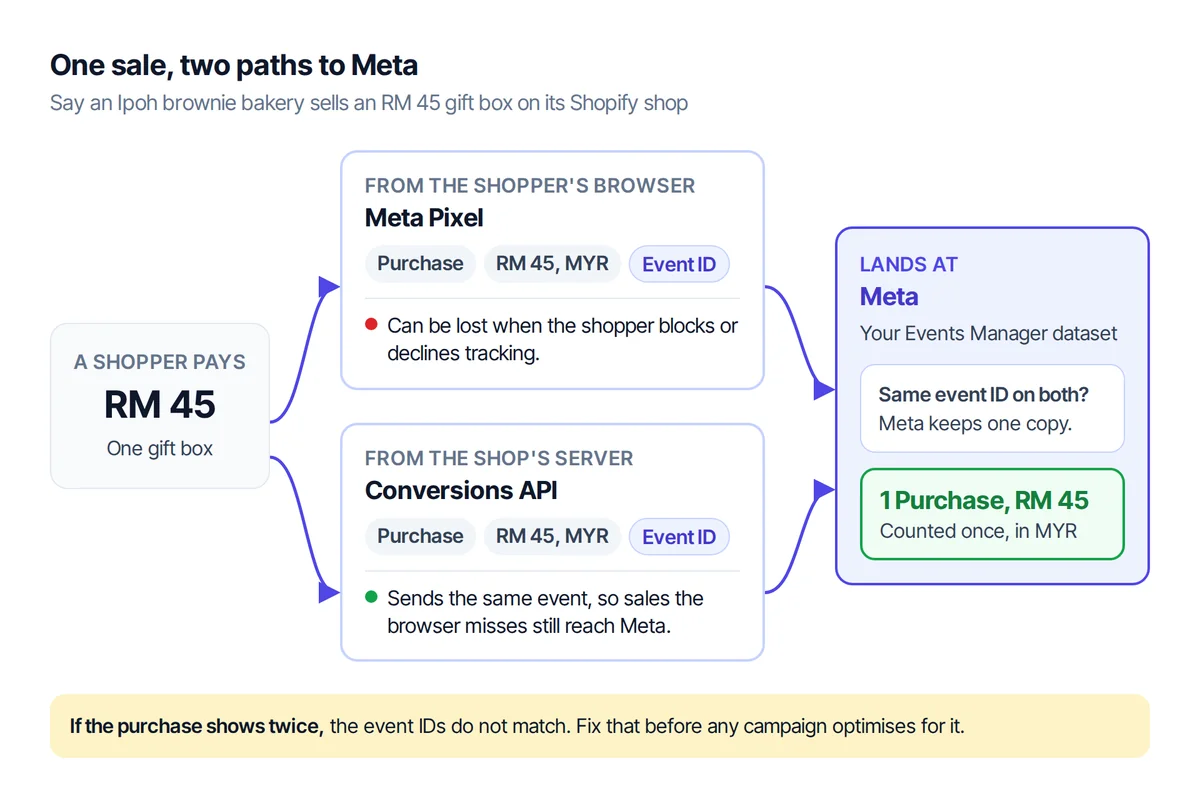
The Conversions API sends the same events from your shop's server instead of the visitor's browser. Browsers lose events. On iPhones, many people decline tracking in apps: AppsFlyer found only about half of users worldwide allow it. A server-side feed fills the gap.
Run both. Each event carries the same event ID from both sides, and Meta keeps one copy. Meta reports that advertisers with a Conversions API setup for web events saw on average 17.8% lower cost per result. Treat that as a guide, not a promise: it is Meta's own figure.
Why sales campaigns need them
- Meta optimises for what it can see. A campaign set to find purchases needs purchase events to learn from. Lessons 1 and 2 showed that the learning phase wants about 50 of them in 7 days.
- Your cost per sale is only as true as your tracking. Missed events make good ads look bad, and you may stop the wrong ad.
- Retargeting needs events. "People who added to cart but did not buy" only exists if the Pixel recorded the add to cart.
Set it up for the way you sell
Shopify
- In Shopify, install the Facebook & Instagram app by Meta.
- Connect the business portfolio, ad account and Page from the last lesson, then pick or create your pixel.
- Under data sharing, choose Maximum. Shopify then sends events through both the Pixel and the Conversions API.
WooCommerce
- In Meta Events Manager, open Partner Integrations and pick WooCommerce.
- Follow the steps to connect your shop. The connector adds the Pixel and the standard shop events, and it can also send events through the Conversions API. Turn that on.
- Check that the dataset ID it shows matches the one in Events Manager.
- Run the test at the end of this lesson to check that purchases arrive from both the browser and the server.
A custom website
Your developer adds the Pixel, then sends the Conversions API events from the server with the same event ID. The Conversions API setup guide has the details to hand them.
WhatsApp only, no website
You do not need a Pixel to start. Run ads that open a WhatsApp chat. Ads Manager then reports the cost per messaging conversation started.
The catch: the sale happens inside the chat, where Meta cannot see it. So you count it yourself.
- In the WhatsApp Business app, set up two labels: From ad and Paid. Add any that are missing.
- Give every chat that came from an ad the From ad label. When the customer pays, add Paid.
- Once a week, count the chats that have both labels. Divide what the ads spent by that number. That is your real cost per sale.
Meta says click-to-WhatsApp ads can also be measured with the Pixel, the Conversions API or offline conversions. That usually needs the WhatsApp Business API through a provider, which is worth it once chat volume grows.
Shopee or Lazada only
You cannot add the Pixel to a marketplace listing. Ads to a listing usually run on the Traffic objective, and you check sales in your seller centre. The guide for Shopee sellers covers this route.
Check that it works
- In Events Manager, open Test Events for your dataset.
- Open your shop in another tab and place a real test order.
- Look for one Purchase with a value and currency. You should see it arrive from both the browser and the server, counted once.
If a purchase shows twice, the event IDs do not match. Fix that before any campaign optimises for it. The guide on Pixel and Conversions API deduplication walks through it.
Ask for consent
Under Malaysia's Personal Data Protection Act 2010, a site that sends visitor data to Meta is processing personal data. Consent is the default rule, and your notice must be in Malay and English. Read PDPA and the Meta Pixel before you go live.
A worked example: the Ipoh bakery grows
Say the Ipoh brownie bakery still takes local orders on WhatsApp. For Deepavali, it opens a small Shopify shop to send gift boxes across Malaysia.
- Local orders: the WhatsApp labels method. Each Monday the owner counts chats labelled From ad and Paid, and works out the cost per sale.
- Gift boxes: the Facebook & Instagram app on Shopify, with data sharing on Maximum. One RM 45 test order shows up in Test Events, counted once, with the value in MYR.
Now the gift box campaign can optimise for purchases, and the reported cost per sale can be trusted.
Where this shows up in AdPlay.ai
When you connect Meta in AdPlay.ai and pick Purchases as your goal, the sales it counts are the purchases Meta records. No events, no sales to show. And when you build a sales ad set in Launch by hand, setting Optimization Goal to Conversions asks for a Facebook Pixel and a Conversion Event, such as Purchase. You cannot launch it without both. The launch guide covers the rest.
Checklist
- My website has the Pixel and the Conversions API on, through my shop platform.
- A test order shows one Purchase in Test Events, with value and currency.
- My site asks for consent, with a notice in Malay and English.
- If I sell on WhatsApp, every ad chat gets a label, and I count paid ad chats weekly.
Your homework
Set up the Pixel and the Conversions API through your shop platform. Place one test order and check it in Test Events. If you sell only on WhatsApp, set up the From ad and Paid labels today and start counting the ad chats that pay.
Frequently asked questions
Do I need the Conversions API if I already have the Pixel?
Yes, for a sales campaign. The browser Pixel misses events when people block tracking or decline it on their phone. The Conversions API sends the same events from your server, and Meta keeps one copy of each.
Can I put the Meta Pixel on my Shopee or Lazada shop?
No. The Pixel only runs on a website you control. Ads to a marketplace listing usually run on the Traffic objective, and you check real sales in your seller centre.
Do I need a developer?
Usually not. Shopify and WooCommerce connect the Pixel and the Conversions API through Meta's own integration. You need a developer only for a custom-built site.
Sources
- 1.Meta Business Help Center: Set up and install the Meta Pixel (2025)
- 2.Meta Business Help Center: About datasets in Meta Events Manager (2025)
- 3.Meta for Developers: Conversions API, get started (2026)
- 4.Meta Business Help Center: About deduplication for Meta Pixel and Conversions API events (2026)
- 5.PPC Land: Meta upgrades Pixel and Conversions API to close the gap for small advertisers (2026)
- 6.AppsFlyer: ATT data findings three years after launch (2024)
- 7.Shopify Help Center: Facebook data sharing (Standard, Enhanced, Maximum) (2026)
- 8.Meta Business Help Center: Create ads that click to WhatsApp in Ads Manager (2026)
- 9.Personal Data Protection Act 2010 (Act 709), Attorney General's Chambers (2010)
Keep exploring
Turn ad research into winning ads
See what 16,000 Malaysian brands advertise, then generate on-brand creative, all in one tool.
7-day free trial · No credit card required