
Module 0 · Before you spend
Set up your Meta business portfolio and ad account
Set up Meta Business Manager the right way in Malaysia: business portfolio, Page, an ad account in MYR, FPX or card payment, roles and business verification.
Updated November 2026 · AdPlay.ai Team
Run ads from a Meta business portfolio (the new name for Business Manager), not from a personal profile. Create the portfolio with your legal business name, add your Facebook Page and Instagram, then create an ad account set to Malaysia and MYR. Choose your payment method at setup: FPX and GrabPay can only be added when the ad account is created. Turn on two-factor login, give full control to one or two owners, and keep your SSM papers ready in case Meta asks you to verify the business.
Lesson 0.3 · 5 min read
Many small shops start by boosting posts from a personal profile. It works for a while. Then the one person who owns the login leaves, gets hacked or forgets the password, and the shop loses its ads, its Page and its history.
A business portfolio fixes this. It is Meta's container for your business: Pages, Instagram, ad accounts, pixels and people. Meta used to call it Business Manager, and you open it at business.facebook.com. Set it up once, in the right order, and the rest of this course runs on it.
The pieces you need
- A Facebook Page for your business, and your Instagram account if you have one.
- A business portfolio that owns the Page and the ad account.
- An ad account inside the portfolio. This is where budgets, ads and bills live.
- A payment method on the ad account.
- A pixel, if you sell on a website. That is the next lesson.
Set it up, step by step
- Secure your own login first. The portfolio hangs off your personal Facebook profile. Turn on two-factor login on that profile before anything else.
- Create the business portfolio. Use your legal business name and address, exactly as they appear on your SSM papers. Matching details save time if Meta asks you to verify later.
- Add your Page and Instagram. If the Page is yours, add it so the portfolio owns it. If someone else owns it, request access instead.
- Create the ad account. Set the country to Malaysia, the currency to Malaysian ringgit (MYR) and the time zone to Kuala Lumpur. A new portfolio usually starts with a limit of one ad account. Meta raises it over time as you spend and pay on time, so one is enough to start.
- Choose how to pay, now. This is the step people get wrong. See the next section.
- Add people with the right access. Give full control to one or two owners only. Everyone else gets partial access to the assets they work on. An agency or freelancer joins as a partner, through their own portfolio.
- Require two-factor login for everyone. In the portfolio's security settings, you can make it a rule for every person who joins.
Pay by card or top up by FPX
Meta lists these for Malaysia: Visa, Mastercard and American Express cards, PayPal, GrabPay and Malaysia Online Banking (FPX). It does not list DuitNow.
There are two ways to pay:
| Way to pay | How it works | Good for |
|---|---|---|
| Automatic (card or PayPal) | Ads run first. Meta charges you when you reach a set amount or on your monthly bill date. | Steady spend, less admin |
| Manual (GrabPay or FPX) | You top up a balance first. Ads stop when it runs out. | A hard ceiling while you test |
Meta says you can only add a manual method if you pick one when you first set up the ad account. It also needs the country set to Malaysia and the currency set to MYR. So if you want FPX, choose it at the start.
Business verification: be ready, do not panic
Meta does not ask every advertiser to verify. When it does, you upload papers that prove your business is real. Meta accepts five types of document, including a business registration and a certificate of incorporation. A utility bill can prove your address and phone number, but not your business name.
For a sole proprietor or partnership, that is your SSM business registration. For a Sdn Bhd, it is your incorporation papers. The SSM verification guide explains which SSM paper fits which slot.
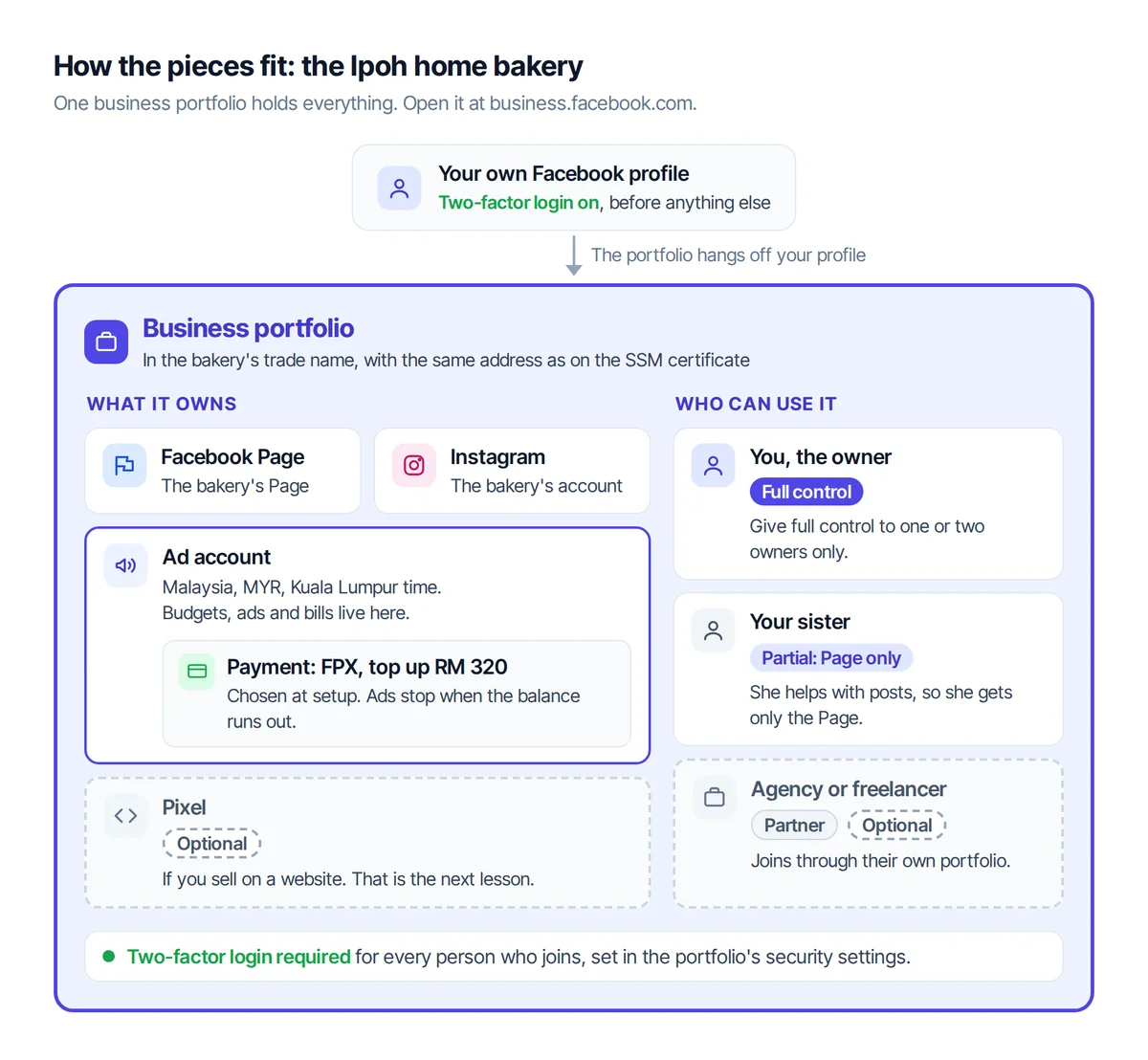
A worked example: the Ipoh home bakery
Say your home bakery in Ipoh is registered with SSM under a trade name, which costs RM 60 a year.
- You turn on two-factor login on your own Facebook profile.
- You create a business portfolio in the bakery's trade name, with the same address as on the SSM certificate.
- You add the bakery's Facebook Page and Instagram account.
- You create one ad account: Malaysia, MYR, Kuala Lumpur time.
- You choose FPX and top up RM 320, about the two-week test budget plus 8% tax from the last lesson. When the balance runs out, ads stop. No surprise bill.
- Your sister helps with posts, so she gets partial access to the Page only.
Connect it to AdPlay.ai
Once the ad account exists, connect it so AdPlay.ai can show your numbers and launch your ads. In AdPlay.ai, open the account menu, pick Integrations and click Connect Meta. Log in with the Facebook profile that has access to the ad account, pick the new account (check that it shows MYR), then choose your goal and type your target from the last lesson.
Connecting works on every AdPlay.ai plan, including the free trial. Each team connects one Meta ad account, and only owners, admins and ad managers can connect it. The guide Connect your Meta ad account shows each screen.
Checklist
- Two-factor login is on for my profile and required in the portfolio.
- The portfolio uses my legal name and address, as on SSM.
- The portfolio owns my Page and Instagram.
- The ad account is set to Malaysia and MYR.
- I chose card or FPX on purpose, at setup.
- Only one or two people have full control.
- My SSM papers are saved where I can find them.
Your ad bill also carries 8% service tax, and a business in LHDN's e-Invoice rollout may need to issue a self-billed e-Invoice for it. The SST and e-Invoice calculator works out the tax and the e-Invoice fields.
Your homework
Create your business portfolio and an ad account in MYR with the payment method you chose. Then open Integrations in AdPlay.ai, click Connect Meta, and finish the steps with your target per sale.
Frequently asked questions
Can I pay for Meta ads with DuitNow?
Meta does not list DuitNow for Malaysia. It lists Visa, Mastercard and American Express cards, PayPal, GrabPay and Malaysia Online Banking (FPX).
Do I need SSM registration to run ads?
Meta does not ask for SSM to start. But if Meta asks you to verify your business later, your SSM papers are what you upload. Register first if you plan to spend seriously.
How do I give my agency or freelancer access?
Add their business portfolio as a partner and give them access to the ad account and Page they need. Never share your Facebook password. You can remove a partner at any time.
Sources
- 1.Meta Business Help Center: About business portfolio and asset permissions (2026)
- 2.Meta Business Help Center: Find your business portfolio's ad account limit (2026)
- 3.Meta Business Help Center: Accepted payment options in Malaysia (2026)
- 4.Meta Business Help Center: How to buy and pay for your Meta ads (2025)
- 5.Meta Business Help Center: Upload official documents to verify your business (2026)
- 6.Meta Business Help Center: Turn on the two-factor authentication requirement (2026)
- 7.SSM: Registration of Business table of fees (2026)
Keep exploring
Turn ad research into winning ads
See what 16,000 Malaysian brands advertise, then generate on-brand creative, all in one tool.
7-day free trial · No credit card required