
Launch and improve
Connect your Meta ad account
Link your Facebook and Instagram ad account to AdPlay.ai, set your goal and target, and see what AdPlay.ai can read and change in your account.
Updated November 2026 · AdPlay.ai Team
Open Settings, go to the Integrations tab and click Connect Meta, or click Connect on the Campaigns page. Sign in to Facebook in Meta's window, pick your ad account, then choose your goal (Purchases, Leads or Link clicks) and what you are happy to pay for one result. Connecting is free on every plan and costs no credits. AdPlay.ai reads your campaigns, ads, spend and results, and only changes your account when you launch an ad or approve a change.
Connect Meta once, before you launch your first ad. It lets AdPlay.ai send ads to Facebook and Instagram, show your numbers on Campaigns and Insights, and let Copilot suggest changes. If you connected during sign-up, at the Connect your Meta ads step, you are already done.
Before you start
- You need a Meta ad account. If you do not have one yet, set it up in Meta first. The course lesson on Business Manager walks you through it.
- You need the Owner, Admin or Ad Manager role on your AdPlay.ai team.
- Use a Facebook login that can see the ad account in Meta.
- You need a Facebook page. Meta runs every ad from one. No page yet? Create one on Facebook first.
Connect your ad account
- Open the account menu at the bottom of the sidebar and click Settings. Go to the Integrations tab. You see a row called Meta Ads (Facebook & Instagram).
- Click Connect Meta. You can also start from Campaigns in the sidebar: before an account is connected, the page shows Meta with a Connect button.
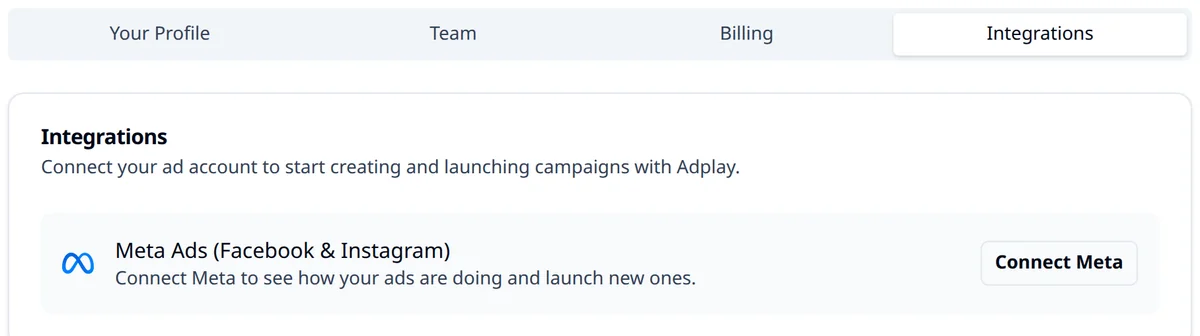
- Meta's own window opens. Sign in to Facebook and allow AdPlay.ai to see and manage your ads, your business accounts and your Facebook Pages. You sign in on Meta's window, so AdPlay.ai never sees your Facebook password. When Meta asks which pages AdPlay.ai can use, tick your page. If you tick none, AdPlay.ai shows Add a Facebook page first: tick your page and click Connect again.
- AdPlay.ai shows Pick your ad account. Each account shows its status (for example Active, Disabled or Unpaid balance) and its currency. Pick an active account and click Connect.
- Next you see What do you want from your ads? Under Goal, pick one:
- Purchases: sales in your shop.
- Leads: sign-ups and forms.
- Link clicks: visits to your page.
- Fill in Target per sale (it says lead or click for the other goals). This is what you are happy to pay in ads for one result. The app's tip: most shops start at a third of the price. A RM 90 skincare set would start at about RM 30.
- If your team has no industry yet, pick one under Your industry. Click Done.
You see "Connected. Copilot is reading your account now. Your first numbers arrive in a few minutes." Back in Integrations, the Meta row now shows your ad account and a green Connected tag.
Facebook Page and pixel
You do not pick a Facebook Page or a pixel when you connect. You pick them for each launch:
- In Launch by hand, the Identity section asks for the Facebook page the ad runs under. The Tracking section asks for the Facebook Pixel.
- On a Copilot launch card, Edit settings shows the Facebook Page.
If your goal is Purchases, your website needs the Meta pixel so Meta can count sales. Meta explains how to install it in Events Manager. Our pixel setup guide and the course lesson on the pixel and Conversions API go step by step.
What AdPlay.ai can and cannot do
It reads your campaigns, ads, spend and results, to show you how they do. Your ads are never shown to anyone else.
It changes your account only when you ask:
- when you launch ads from AdPlay.ai, or
- when you tap the button on a Copilot card (Pro and above), or
- when you turn on the Meta spending limit in Copilot settings.
The Campaigns page says it plainly: "AdPlay only changes what you approve."
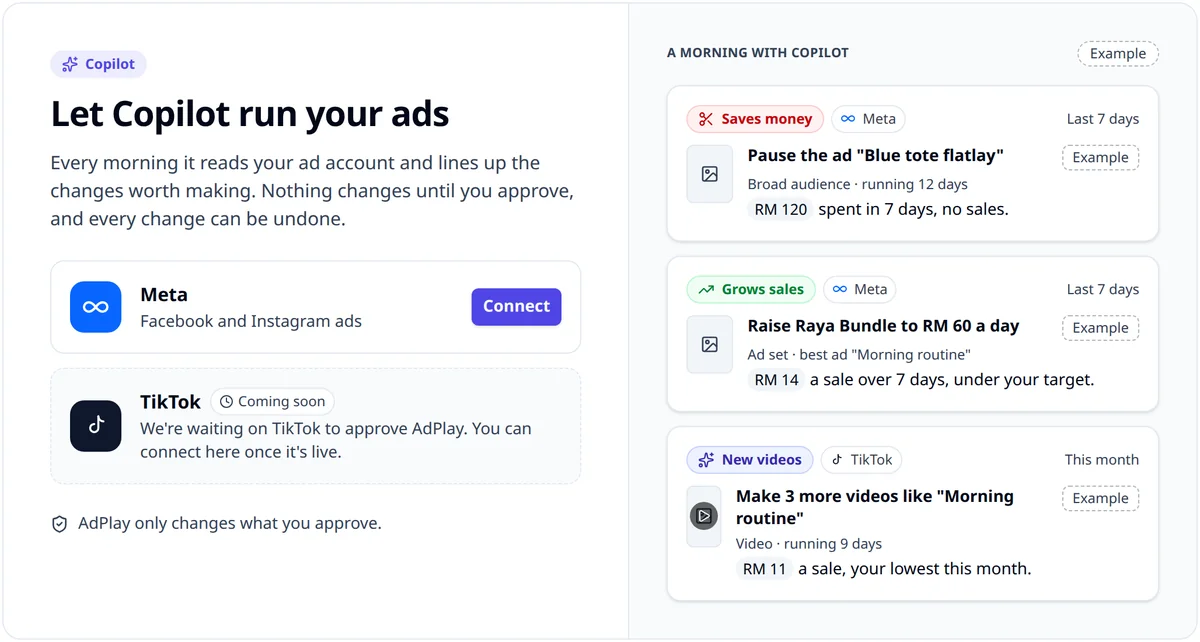
It does not pay for your ads. Meta charges your ad spend to the payment method on your ad account. AdPlay.ai credits pay only for AI work, such as making ads.
Change the goal later
Open Campaigns and click Change goal under the numbers at the top.
- On Pro and above, it opens Copilot settings at Goal and money. The Settings button at the top of the page opens the same place.
- On the free trial and Starter, it opens Goal and target.
Reconnect or disconnect
In Settings > Integrations, the Meta row has two buttons:
- Reconnect: signs in to Meta again for the same ad account. Use it when Meta signs AdPlay.ai out or the numbers stop updating. Your goal and target stay as they are.
- Disconnect: unlinks the ad account from your team. AdPlay.ai asks you to confirm first. You can reconnect at any time.
Common mistakes
- Picking a disabled account. An account marked Disabled or Unpaid balance cannot run ads. Fix it in Meta first.
- A target from a guess. Start from your price and margin, not a number from a forum. You can change it later.
- No pixel on a Purchases goal. Without it, Meta cannot count sales, so Insights and Copilot have no sales to judge your ads by.
What to do next
Your account is connected. Now launch your ads to Facebook and Instagram.
Frequently asked questions
Does connecting Meta cost credits or need a paid plan?
No. Every plan can connect a Meta ad account, including the free trial, and it costs no credits. You need a paid plan or an active trial to launch ads, and Pro for Copilot's cards.
Who on my team can connect the ad account?
Owners, admins and ad managers. Other members see the button turned off, with a note to ask a team admin.
Can AdPlay.ai change my ads without asking?
No. AdPlay.ai changes your Meta account only when you launch an ad from it, tap the button on a Copilot card, or turn on the Meta spending limit in Copilot settings. Changes Copilot makes come with Undo for 7 days.
Can I connect more than one ad account?
Each team connects one Meta ad account. To run a second ad account, connect it in another team. On the free trial and Starter, the teams you own must all use ad accounts from the same Meta Business. Pro and above can connect ad accounts from different Businesses.
What can AdPlay.ai see in my Meta ad account?
It reads your campaigns, ads, spend and results, to show your numbers and to run Copilot. It changes your account only when you launch an ad, approve a Copilot card or turn on the Meta spending limit in Copilot settings. AdPlay.ai never sells this data.
Does AdPlay.ai see my Facebook password?
No. You sign in on Meta's own window, so AdPlay.ai never sees your Facebook password. Meta then asks you to allow AdPlay.ai to see and manage your ads, business accounts and Facebook Pages.
How do I disconnect my Meta ad account from AdPlay.ai?
Open Settings, go to the Integrations tab and click Disconnect on the Meta row, then confirm. Your ads on Meta are not paused or changed, and you can reconnect at any time. AdPlay.ai deletes that account's data from your team within 30 days.
Can AdPlay.ai run my ads on Instagram too?
Yes. AdPlay.ai launches ads to your Meta ad account, and Meta picks where to show them, on Facebook and Instagram.
Sources
Keep exploring
Turn ad research into winning ads
See what 16,000 Malaysian brands advertise, then generate on-brand creative, all in one tool.
7-day free trial · No credit card required