
Module 6 · Scale and refresh
Test one change at a time
Run a clean Meta ad test: keep everything the same, change only the hook, the offer or the language, then judge on cost per result after a fair run.
Updated November 2026 · AdPlay.ai Team
A test tells you something only when one thing changes. Keep the picture, audience and budget the same, change only the hook, the offer or the language, and launch both ads together in the same ad set. Give them at least a week and judge on cost per result, not likes.
Lesson 6.2 · 5 min read
When an ad works, you want the next one to work better. The fastest way to learn what helps is to change one thing, run both versions side by side, and see which one brings cheaper results.
If you change the photo, the headline and the price at the same time, you may get a winner, but you learn nothing. Next month you will be guessing again.
Pick the one thing to change
Test in this order. Each one is a bigger lever than the next.
- The hook. The first line and the first thing people see. It decides whether anyone stops scrolling.
- The offer. The reason to buy now: a bundle, free delivery, a gift with purchase, a price.
- The language. The same ad in English, Malay or Chinese, for the same market.
Everything else stays the same: the layout, the product, the audience, the budget, the button.
Keep the test fair
- Same ad set, same time. Put both ads in one new ad set and launch them together. Then both see the same people and the same days.
- Do not add the variant next to an old winner. An ad that has run for weeks has a head start in delivery, so a new ad can lose to it on day one. Launch a fresh copy of the original with the variant instead.
- Launch them together. Meta lists adding a new ad among the edits that can restart the learning phase of an ad set. Adding both at once means one restart, not two.
- Do not edit during the test. Every change to the ad set mixes up the result.
- Judge on the number the campaign exists for. For a shop, that is cost per sale. For a service, cost per lead. Likes and comments are not the goal.
How long to wait
Meta says an ad set needs about 50 optimisation events (sales, leads, or whatever you optimise for) within about 7 days to leave the learning phase. Many small shops will not reach 50 in a week. That is fine for a simple test, but it means you need patience.
A good rule: run at least 7 days, so both ads see weekdays and a weekend. Do not call a winner on day 2 because one ad got three sales and the other got one. Small numbers jump around.
Inside one ad set, Meta does not split spend evenly. It may give most of the money to one ad. If one ad gets very little spend, you cannot read it yet. If you need an even split, Ads Manager has an A/B test tool that splits the audience for you and can compare up to 5 versions.
A worked example
Say you sell a RM 69 batik kaftan online and run ads to women in the Klang Valley. Your best ad shows the kaftan in a living room with the line "Comfy enough for home, smart enough for guests".
You want to know if a stronger offer sells more. So you keep the photo, the layout and the line, and change only the offer:
- Ad A (the original): no offer on the image.
- Ad B (the variant): "Free delivery for 2 or more" in the corner.
You launch both in the same ad set at RM 40 a day. These numbers are made up to show how to read a result. After 8 days, Ad A has 9 sales at RM 17 each. Ad B has 14 sales at RM 12 each. The offer helped. Your next test keeps the offer and tries a new hook.
If Ad B had cost RM 16 a sale and Ad A RM 17, you would call it a tie, not a win. Run it longer or test something bigger.
Make the variant in AdPlay.ai
Create variant makes a new ad that keeps your ad's layout and changes only what you describe. It is built for this kind of test. It costs about 100 credits, the same as a new image ad. See Create variant for every option.
Open your best ad from Ads and press Create variant. Leave Products and Market as they are. To test the language, change Language only. To test the hook or the offer, type one change in What should change?, for example "Add 'Free delivery for 2 or more' in the corner. Keep everything else."
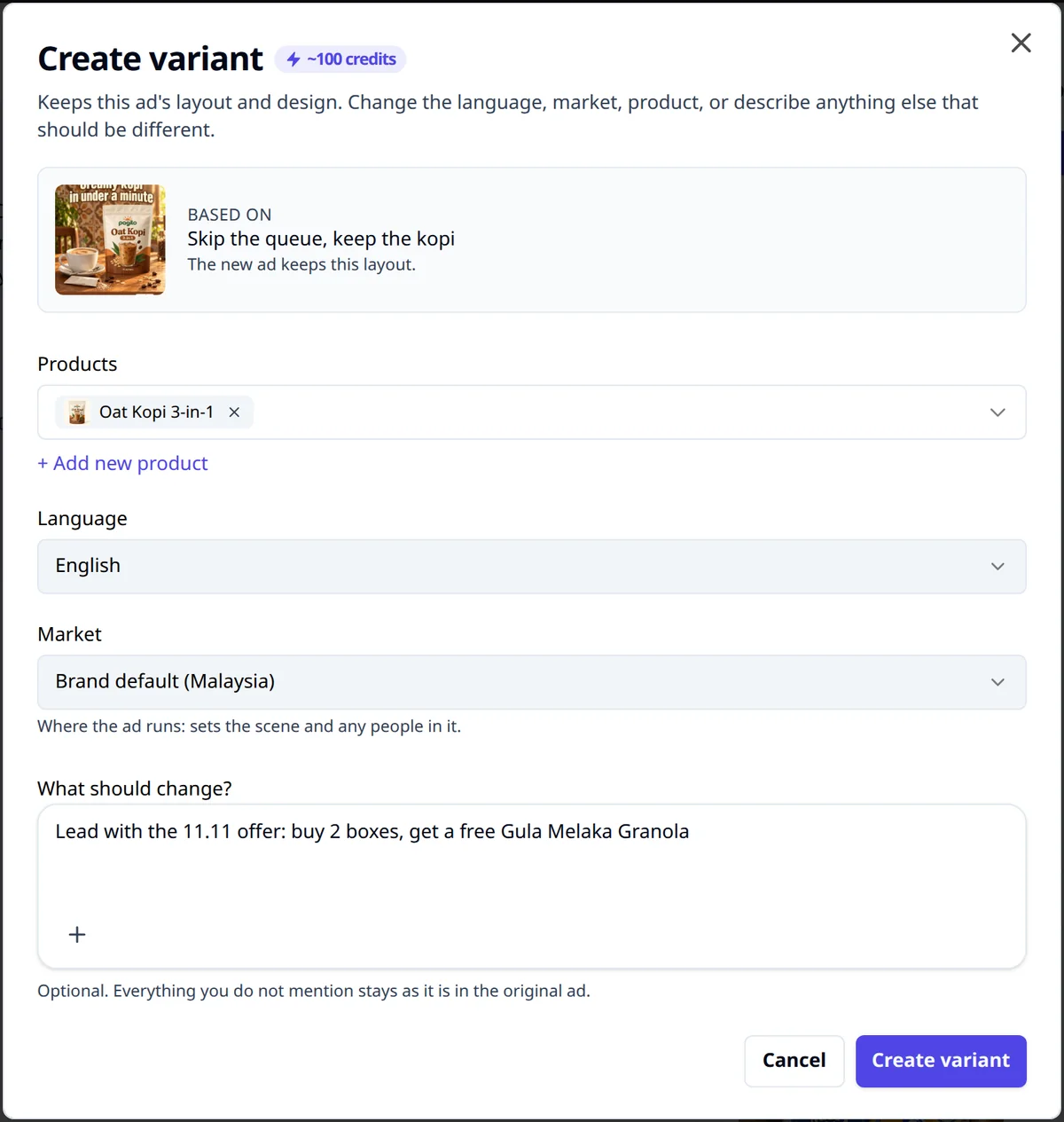
You can also ask Ask AI on the ad page for variants to test. It suggests up to 3, each with one change, and Make this variant opens Create variant with the change filled in.
Then launch the original and the variant together, as two new ads in one new ad set. In Launch by hand you can tick both ads and send them in one go. See launch your ads.
When the results come in, Insights shows Too new to judge until an ad has run for 7 days, and Not enough data until it has at least 3 results. On Pro, Copilot reads every change it makes a week later. If another change landed in the same ad set around the same time, its Activity tab marks the result Can't tell. That is the same lesson: one change at a time.
For more on testing order and how many ads to run, read Facebook ad creative testing.
Checklist
- One change only: hook, offer or language.
- Same ad set, same budget, launched together.
- No edits while the test runs.
- At least 7 days before you decide.
- Judge on cost per sale or cost per lead.
- Write down the result and the next test.
Your homework
Pick your best ad. Use Create variant to make one version with a new hook and nothing else changed. Before you launch it, write down two things: the number you will judge on, and the date you will decide.
Frequently asked questions
How long should a Meta ad test run?
At least 7 days, so both ads see weekdays and a weekend. Meta's learning phase looks for about 50 results in 7 days, so a small budget often needs longer before the numbers settle.
Can I test two things at once if I am in a hurry?
You can run two separate tests, each with its own pair of ads. Do not put two changes in one ad. If it wins, you will not know which change did it.
What should I test first?
Test the hook first, because it decides whether people stop at all. Then test the offer, then the language.
Sources
Keep exploring
Turn ad research into winning ads
See what 16,000 Malaysian brands advertise, then generate on-brand creative, all in one tool.
7-day free trial · No credit card required