
Make ads
Make a variant of an ad
Use Create variant in AdPlay.ai to make a new ad with the same layout and one change: a new hook, offer, market or a Malay version for an A/B test.
Updated November 2026 · AdPlay.ai Team
Create variant makes a new ad that keeps your ad's layout and design and changes only what you ask for. Use it for an A/B test (one new hook or offer) or for the same ad in Malay or Chinese. Your first ad stays as it is. Each variant costs about 100 credits, or one of the 2 ads on the free trial.
Use Create variant when one ad looks good and you want to know if one change makes it better. Change only the hook, the offer, the audience or the language, and keep the rest the same. Then a difference in results points to that one change. It is also the quick way to make the same ad in Bahasa Melayu or Chinese.
When to use it
- An A/B test. Same ad, a new first line. Same ad, "Free delivery" instead of "RM 10 off".
- A Malay or Chinese version. Same layout and offer, new language.
- Another market. The same ad for buyers in Singapore instead of Malaysia.
- Another product. The same layout for a second product in your range.
If you want to fix this ad itself, use Ask AI instead. If you want a new idea, use the Ad Generator.
Way 1: From your Ads list
- Open Ads in the sidebar and click the ad. A preview opens.
- In the small toolbar on the preview, press the wand button. Its label reads Create variant when you point at it.
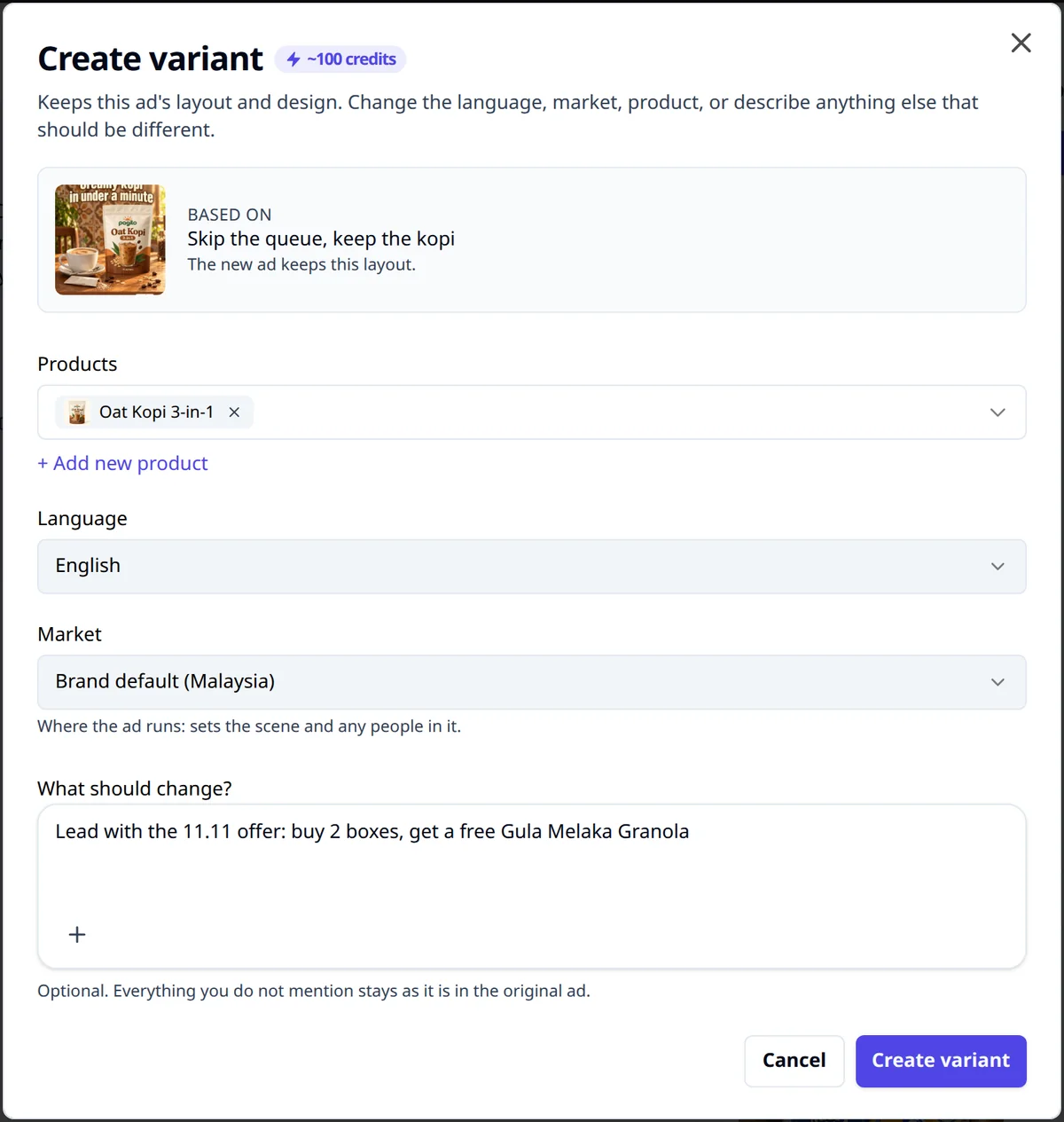
- The Create variant window opens with its price, about 100 credits. Under Based on you see your ad and "The new ad keeps this layout."
The button is off while the ad is still being made. It reads "Not available for carousel ads yet" on a carousel and does not show on a video ad.
Way 2: Let Ask AI plan the test
- Open the ad's page (Open ad on the preview).
- In Ask AI, type something like "Give me 3 variants to test" or "What should I A/B test on this ad?".
- AI explains how to run the test and shows up to 3 variant cards, each with one change. The cards have no price of their own; the reply uses its usual few credits.
- Press Make this variant on the card you like. Create variant opens with the change already filled in. Nothing is made until you press the button in the window.
Fill in the window
- Products. Your ad's product is already picked. Pick another to use this layout for a different product.
- Language. It starts on the language you used last, so check it. Pick Bahasa Melayu (Malay), 中文 (Chinese) or 繁體中文 (Traditional Chinese) for a version in that language, or English.
- Market. Leave it on your brand's market, or pick another country.
- What should change? Write the one change, in plain words. For example:
- "Lead with free delivery in the Klang Valley instead of the discount"
- "Speak to working mums who have no time to cook"
- "Change the offer to Buy 2, save RM 30"
- To use your own photo (a new background, a person), press + and add one photo. Say how to use it, for example "use this photo as the new background".
- Press Create variant.
You see "You're all set" and a View in Ads button. The new ad usually takes 2 to 4 minutes, and you can keep working. It shows in Ads, and under Other versions of this ad on the first ad's page. A variant card in Ask AI then reads Made.
Run a fair test
A variant is only half of an A/B test. The other half is how you run it.
- Change one thing. If the hook, photo and offer all change, you cannot tell which one worked.
- Same audience, same budget, same time. Launch both ads together so neither gets an easier week. Meta's A/B test tool in Ads Manager splits your audience so each version reaches different people.
- Decide what "better" means first. Cost per sale, cost per WhatsApp chat or cost per lead: pick one before you look.
- Give it time. One good day is not a result. The lesson Test one change covers how long to wait.
Common mistakes
- Writing a whole new brief. Long notes in What should change? turn a variant into a new ad. Keep it to one change.
- Using variant to fix a typo. That makes a second ad and costs credits. Fix this ad with Ask AI, or type the text yourself on the ad's page.
- Forgetting to check the new language. Read the Malay or Chinese words before you launch. Ask someone who speaks it daily if you can.
What to do next
Launch your ads to put the original and the variant on Facebook and Instagram together. For more on reading the result, see Facebook ad creative testing.
Frequently asked questions
What is the difference between Create variant and Ask AI?
Ask AI changes the ad you have open. Create variant makes a second, new ad with the same layout, so you can run both and compare them.
Can I make a variant of a video or carousel ad?
Not from the ad preview. Create variant is for single image ads. On a carousel's ad page, Ask AI can suggest variants, and each one is made as a new single image ad from card 1.
Can I use Create variant on the free trial?
Yes. A variant uses one of the 2 image ads the free trial includes. After that, it needs a paid plan.
Do I have to write something in What should change?
No. If you only change the language, market or product, you can leave it empty. Everything you do not mention stays as it is in the original ad.
Sources
Keep exploring
Turn ad research into winning ads
See what 16,000 Malaysian brands advertise, then generate on-brand creative, all in one tool.
7-day free trial · No credit card required