
Research your market
Find winning ads in the Ad Library
Search the AdPlay.ai Ad Library by brand, ad copy, visual or industry, filter by run time and format, sort by Longest Running and save your filters.
Updated November 2026 · AdPlay.ai Team
The Ad Library in AdPlay.ai lets you search real Facebook and Instagram ads from other brands by brand, ad copy, visual or industry. To find ads that brands keep paying for, sort by Longest Running and add the Active Status filter set to Live. Save the search as a Saved Filter so you can run it again in one click.
Use the Ad Library before you make an ad. It shows what other brands in your market are running, how long they have kept each ad live, and which angles they repeat. A few minutes here can stop you paying to test an idea that others have already tried and stopped.
Search the Ad Library
- Click Ad Library under Research in the sidebar. You see the newest ads first.
- Type a word in the search box, such as "tudung", "kuih raya" or "free delivery". A menu opens with the search types below.
- Pick a type, or press Enter to search Everything. Your search shows as a chip above the results. Click the x on the chip to clear it.
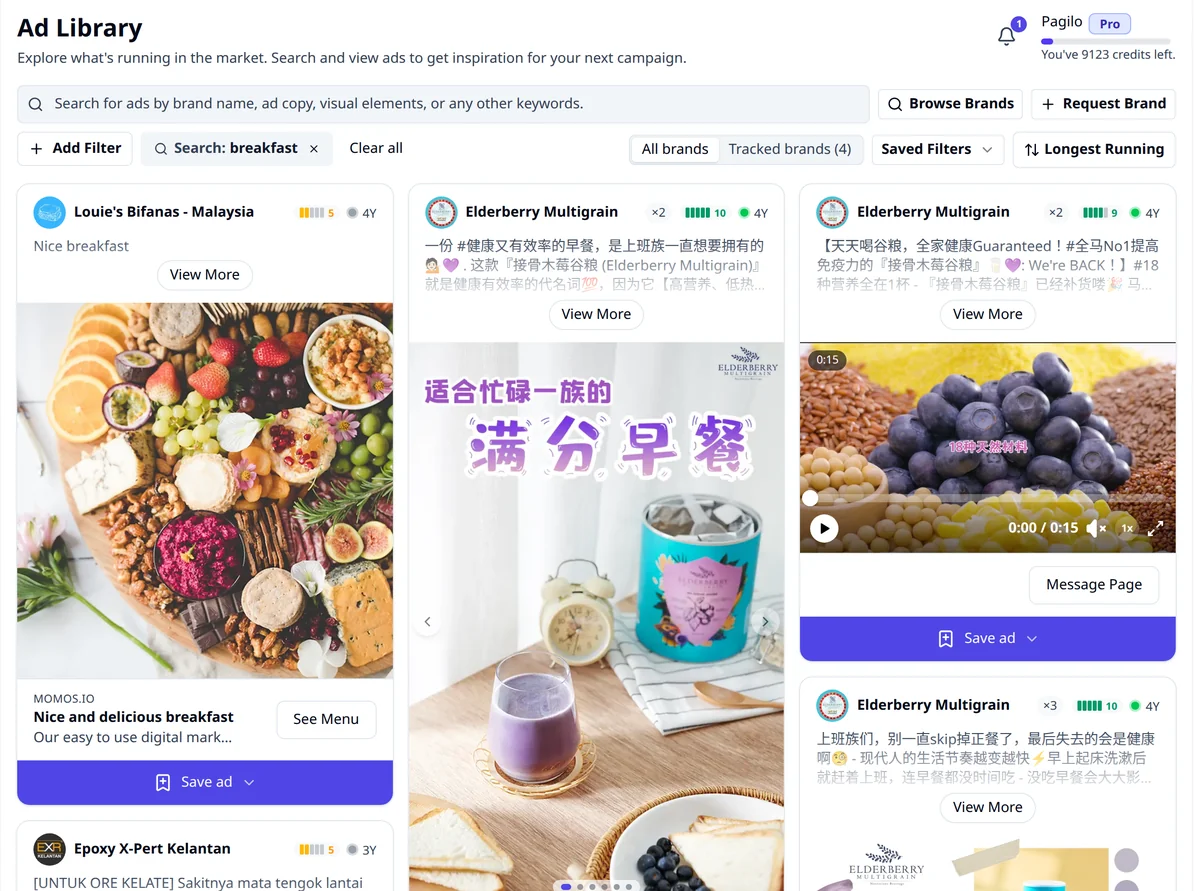
| Search type | What it does |
|---|---|
| Everything | Searches every field |
| Brand | Adds the brand as a filter |
| Exclude Brand | Hides that brand from the results |
| Ad Copy | Searches the ad's text, its hook and the spoken words in video ads |
| Industry | Adds the industry as a filter |
| Visual | Searches the words and objects in the picture |
To find a brand by name, click Browse Brands. If a brand is missing, click Request Brand and paste its Facebook page link. The Track competitors guide shows the steps.
Filter the results
Click Add Filter and pick a group:
- Industry, Theme (for example Testimonial, Social Proof or UGC) and Language (English, Malay, Chinese and more)
- Media Type: Image, Video or Carousel
- Active Status: Live or Not Live
- Time live: ads that started in the last 7 days, 30 days, 3 months and so on
- Run Time: from Under 7 Days to Over 12 Months
- Country, Platform, Gender, Age and Performance
For more control, choose Advanced Filters and join filters with AND or OR. If you track brands, a switch with All brands and Tracked brands appears. Pick Tracked brands to see only the brands you follow.
Sort the results
The sort button has three choices:
- Recently Started: the newest ads first. Good for seeing what is new this week.
- Longest Running: the oldest start dates first. This includes ads that have stopped, so add Active Status: Live to see only ads still running.
- Best Performing: the highest Performance Estimate first.
Save your search as a filter
- Set up the search, filters and sort you want.
- Click Saved Filters, then Save as new filter.
- Give it a name, such as "Raya food, live, over 30 days", and click Save. Tick Set as default filter if you want the Ad Library to open with it.
- Next time, pick it from Saved Filters. If you change it, click Save changes.
Use the menu beside a saved filter to rename it, delete it or set it as the default.
Open an ad
Click any ad to see it in full. The panel shows the brand, Published date, Run Time (such as "Running for 3 months", or "Ran for over 3 years" for an ad that stopped), format, themes, platforms and landing page. The Performance Estimate scores the ad from 1 to 10, and may say "Launched 4 times" when the brand ran the same ad again.
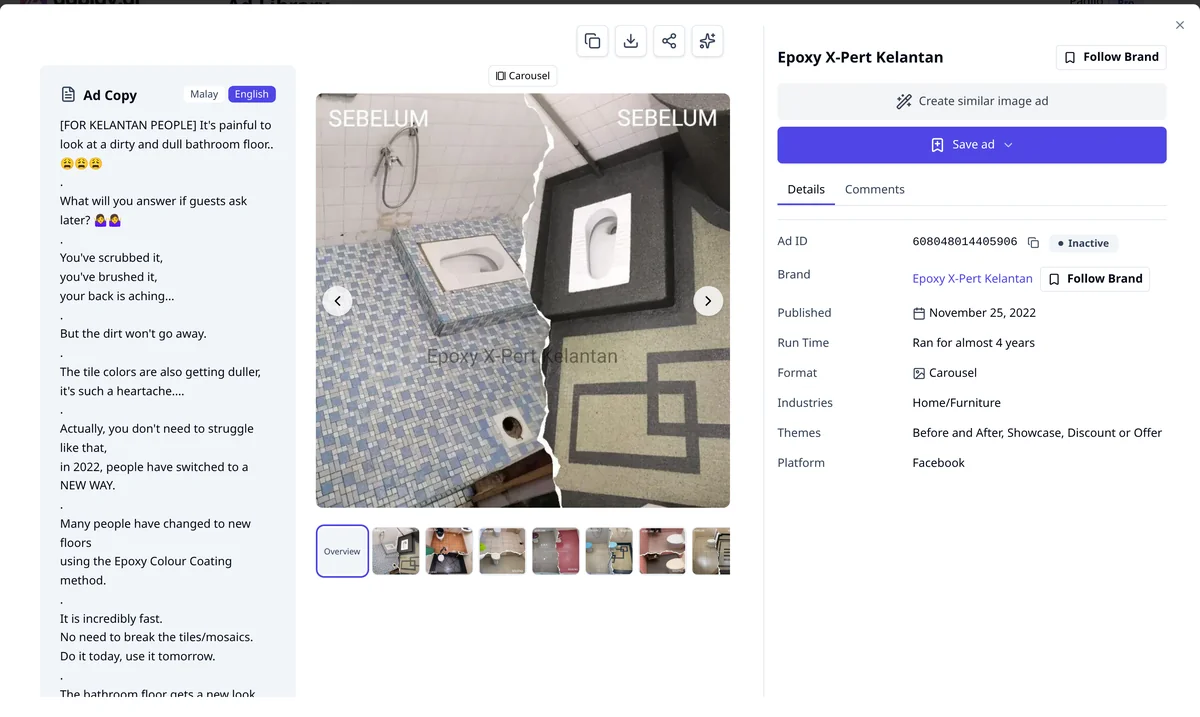
From here you can:
- Save ad to a folder in Saved Ads.
- Click Create similar image ad to make your own version of an image ad. See Copy a winning ad.
- Click the Analyze with AdGPT icon to ask AdGPT to break the ad down.
- Click the brand name to open its brand page, or Follow Brand to track it.
What a long-running ad tells you
Meta shares spend and reach for ads about social issues, elections or politics (Meta Transparency Center). It gives more detail for ads shown in Europe, but for a normal business ad in Malaysia, nobody outside the business sees what it cost or what it sold. So you read the clues the ad leaves in public.
- Run time. A small shop rarely keeps paying for an ad that does not sell. An ad from a brand your size that has been live for months is worth a close look.
- Repeats. When a brand launches the same ad again, or runs one angle in many versions, it is likely working for them.
- New ads are tests. An ad under 7 days old tells you what a brand is trying, not what works.
- Big brands are different. A large company can keep a brand awareness ad live for a long time on budget alone. Weigh run time most for brands close to your size.
Copy the structure of a winner, not its words or photos. Keep the hook type, the layout and the kind of offer, then make it about your product. For a deeper walkthrough, read our Meta Ad Library guide.
Next
Follow the brands you found with Brand Tracker, so their new ads come to you.
Frequently asked questions
Does the Ad Library show how much a brand spends on an ad?
No. Meta shares spend and reach for ads about social issues, elections or politics, not for normal business ads, so nobody outside a business can see what its ads cost or sell. How long an ad has run, and whether the brand launched it again, are the best public clues.
What is the difference between Run Time and Time live?
Time live picks ads that started recently, such as in the last 7 days. Run Time picks ads by how long ago they started, such as Over 30 Days. Run Time also matches ads that have stopped, so add Active Status set to Live when you want ads that are still running.
Is the Ad Library on the free trial?
Yes. You can search, filter and save ads during the 7-day free trial. When the trial ends, the Ad Library is locked until you pick a plan.
What does the Performance Estimate mean?
It is a score from 1 to 10 that AdPlay.ai works out from public signals: how long the ad has run, whether it is still live, which platforms it runs on and the creative itself. It is a guide for sorting, not a measure of real sales.
Sources
Keep exploring
Turn ad research into winning ads
See what 16,000 Malaysian brands advertise, then generate on-brand creative, all in one tool.
7-day free trial · No credit card required