
Make ads
Make your version of a winning ad
Found an ad that works in the AdPlay.ai Ad Library or your Saved Ads? Use Create similar image ad to make your own version for your product and brand.
Updated November 2026 · AdPlay.ai Team
Open the ad in the Ad Library, Saved Ads or a brand page and press Create similar image ad. Pick your product, language, market and size, and say what should change. AdPlay.ai rebuilds the ad's layout and idea with your product, your logo and new words. It costs about 100 credits, or one of the 2 ads on the free trial.
Use Create similar image ad when you have found one ad you want to learn from: a competitor's Raya promo, a bakery's 11.11 bundle, an ad that has run for months. AdPlay.ai keeps what makes that ad work and makes it for your product. You do not need to brief a designer or start from a blank page.
Step 1: Find an ad worth copying
- Open Ad Library in the sidebar.
- Search for your product type, a competitor or an offer, such as "kuih raya", "tuition", "11.11" or "free delivery". The search menu lets you search by Everything, Brand, Ad Copy, Industry or Visual, or leave a brand out with Exclude Brand.
- Sort by Longest Running. A brand keeps paying for an ad only while it brings results, so an ad that has run for a long time is a good sign. It is not proof.
- Click an ad to open it. You see its picture, its copy and its actions.
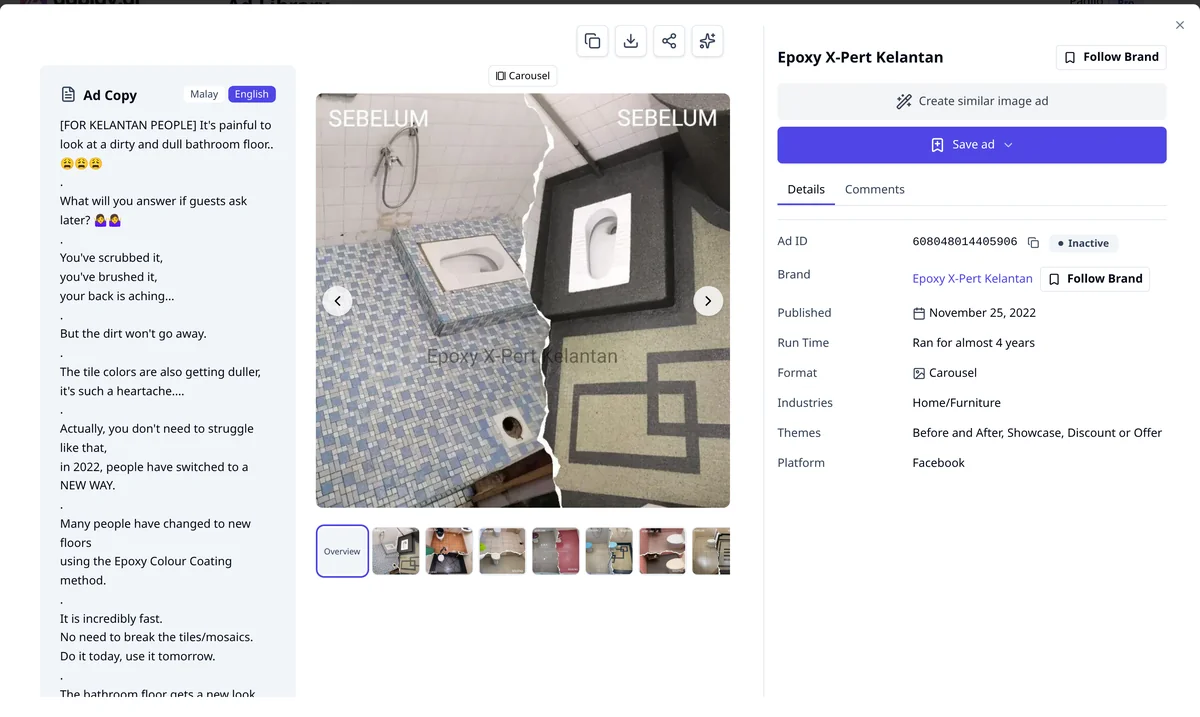
The guide Find winning ads in the Ad Library covers filters and saved searches.
You can start from ads you kept, too. Open Saved Ads in the sidebar, or a brand page in Brand Tracker, and click an ad. The same actions show.
Step 2: Press Create similar image ad
- In the ad's actions, press Create similar image ad.
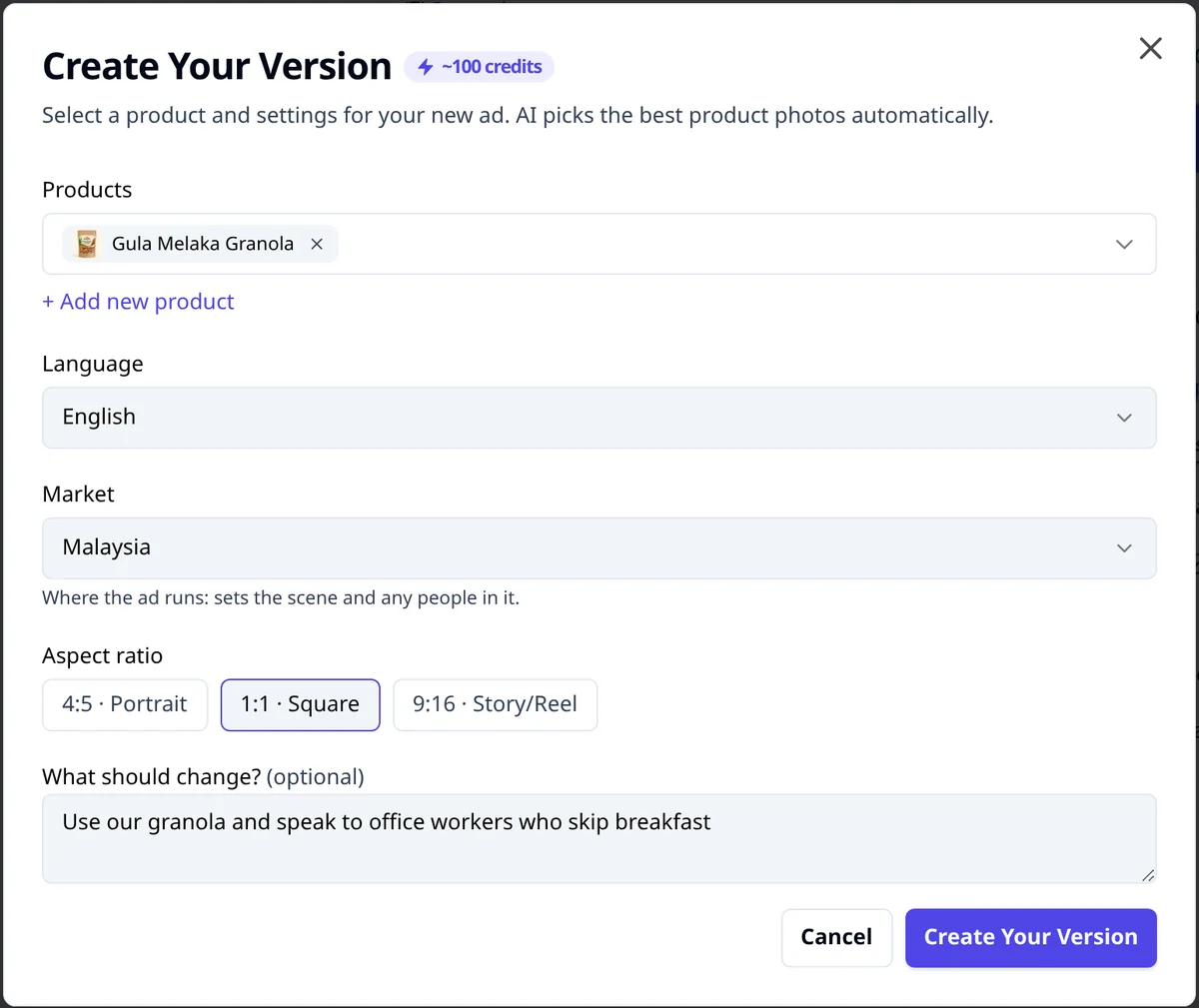
- The Create Your Version window opens. It shows the price, about 100 credits, and says "AI picks the best product photos automatically."
If you are on the free trial and your 2 trial ads are used, a window asks you to pick a plan instead.
Step 3: Set it up
- Products. Pick the product this ad is for. No product yet? Press + Add new product to add one without leaving the window.
- Language. English, Bahasa Melayu (Malay), 中文 (Chinese) or 繁體中文 (Traditional Chinese). It starts on the language you used last. Your ad is written in the language you pick, whatever language the original used.
- Market. It starts on the country the ad ran in. Change it if your buyers are somewhere else.
- Aspect ratio. It starts on the shape of the ad you copy. Pick 4:5 · Portrait for the feed, 1:1 · Square, or 9:16 · Story/Reel for Stories and Reels.
- What should change? (optional). Tell it what to do differently. For example:
- "Lead with free delivery in the Klang Valley"
- "Speak to new parents, not students"
- "Make it feel more premium"
- "Use our Buy 2, save RM 30 offer"
- Press Create Your Version.
You see "You're All Set!" and a View in Ads button. Your ad usually takes 2 to 4 minutes. You can keep working, and it shows in Ads when it is ready.
What it keeps and what it changes
| Kept from the ad you chose | Made yours |
|---|---|
| The layout and where each part sits | Your product and its photos |
| The idea that sells (a before and after, a price slash, a list of reasons) | New headline and words, written for your product |
| The style of the lettering | Your logo in the logo spot (left empty if you have no logo) |
| People in the picture only if the ad had people | Your Brand Kit colours (with none set, the original's colours stay) |
Add your logo and colours to Brand Kit first, so the new ad has them to use and looks like your brand, not theirs.
Check before you launch
A copied layout is fine. Copied facts are not.
- Your offer, your facts. Make sure the price, discount and claims are yours and true today. Never copy another brand's reviews, results or "No. 1" claims. See Malaysian ad rules.
- Your product looks right. Check the shape, colour and label against the real thing.
- Not too close. If your ad could be mistaken for the other brand's ad, change more. Ask for a different background or a new headline with Ask AI.
Tips
- Pick the idea, not the brand. A clinic's before-and-after layout can work for a cleaning service. Look for ads with a clear structure.
- Save good ads as you browse. Press Save ad and put it in a folder. Your saved ads become a swipe file you can come back to. See Track your competitors.
- Make two, not ten. Copy two different winning ads, launch both, and let the results decide.
What to do next
Open the new ad and fix small things with Ask AI. To understand why an ad works before you copy it, read how to reverse-engineer a winning ad.
Frequently asked questions
Does Create similar copy the other brand's ad exactly?
No. It keeps the layout, the type style and the idea that sells. The product, logo and words are yours. When your Brand Kit has colours, the ad uses them instead of the other brand's colours. With no brand colours set, it keeps the original's colours, so add yours first.
Why don't I see Create similar image ad on some ads?
It shows on image ads. A video ad shows Create similar video ad instead. Video ads are experimental and stay locked until you have made 3 image ads in the Ad Generator.
When should I use the Ad Generator instead?
Use the Ad Generator when you do not have one ad in mind. It finds winning ads in your market for you and offers several ideas. Create similar is for one ad you already chose.
Can I use this on the free trial?
Yes. Each ad uses one of the 2 image ads the free trial includes. After that, it needs a paid plan.
Keep exploring
Turn ad research into winning ads
See what 16,000 Malaysian brands advertise, then generate on-brand creative, all in one tool.
7-day free trial · No credit card required