
Ask AdGPT
Use AdGPT to research and make ads
How to use AdGPT in AdPlay.ai: what to ask it, how to attach a product or a reference ad, make ads from the chat and find old chats in Chat History.
Updated November 2026 · AdPlay.ai Team
AdGPT is the chat in AdPlay.ai for questions and one-off asks about ads. It searches the Ad Library and the web, shows real ads as cards, and makes an ad for your product in the same reply when you ask for one. Use the Ad Generator when you want a batch of ads from several angles, and Copilot for questions about your own running campaigns.
Use AdGPT when you have a question about ads or one clear thing you want made. Ask what competitors are running, get a few ideas for one product, or turn an ad you like into your own version. It is a chat, so you can steer it in your own words.
What to ask AdGPT
AdGPT works best with one clear ask per message. Some examples:
- "What are skincare brands running for 11.11?"
- "Compare the ads of the brands I track."
- "Give me three ad ideas for my kuih raya gift box."
- "Make an ad like this one for my product, with our RM 49 bundle offer."
- "Make this ad in 4:5, 1:1 and 9:16."
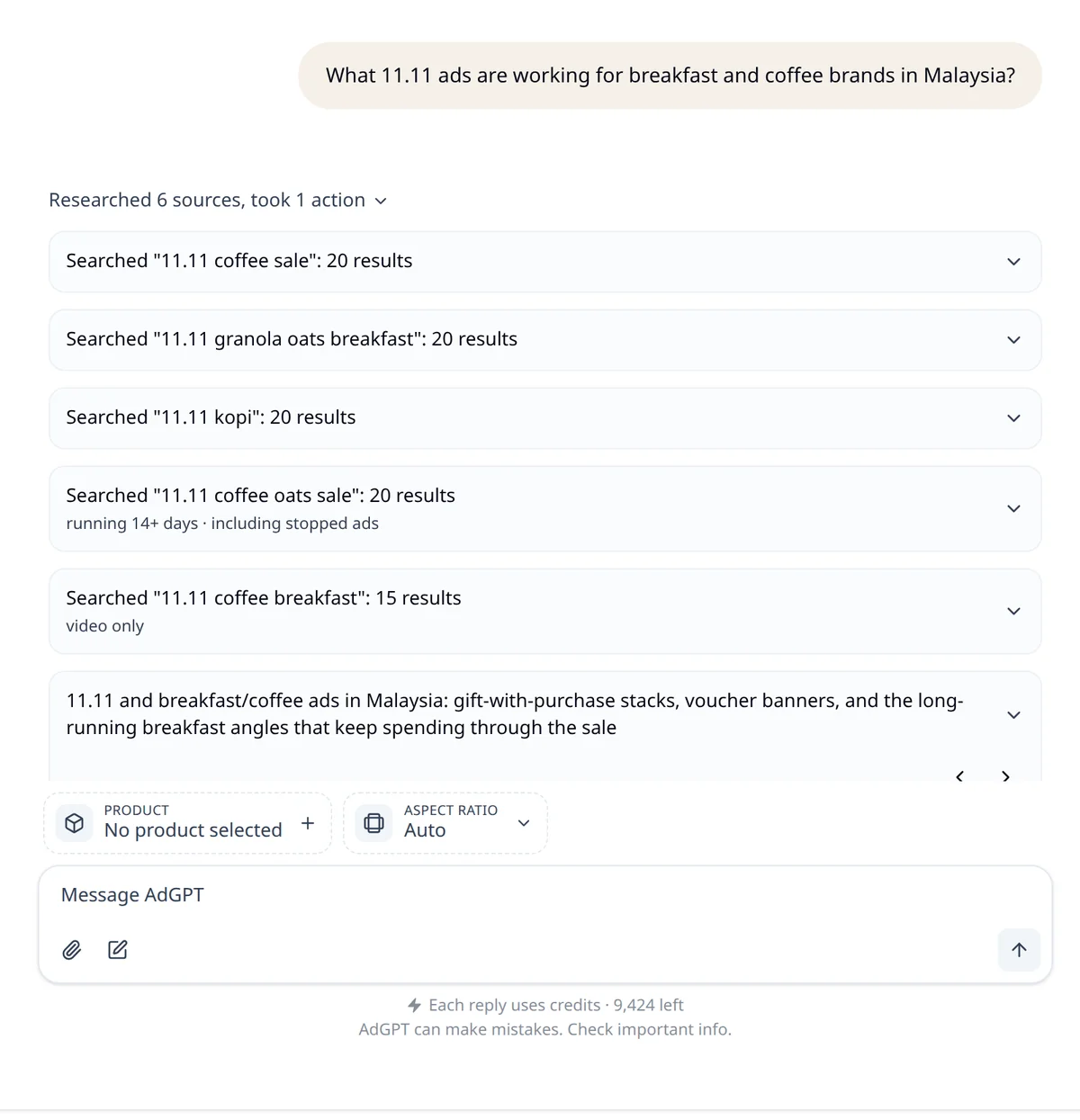
When it researches, AdGPT lists each Ad Library search it ran, so you can see what its answer is based on.
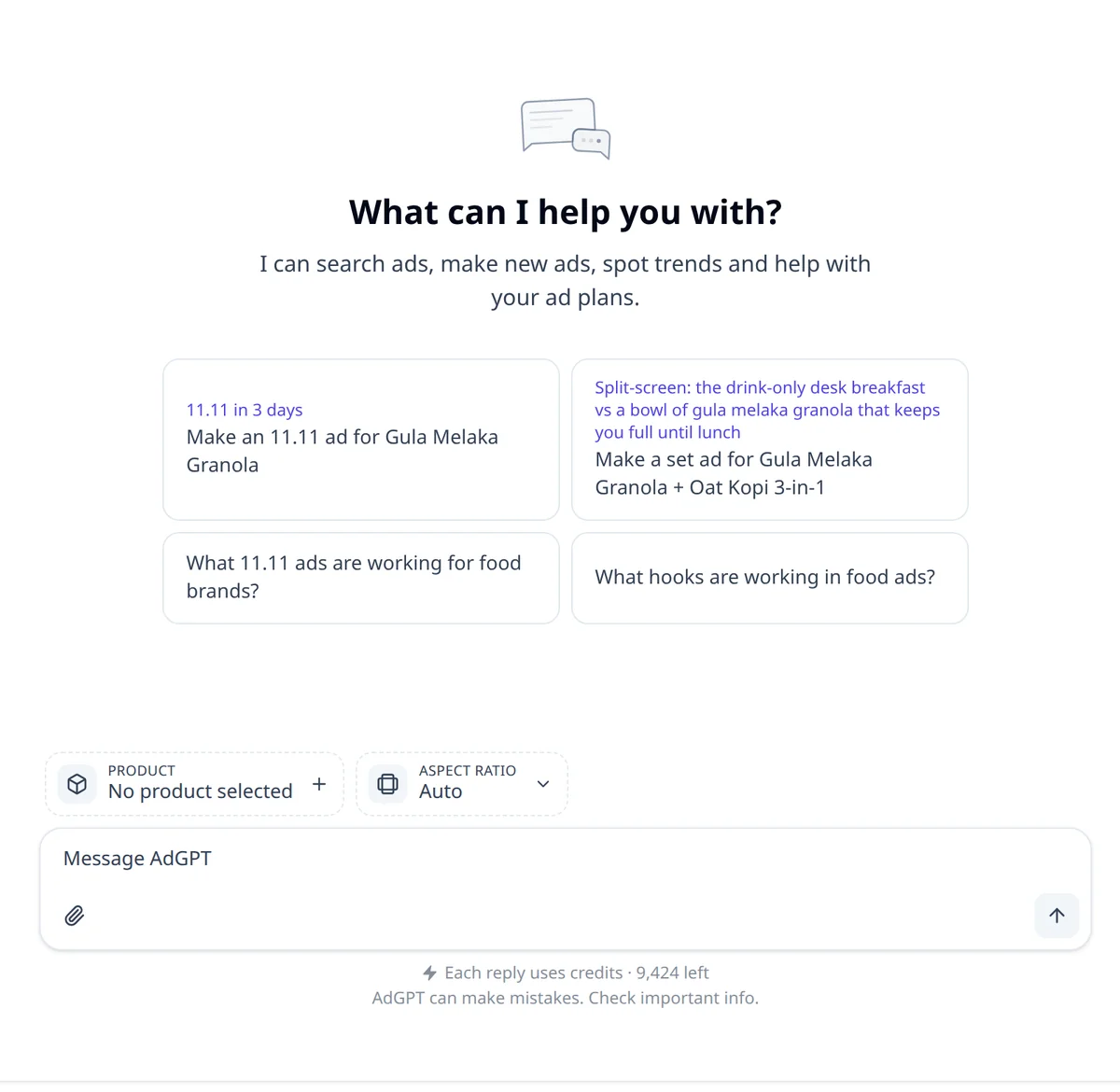
A new chat shows four starter cards, based on the calendar and your products. Click one to put its text in the message box. Change the words if you need to, then send it.
Start a chat and attach a product
- Click AdGPT in the sidebar. You see "What can I help you with?" and the starter cards.
- Click the Product slot above the message box (it says No product selected). Pick your product from the list. You can also click the paperclip and choose Add Product. The list comes from your Products & Services page, so add the product there first.
- If you want a set size, click Aspect ratio and pick 4:5 Portrait, 1:1 Square or 9:16 Story/Reel. Leave it on Auto and the ad follows your reference ad's shape, or comes out 4:5.
- Type in the Message AdGPT box and press Enter.
The product and the aspect ratio stay in place for your next messages. A new chat starts empty, so attach the product again: AdGPT writes from your product facts, so the ad says true things. To add a photo or a document, click the paperclip and choose Add File (JPG, PNG, WebP, PDF or a text file) or From Assets. A photo you attach can go into the ad itself, or be the reference.
Use a real ad as the reference
- Ask AdGPT to find ads, for example "Show me long-running ads for baby carriers." It shows the ads as cards in the chat.
- Click Use this ad under the card you like. The ad appears above the message box as a Reference ad. It is used for your next message only.
- Say what you want: "Make an ad like this for my product." AdGPT keeps what works in that ad and makes it for your product.
Your own ad works as a reference too. Attach a picture of it and say "Make a new one like this." The new ad keeps your ad's look.
You can also start from the Ad Library. Open any ad and click the Analyze with AdGPT icon. AdGPT opens in a new tab with a question ready about that ad's hook, offer and look. Nothing is sent until you press Enter.
To learn what to look for in a reference ad (the hook, the offer, the proof), read the course lesson Reverse-engineer a winning ad.
Make an ad from the chat
- Say what you want: "Make an ad for my serum for Deepavali." AdGPT makes it in the same reply. It looks at real ads in your market first only when that helps the ad.
- Want options first? Ask "Give me ad ideas for my serum for Deepavali." AdGPT shows a few, each with one line on why. Reply with your pick, such as "Make the second one."
- A Making your ad card shows while the ad is made. This takes a few minutes.
- Click the finished ad card. The ad opens on its own page in a new tab, where you can polish it with Ask AI or launch it.
- Keep going in the same chat. Ask for a 9:16 version for Stories, or a new headline. A new size is a new ad made for that size, not a crop.
Give your real offer word for word. Proof works the same way: a rating, a sold count or a customer review you type can appear on the ad. AdGPT is set up not to make up prices or proof. If the ad you copy is a sale ad and you have not given an offer, it asks for yours first.
Plans: chat works on the free trial, and your 2 trial ads can be made in AdGPT. Changing the picture of an ad from the chat needs a paid plan. When the trial ends, AdGPT and Chat History stay locked until you pick a plan.
Find an old chat
- Click Chat History at the top of the AdGPT page.
- Type in Search chats to find one by name. Click a chat to open it and carry on.
- Use the menu on a chat to rename or delete it. Click Select to delete several at once.
- To start fresh, click Start a new chat on the Chat History page, or New Chat at the top of a chat.
Your chats are private to you. Chat History shows the chats for the team you are in now.
When to use something else
- A batch of ads from several angles, with a review step: use the Ad Generator.
- A change to one ad you already have: use Ask AI on the ad page. It works only on that ad, and you keep or discard each try.
- Questions about your own campaigns: use Copilot. If you ask AdGPT "How are my ads doing?", it hands the question to Copilot, with an Open in Copilot link under the answer.
Not sure which one fits? The Which tool do I use? guide has a short table.
Next
Learn to search the Ad Library yourself, so you can bring AdGPT the ads you want to copy.
Frequently asked questions
Will AdGPT make the ad straight away?
Yes, when you ask for an ad. Say "Make an ad for my serum" and AdGPT makes it in the same reply, looking at real ads in your market first only when that helps. If you want options first, ask for ideas, and it shows a few for you to pick from.
Does AdGPT use credits?
Yes. Each reply uses credits, based on how much work it did, and an ad made in the chat uses credits like any other ad. On the free trial you can chat, and you can make your 2 trial ads here. Changing the picture of an ad from the chat needs a paid plan.
Can my teammates see my AdGPT chats?
No. Your chats are saved to your own login, for the team you are in. The ads you make in a chat are saved as ads, so they open on their own page like any other ad.
Can AdGPT change my Facebook campaigns?
No. AdGPT does not change your Meta ad account. It passes questions about your campaigns to Copilot, and the answer shows under the name Copilot, with an Open in Copilot link. Copilot changes nothing until you approve it.
Keep exploring
Turn ad research into winning ads
See what 16,000 Malaysian brands advertise, then generate on-brand creative, all in one tool.
7-day free trial · No credit card required