
Module 1 · Know your market
How to build a swipe file of ads that work
A swipe file is your own library of ads worth learning from. What to save, how to sort it by angle, and how to use it every time you make a new ad.
Updated November 2026 · AdPlay.ai Team
A swipe file is your own collection of ads worth learning from. Save ads that have run for a long time, ads that stopped your scroll, and ads with an offer or proof you have not seen before. Sort them into a few folders by angle, write one line on why each one works, and open the file every time you plan a new ad.
Lesson 1.3 · 5 min read
Why you need your own copy
Good ads disappear. In Meta's Ad Library, a normal product ad shows only while it runs. When the brand stops it, the ad leaves the library and you cannot find it there again. Only ads about social issues, elections or politics stay, for 7 years (Meta Transparency Center).
So the Raya ad you admired this year is likely gone by next Raya, when you need it. A swipe file fixes that. It is your own collection of ads worth learning from, kept in one place, with a note on why each one is there.
What to save
Save an ad when at least one of these is true:
- It has run for more than 30 days. You learned why in Read the Ad Library.
- The brand runs the same idea in many versions. They tested it and chose to spend more.
- It stopped your scroll. Even if it is from another category. Your buyer scrolls past the same feed.
- It has an offer or a proof you have not seen before. A new bundle, a guarantee, a clever way to show reviews.
Do not save an ad only because it looks nice. If you cannot say why it works, it will not help you later. And do not save a brand's whole catalogue: that is what tracking a brand is for.
How to sort it
Sort by angle, not by brand. The angle is the reason to buy that the ad leads with. The brand name is already on every ad, so folders by brand add nothing.
Four to six folders are enough to start. For example:
- Result or taste. Ads that lead with what the buyer gets.
- Price and bundles. Discounts, bundles, free delivery, cash on delivery.
- Proof. Reviews, numbers sold, real customers.
- Festive. Raya, Chinese New Year, Deepavali, Christmas, 11.11 and other sale days.
- Hooks that stopped me. Great first lines and first pictures.
Then add one line per ad: "Works because...". Add a second line if you can: "For us, I would change...". These two lines are what turn a pile of screenshots into a tool.
If you keep your file in a spreadsheet instead, use one row per ad: date seen, brand, link, screenshot, angle, offer, proof, format, button, run time and your "works because" line.
How to use it
A swipe file is only worth something if you open it. Use it at three moments:
- Before you make a new ad. Open one folder. Pick two or three ads. Write what they have in common. That is your starting structure.
- Before a festive season. Open the festive folder well before the date. See what worked last year, and when it started. The Plan your next season lesson covers timing.
- When an ad gets tired. Open the hooks folder and borrow a new type of opening for the same offer.
Mix parts from different ads: a hook from one, an offer from another, a format from a third. Never copy another brand's words, photos, video or logo. Meta's ad rules do not allow ads that infringe someone else's copyright or trademark (Meta Advertising Standards), and buyers notice copies.
Once a month, spend ten minutes cleaning up. Remove ads that no longer teach you anything.
Worked example: the sambal seller's file
Say you sell homemade sambal online at RM 18 a jar. After two weeks, your file could look like this:
- Taste of home: 4 ads. Three open on sambal over hot rice, with no words on the picture.
- Bundles and delivery: 3 ads. Two sell 3 jars with free delivery in the Klang Valley.
- Proof: 2 ads. One shows screenshots of customer messages.
- Festive: 1 ad, a Raya hamper with sambal inside.
Your note on one ad reads: "Works because the first picture is the food, not the jar. For us: show our jar beside the plate." When you plan your Raya ad next year, you open Festive and Bundles together. You see a hamper offer and a free-delivery line, and you start from there instead of a blank page.
Do it in AdPlay.ai
- Open Saved Ads in the sidebar and click Create Folder. Name it after an angle. You can add a short description.
- In the Ad Library or on a tracked brand's page, open an ad. Click Save ad. Under Save to..., pick a folder, or make one with New folder.
- Open the ad's Comments tab and write your "works because" line. Only your team sees it.
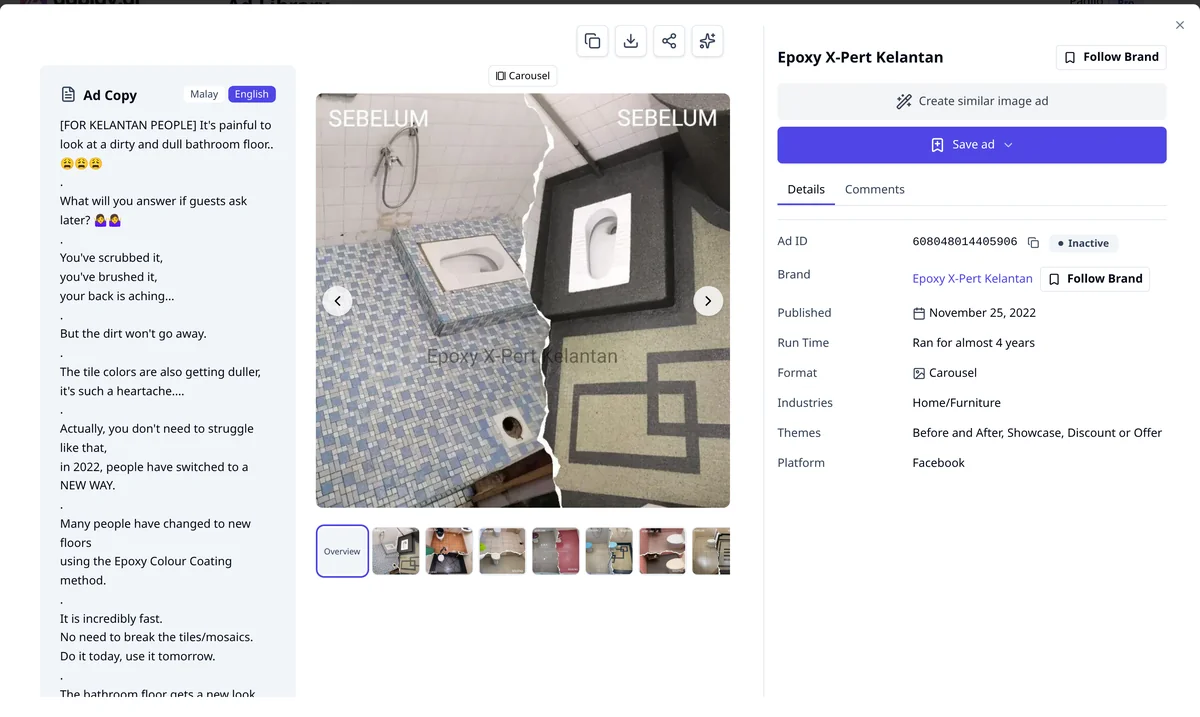
- In Saved Ads, search by brand or ad text, filter, and sort by Longest Running or Recently Saved.
- To sort many ads at once, select them and use Move to folder.
- To use a saved picture or carousel ad, open it and click Create similar image ad. You can also ask AdGPT to look at your saved ads for ideas.
Ads in AdPlay.ai's Ad Library stay after they stop running (they show as Not Live), so a saved ad stays in your file after the brand stops it. The Track competitors guide covers Saved Ads folders in more detail.
Checklist
- Every saved ad passes at least one of the four tests.
- Folders by angle, not by brand.
- A "works because" line on every ad.
- A festive folder, opened well before each season.
- Ten minutes a month to clean up.
Your homework
Create four folders in AdPlay.ai's Saved Ads, one per angle. Save 10 ads into them, from your five tracked brands and from searches in your category. Write a "works because" line on each one.
In the next lesson, Reverse-engineer a winning ad, you take the best ad in your file apart, piece by piece.
Frequently asked questions
How many ads should a swipe file have?
Start with 10 good ones. A short file you open every week beats 200 ads you never read. Add a few each week and remove ads that no longer teach you anything.
Can I save ads from the Meta Ad Library?
Not in a way that lasts. A normal product ad leaves Meta's library when it stops running, so you cannot go back to it later. Take a screenshot and note the details the same day, or save the ad in a tool that keeps it.
Is it okay to use ads from my swipe file?
Use them to learn the structure: the type of hook, the offer, the kind of proof. Never reuse another brand's words, photos, video or logo. Make every part again with your own product and your own proof.
Sources
Keep exploring
Turn ad research into winning ads
See what 16,000 Malaysian brands advertise, then generate on-brand creative, all in one tool.
7-day free trial · No credit card required