
Module 8 · When things go wrong
Rejected ads: find the reason and fix it
Meta rejected your Facebook or Instagram ad. Read the real reason, fix the one part that broke the rule, then resubmit or request a review.
Updated November 2026 · AdPlay.ai Team
A rejected ad means Meta's review found one part of the ad that breaks its Advertising Standards: the picture, the words, the targeting or the landing page. Read the exact reason in Account Quality, fix that one part, and let Meta check it again, which usually takes about 24 hours. If you are sure the ad follows the rules, request a review instead of changing it. Never copy a rejected ad and tweak it to get past review.
Lesson 8.1 · 5 min read
Every advertiser gets a rejected ad sooner or later. It feels like a wall, but it is really a label: Meta tells you which rule the ad broke, and that points to the one thing you need to fix. This lesson shows you how to read that label, fix the ad and get it running again, without putting your ad account at risk.
First, check that it is really rejected
Three different problems all look like "my ad is not running". Each has a different fix.
- In review: Meta has not finished checking the ad. Meta says most reviews finish within about 24 hours. Do not edit the ad while you wait, because an edit sends it back for review.
- Rejected: review is done, and one part of the ad broke a rule. This lesson is for you.
- Restricted or disabled: Meta has limited your whole ad account, Page or profile, not just one ad. Go to the lesson on restricted accounts.
Step 1: read the real reason
The short line in Ads Manager rarely tells you enough. The full reason is in Account Quality, Meta's page that lists every rejected ad and the rule it broke.
- Open Account Quality in Meta Business Suite (facebook.com/accountquality).
- Pick your ad account.
- Find the rejected ad and read the rule Meta names.
- Write that rule down before you change anything.
Step 2: find the one part that broke the rule
Meta checks the whole ad as one package. A problem in any part rejects the whole ad. Check each part against the rule Meta named.
| Part of the ad | What often goes wrong |
|---|---|
| Post text and headline | Talking about the reader's body or problems ("Do you have pimples?"), promised results, fake urgency |
| Picture or video | Before-and-after photos side by side, shocking close-ups, another brand's logo, music you do not own |
| Targeting | A product with age rules, such as alcohol, shown to people who are too young |
| Landing page | An offer or price that does not match the ad, a page that does not load |
Health and beauty products need extra care in Malaysia. A product presented as a medicine or a cure needs approval from the Ministry of Health's Medicine Advertisements Board before you advertise it, under the Medicines (Advertisement and Sale) Act 1956. That approval number is the KKLIU number. Read the KKLIU guide and the before-and-after rules if you sell skincare, supplements or slimming products. The lesson on Malaysian ad rules covers the rest.
Step 3: fix it, or request a review
Now pick one of two routes. Meta allows both.
Fix and resubmit when you can see what broke the rule. Change only that part and save. Meta checks the ad again. This is the right route for most rejections.
Request a review when you are sure the ad follows the rules. Do not change the ad. In Account Quality, pick the ad, choose Request review and write two or three plain sentences: the rule Meta named, and why your ad does not break it. Then wait. Sending the same request again does not make it faster.
Keep the rejected ad while a review is open. The review is about that ad, so do not delete it.
The one move to never make
The first thing many people want to do is copy the rejected ad, change one word and run it again. Do not do this. Meta calls it circumventing systems. It looks the same as what scammers do, and it can turn one rejected ad into a restricted ad account. A truly fixed ad, or a new ad built to follow the rules, is fine.
A worked example
Say you sell a collagen drink from home in Ipoh. Your new ad opens with "Kulit kusam? Is your skin dull and dry?" and shows a before-and-after photo of a customer. Meta rejects it.
- Read the reason. Say Account Quality names personal attributes. That points at the words, because the question tells the reader something about their own skin.
- Check every part. The before-and-after photo is a second risk under Meta's health rules, so it goes too.
- Fix. The new post text describes the product, not the reader: "A daily collagen drink, mixed in 30 seconds. Mango flavour, no added sugar." The picture shows the sachet next to a glass. Customer reviews move to your landing page.
- Resubmit and wait. No edits for a day while Meta checks it.
Fixing a rejected ad with AdPlay.ai
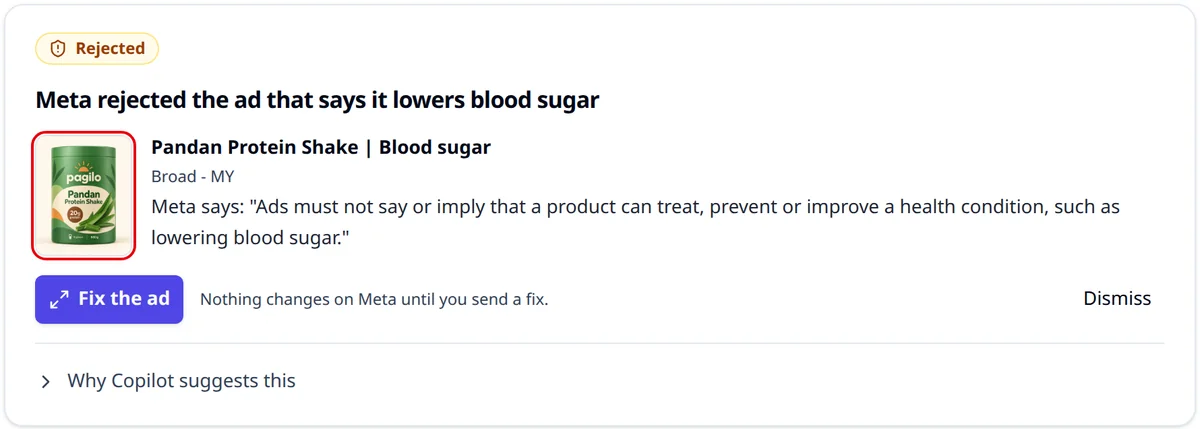
On Pro or above, Copilot can put a Rejected card in To do on Campaigns. Tap Fix the ad to see Why Meta rejected it in plain words, and Meta's own words when Meta gave them. Under Fix the words, change the Main text and Headline, then tap Send the fixed ad. Meta checks it again, usually within a day, and you can undo the change for 7 days. If AdPlay.ai cannot change that ad's words, the card says so: fix them in Meta Ads Manager. Copilot cannot request a review for you: do that in Account Quality. See the Copilot guide.
Insights lists only ads that have run. An ad that ran and was later turned down, for example after an edit, shows Rejected by Meta there. A new ad rejected before it ever ran does not appear, so check Account Quality for those.
If the picture broke the rule and you made the ad in AdPlay.ai, open the ad's page, change the picture with Ask AI (see polish an ad with Ask AI), then launch the fixed version. Picture changes need a paid plan.
Checklist
- I know which state the ad is in: in review, rejected or restricted.
- I read the exact rule in Account Quality.
- I checked the words, the picture, the targeting and the landing page.
- I changed only the part that broke the rule, or requested one review.
- I did not copy the rejected ad with a small tweak.
Your homework
Open Account Quality and look for any rejected ad. Write down the rule Meta names, and fix the one part it points to. On Pro, open Campaigns in AdPlay.ai first: if Copilot left a Rejected card in To do, fix the words there. If you have no rejected ads, read your next ad's post text and remove any line that talks about the reader's body or problems.
Frequently asked questions
How long does Meta take to check a fixed ad?
Meta says most ads are reviewed within about 24 hours, and an edited ad goes through review again. Some take longer, so send time-sensitive ads, like a Raya or 11.11 sale, a day or two early.
Can I make a copy of the rejected ad and run that instead?
Not with a small tweak. Meta treats re-running a rejected ad with small changes to get past review as circumventing its systems, and that can put the whole ad account at risk. Fix the part that broke the rule, or request a review of the original ad.
Does one rejected ad hurt my ad account?
One rejection that you fix is routine. A pattern of rejected ads, or attempts to get around review, is what leads Meta to restrict an account. If the same reason keeps coming back, change how you write and design your ads, not just the one ad.
Sources
- 1.Meta Transparency Center: Introduction to the Advertising Standards (2026)
- 2.Meta Business Help Center: How to troubleshoot a rejected ad (2026)
- 3.Meta Business Help Center: About ads in review (2026)
- 4.Meta Transparency Center: Circumventing systems (2026)
- 5.Laws of Malaysia, Act 290: Medicines (Advertisement and Sale) Act 1956, Attorney General's Chambers (2015)
Keep exploring
Turn ad research into winning ads
See what 16,000 Malaysian brands advertise, then generate on-brand creative, all in one tool.
7-day free trial · No credit card required