
Make ads
Polish an ad with Ask AI
Fix the headline, post text or picture of one AdPlay.ai ad with Ask AI. Every change is a try you keep or discard, then run the Ad check before you launch.
Updated November 2026 · AdPlay.ai Team
Open the ad and type what to change in the Ask AI box beside it. Each change shows on the ad as a try, and nothing changes until you press Keep. Wording changes work on the free trial. Picture changes, a new size and a Stories version need a paid plan.
Use Ask AI when an ad is almost right and one or two things need work: a weak headline, the wrong button, a picture that feels too dark. Every change waits for you to keep it, so you can try ideas without losing the version you have.
Open the ad
- Open Ads in the sidebar and click an ad. A preview opens.
- Press Open ad. The ad's own page opens.
You see the ad as a Facebook post with the Ask AI column beside it. A new chat shows starter questions, such as "What would you change first?" and "Is this ready to run on Meta?".
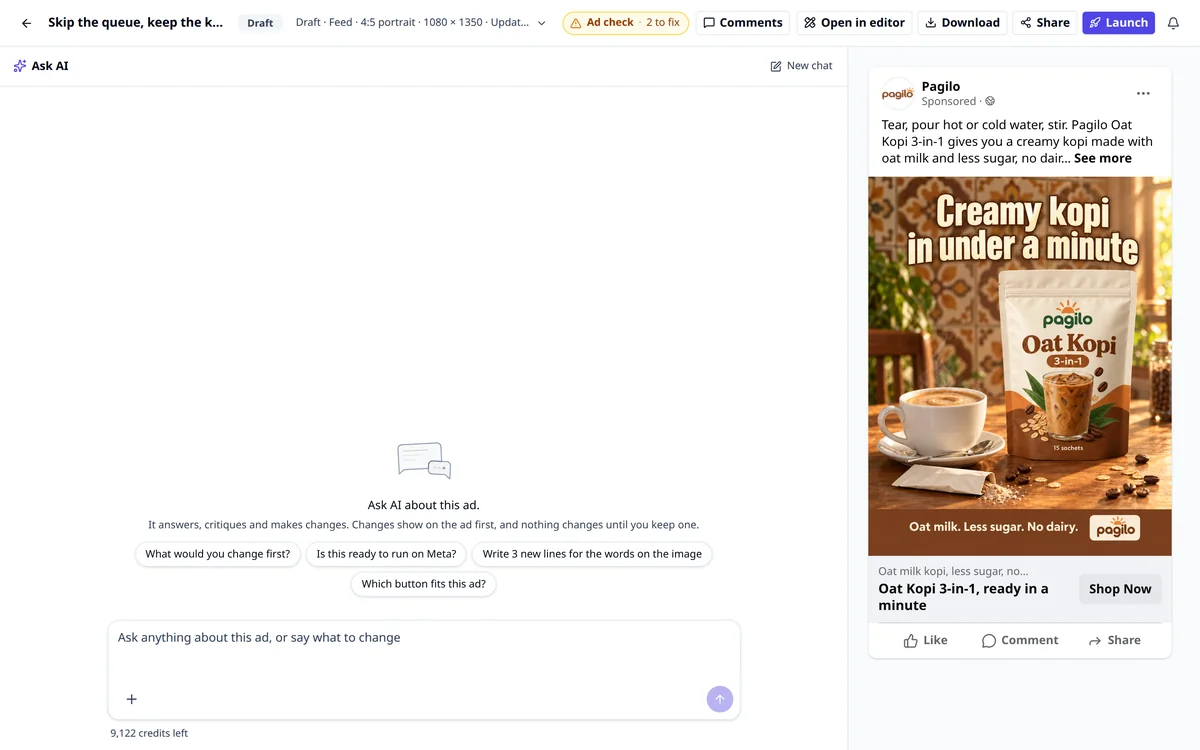
Ask for a change
- Type in the box, for example "Make the headline shorter and lead with the RM 20 off" or "Make the background warmer".
- To ask about one line printed on the image, tap that line first. The box then asks about that line only.
- To use a picture, press + and pick Product photo, Logo or Upload a photo. Say how to use it, for example "put this photo on the table".
- Press send.
AI replies in the chat. For a new headline or post text, it writes a few options for you to pick from. For a picture change, a small label on the image shows the progress, for example "Changing the image · about 40 sec".
You can also type the post text or headline yourself. Click it in the post, change the words and press Save. Typing it yourself uses no credits.
Keep or discard each try
A change lands on the ad as a try. A bar above the post lets you decide:
- Flip between Old and New to compare. With several tries, the bar shows Old, 1, 2 and 3.
- For a picture, press Compare side by side to see both at full size.
- For a picture, press Try again to get another version. Up to 3 tries can wait at once.
- Press Keep new (or Keep 1, Keep 2 or Keep 3 when there are several tries) to use what is on screen. On Old the button reads Keep old, which leaves the ad as it was.
After a Keep, a short line confirms it ("Kept on the ad." for a picture, "Headline updated." for a headline) with an Undo link. If several changes wait on the ad, the bar also offers Keep all (with the count) and Discard all.
Make a Stories version
Type "Make a Stories version" in Ask AI. It makes a 9:16 copy for Stories and Reels as a new ad, so this ad stays as it is. You see "Stories version ready." with an Open button, and the new ad shows under Other versions of this ad. It costs 8 credits on a paid plan. A carousel makes it from one card.
Run the Ad check
On a computer, the Ad check sits beside Launch at the top of the page. It reads like "No issues found" or "2 to fix".
- Press Ad check to see the list. It looks for things like a blurry picture, a headline or description that may get cut off, a button that does not fit the ad, and notes AI made when it built the ad.
- Press the fix button on an item to send it to Ask AI. The price shows beside it. Each fix lands as a try you keep or discard, like any other change.
- The check runs again after every change.
An ad needs post text and a headline before it can launch. Everything else on the list is advice. When you press Launch, the same list shows first, with Launch when it is clear or Launch anyway when something is still open.
What each change needs
| Change | Plan | Credits |
|---|---|---|
| Replies, post text, headline, description, the Ad check | Free trial or any plan | A few, shown under each reply |
| A new button | Free trial or any plan | None |
| Change the look of the picture | Paid plan | 15 |
| Redraw the words on the image | Paid plan | 30 |
| Stories version or a new size | Paid plan | 8 |
| Remove the background or sharpen | Paid plan | 10 |
If a picture change fails, you see "The picture was not charged."
Tips
- Ask for one thing at a time. One change per message gives a clearer result.
- Keep the headline short. Meta's Ads Guide recommends up to 27 characters for a Facebook Feed headline. The Ad check flags a headline over 40 characters, so aim lower than that yourself.
- Start a new chat for a new topic. Press New chat. AI starts fresh, and your ad stays the same.
- Ask AI changes only this ad. It also answers marketing questions about it. For a new ad, competitor research or your ad results, it offers Open in AdGPT.
What to do next
To test the same ad with one thing changed, such as the offer or a Malay version, use Create variant. For exact layout and fonts, edit the ad in the editor. When it is ready, launch your ads.
Frequently asked questions
Can I use Ask AI on the free trial?
Yes, for words. Ask AI can answer questions, write post text, headlines and descriptions, and run the Ad check on the trial. Changing the picture, a new size, a Stories version, removing the background and sharpening need a paid plan.
How many credits does Ask AI use?
A reply or new wording uses a few credits, shown under each reply. Picture changes have a fixed price on the button: 15 credits to change the look, 30 to redraw the words on the image, 8 for a Stories version or a new size, and 10 to remove the background or sharpen.
What if I don't like any of the tries?
Press Keep old. Your ad stays as it was. A picture that fails to change is not charged.
Can Ask AI make a new ad for another product?
Not by itself. Ask AI changes only the ad you have open. For a new ad, it offers an Open in AdGPT button. For the same layout with one thing changed, use Create variant.
Sources
Keep exploring
Turn ad research into winning ads
See what 16,000 Malaysian brands advertise, then generate on-brand creative, all in one tool.
7-day free trial · No credit card required