
Module 8 · When things go wrong
Ad account restricted or disabled: what to do
Meta restricted or disabled your ad account, Page or profile. Find what was hit, fix the cause, request one review, and keep it from happening again.
Updated November 2026 · AdPlay.ai Team
When Meta restricts or disables an account, first find out exactly what was hit in Account Quality: the ad account, the Page, the business, or your own Facebook profile. Fix the cause you can fix (pay a failed charge, secure a hacked login, verify your identity), then request one review with a short, honest message. Do not open a new ad account to keep advertising while you wait, because Meta can treat that as getting around its decision.
Lesson 8.3 · 5 min read
A restricted account is scarier than a rejected ad, because everything can stop at once. The good news: most restrictions have a plain cause, and Meta gives you a way to ask for a review. What matters is doing the steps in the right order, once, and not making it worse while you wait.
Find out what was hit
Meta can restrict four different things, and each is fixed in its own place. Open Account Quality in Meta Business Suite (facebook.com/accountquality). It lists each of these with its own status and reason.
| What was hit | What it means for you |
|---|---|
| Ad account | That account cannot run ads, or can run fewer. Other ad accounts may still work. |
| Facebook Page | The Page is limited. Ads that run from that Page are affected. |
| Business (Business Manager) | Everything inside the business can be frozen at once. |
| Your own Facebook profile | You may not be able to create or manage ads anywhere, even if the accounts look healthy. |
Also check the word Meta uses. Restricted usually means a limit, such as no new ads or a lower spending cap. Disabled means a full stop: nothing runs until Meta reverses it. Write down what Account Quality says, including any deadline it shows.
Know the usual causes
Most restrictions come from one of four places:
- Payment. A charge failed, a card expired, or a bank reversed a payment.
- Rule breaks. Several rejected ads, or one serious one, add up. Meta's Transparency Center says repeated or serious violations can lead to an account being disabled.
- A login that looks hacked. A new phone, a new country or a sudden jump in spend can look like someone else took over the account.
- Identity or business checks. Meta may ask you to confirm who you are, or to verify your business with official documents.
Fix in this order
- Secure the login first. On every admin's Facebook profile, log out of devices you do not know, change the password and turn on two-factor login. A review request does little while the login still looks unsafe.
- Clear any payment problem. Open Meta billing, pay what is owed and check the payment method. A payment restriction often lifts on its own once the bill is paid.
- Answer identity or business checks. If Meta asks for ID or business documents, send them. For a Malaysian business, these are usually SSM documents. The SSM verification guide shows which ones.
- Request one review. In Account Quality, pick the restricted item and choose Request review. Write a short, honest message:
My ad account was restricted for the reason Meta shows. What happened, in one sentence. I have what you fixed. Please review it again.
Keep it calm and factual. Then wait, and do not send the same request again. For more ways to word it, see the appeal template.
What not to do while you wait
- Do not open a new ad account to keep advertising. Meta links accounts, Pages, cards and people. A fresh account made to get around a restriction can be treated as circumventing its systems, and restricted too.
- Do not buy or borrow someone else's ad account. It puts your Page and their account at risk.
- Do not delete the rejected ads behind the restriction while a review is open.
A worked example
Say you sell baby clothes online from Shah Alam. On Monday morning every ad has stopped, and Ads Manager shows a red banner.
- Account Quality shows the ad account is restricted for an unpaid balance. The Page and your profile are fine.
- Cause: the business card expired last month, so Meta's charge failed.
- Fix: you add the new card in Meta billing and pay the balance. Nothing else.
- Result: in this case the restriction lifts by itself, with no review needed. You check that your campaigns are switched back on.
If Account Quality had shown a rule break instead, you would fix the ads behind it first, then request one review.
Keep it from happening again
- Turn on two-factor login for every admin, and keep two trusted admins so one locked profile does not stop the business.
- Keep a valid card on file and pay on time.
- Verify your business with your SSM documents before you need to.
- Follow the ad rules from the start. See rejected ads and Malaysian ad rules.
- Grow spend in steps on a new ad account, not in one big jump.
- Run one tidy business in Meta, set up as in set up Business Manager.
Where AdPlay.ai fits
AdPlay.ai cannot lift a Meta restriction. Only Meta can. But it helps you notice early and get back fast.
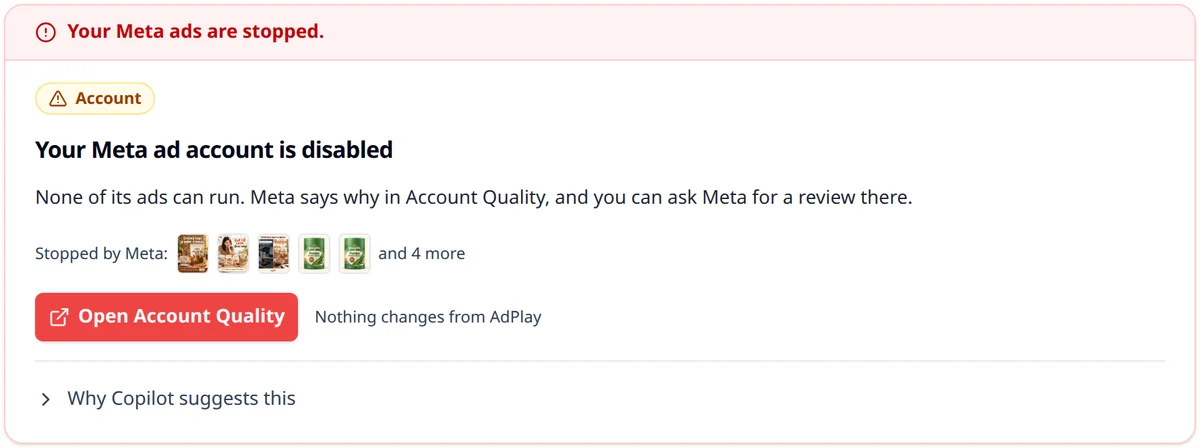
On Pro or above, Copilot puts account problems at the top of To do on Campaigns, with a red band such as "Your Meta ads are stopped." The card says what happened in plain words, such as "Your Meta ad account is disabled", "Meta is reviewing your ad account" or "Meta could not charge your payment method", with a button to Open Account Quality or Open Meta billing. See the Copilot guide.
The ads you made in AdPlay.ai stay saved under Ads, whatever happens to the Meta account. If AdPlay.ai stops seeing your Meta ads after you secure your profile or change your password, open Settings from your account menu, go to Integrations, and use Reconnect on the Meta Ads (Facebook & Instagram) row. See connect Meta.
Your homework
Today, turn on two-factor login for every admin of your Meta business, and check your payment method in Meta billing. Then open Settings in AdPlay.ai, go to Integrations, and check that the Meta Ads (Facebook & Instagram) row shows Connected.
Frequently asked questions
Can AdPlay.ai lift a restriction on my Meta account?
No. Only Meta can review and lift a restriction, through Account Quality. On Pro or above, Copilot can tell you that something is wrong, and the ads you made in AdPlay.ai stay saved whatever happens to the Meta account.
Should I open a new ad account while I wait?
No. Meta links ad accounts, Pages, payment methods and the people who run them. A new account made to keep advertising after a restriction can be treated as circumventing Meta's systems and restricted too. Fix the original account instead.
How long does Meta take to review a restricted account?
It varies, and Meta does not promise a fixed time. Follow the status in Account Quality, answer quickly if Meta asks for ID or business documents, and do not send a second request while the first is open.
Sources
- 1.Meta Business Help Center: Troubleshoot a disabled or restricted account (2026)
- 2.Meta Business Help Center: Request a review if you're restricted from advertising (2026)
- 3.Meta Transparency Center: Disabling accounts (2026)
- 4.Meta Transparency Center: Circumventing systems (2026)
- 5.Meta Business Help Center: About business verification in Meta Business Suite (2026)
Keep exploring
Turn ad research into winning ads
See what 16,000 Malaysian brands advertise, then generate on-brand creative, all in one tool.
7-day free trial · No credit card required