
Launch and improve
Run your ads with Copilot
Copilot reads your Meta ad account every morning and lines up changes as cards. Learn To do, approving a card, Undo, Copilot settings and Ask Copilot.
Updated November 2026 · AdPlay.ai Team
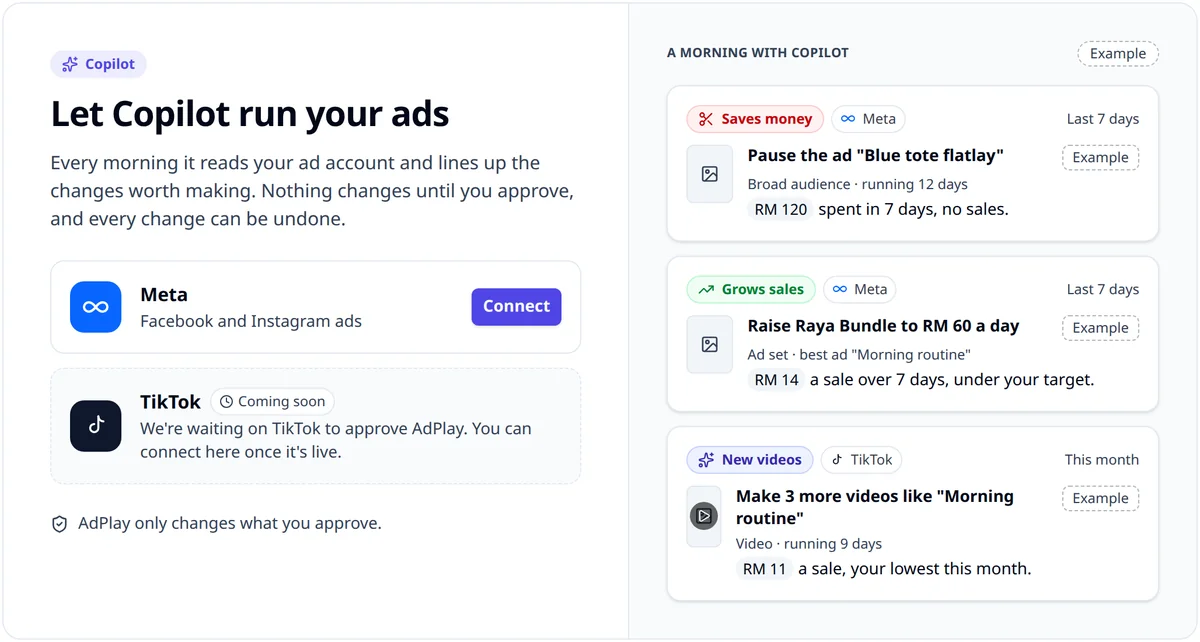
Copilot works on the Campaigns page. Every morning it reads your Meta ad account and lines up the changes worth making as cards in To do: pause an ad, raise or lower a budget, make new ads, or launch ads. Nothing changes until you tap the button on a card, and anything Copilot changes has Undo for 7 days. Cards and Settings need Pro or above; Ask Copilot chat starts on Starter.
Use Copilot once your Meta ad account is connected and your ads are running. It does the daily check for you: which ad is wasting money, which one deserves more budget, and when it is time for new ads. You decide on each change.
Where Copilot lives
Open Campaigns in the sidebar, under Launch. A number beside Campaigns counts the cards waiting for you. The page has three tabs:
- To do: the cards Copilot lined up today.
- Activity: every change you approved, plus the changes you made in Ads Manager, with whether each one helped.
- All campaigns: your Meta campaigns, ad sets and ads in a table.
At the top are Launch ads, Ask Copilot and, on Pro, Settings.
Work through your To do cards
- Open Campaigns. On Pro it opens on To do.
- Read a card. A tag says what kind it is, such as Saves money, Grows sales, New ads, Ready to launch or Tracking. The title says what to do and why. The line under it gives the real number, for example "RM 120 spent in 7 days, no sales".
- Open Why Copilot suggests this if you want the full reasoning.
- Tap the button that names the change, such as Pause ad or Raise to RM 40 a day. That is your approval. The card shows "Applying on Meta. This takes a few seconds."
- Not convinced? Click Dismiss and pick a reason: Not now, Wrong call or Already handled. Keep it closes the reasons.
Approved changes move to Done today and to Activity. Each one has an Undo button for 7 days.
Cards that make ads
A New ads card offers to make ads like your best one, for example Make 3 ads. Making ads costs credits, and the card says how many before you tap. When the ads are ready, a launch card appears in To do, and nothing goes live until you approve that one too.
The limits Copilot keeps
Copilot's suggestions stay inside fixed rules:
- It raises a budget by 20% at most in one step, and lowers it by 50% at most.
- It waits 72 hours after the last big edit on the same campaign or ad set, including edits made in Ads Manager.
- It does not raise a budget while the ad set is still in Meta's learning phase.
- It never pauses the last running ad in an ad set.
- It keeps to your monthly cap.
- It leaves anything on your Never touch list alone.
Small, spaced budget steps matter on Meta. Meta counts a large budget change as a significant edit, which can send an ad set back into the learning phase. The course lesson on raising the budget safely explains more.
Copilot settings
Click Settings at the top of Campaigns to open Copilot settings. It has four sections:
- Goal and money: your goal (Purchases, Leads or Link clicks), your target per result, and Monthly caps. You can also turn on "Also set the Meta cap as the spending limit on your Meta ad account". When the account reaches it, Meta stops every ad in it, including ads Copilot did not make.
- Never touch: the campaigns, ad sets and ads Copilot must leave alone. You add to it by telling Copilot in chat. Remove takes one off.
- Memory: rules Copilot keeps on every read. A rule is added when you tell Copilot in chat or tap Yes, remember that on a card. Forget removes one.
- Accounts: the ad accounts Copilot reads.
The Daily check on switch at the top of Copilot settings turns the morning check off. While it is off, Daily check off shows at the top of Campaigns, and cards wait until you turn it back on. Changes you already approved stay.
Owners, admins and ad managers can approve cards and change settings. Other members can read them.
Ask Copilot
Click Ask Copilot to open a chat beside the page. It also works on Insights. Try:
- "How are my ads doing?"
- "Why did you suggest pausing this ad?"
- "Don't touch the Raya campaign."
Copilot answers with your own numbers. It can explain a card, line up a new one, or add something to Never touch. Its chat history is separate from AdGPT's.
If you ask AdGPT about your campaigns, it hands the question to Copilot and shows the answer with Open in Copilot.
What each plan gets
- Free trial: chat is locked. To do shows up to three example cards on your own numbers, each with On Pro.
- Starter: the same example cards, plus 100 Copilot questions a month. Copilot answers but does not make changes.
- Pro and Agency: real cards, approvals, Undo, settings, and chat with no monthly cap.
Each chat question uses credits, on every plan that has chat.
What to do next
Copilot shows what to change today. To see which ads and ideas work best over time, open Insights.
Frequently asked questions
Will Copilot change my ads while I sleep?
No. Copilot only suggests. A change happens when you tap the button on its card, and you can undo it for 7 days from Done today or the Activity tab.
Which plan includes Copilot?
To do cards, approving them, Make more like this and Copilot settings are part of Pro and Agency. On the free trial and Starter you see up to three example cards on your own numbers, marked On Pro. Chat with Copilot starts on Starter.
What is the difference between Copilot and AdGPT?
Copilot runs your Meta campaigns: spend, results, budgets and launches. AdGPT is for creative work: research, ideas and making ads. Ask AdGPT about your campaigns and it hands the question to Copilot, with Open in Copilot under the answer.
Can I stop Copilot from touching an ad?
Yes. Tell Copilot in chat, for example "Don't touch the Raya campaign". It goes on the Never touch list in Copilot settings, and Copilot then makes no pauses, no budget changes and no cards about it. Remove takes it off the list.
Sources
Keep exploring
Turn ad research into winning ads
See what 16,000 Malaysian brands advertise, then generate on-brand creative, all in one tool.
7-day free trial · No credit card required