
Make ads
Make set ads for bundles and routines
How Set of 2 and Set of 3 ideas work in the AdPlay.ai Ad Generator: when research proposes a set, how to pick the partner products, and how to add a set offer.
Updated November 2026 · AdPlay.ai Team
A set ad shows your product with one or two of your other products in one picture, for a bundle, a routine or a buy-both offer. You do not ask for a set: research proposes one, marked Set of 2 or Set of 3, when winning ads in your market show products together. When you generate it, you tick the partner products (up to 3 products in total) and can type a set offer for that idea.
Use a set ad when you sell products that go together: a bundle, a "buy both" deal, a skincare routine, or a festive gift box. Think of a cookie jar shown with a matching gift jar for Raya, or a cleanser, toner and moisturiser lined up as one routine. The set ad shows them in one picture, so the buyer sees the whole deal at once.
How a set idea appears
You do not pick a set before research. You pick the products to research, as in Make your first image ads. The research then reads your other products in Products & Services. If winning ads in your market show products together, it proposes a set idea.
On the ideas board, a set idea has a Set of 2 or Set of 3 label beside its name. It sits with its main product (under that product's tab, if you researched several).
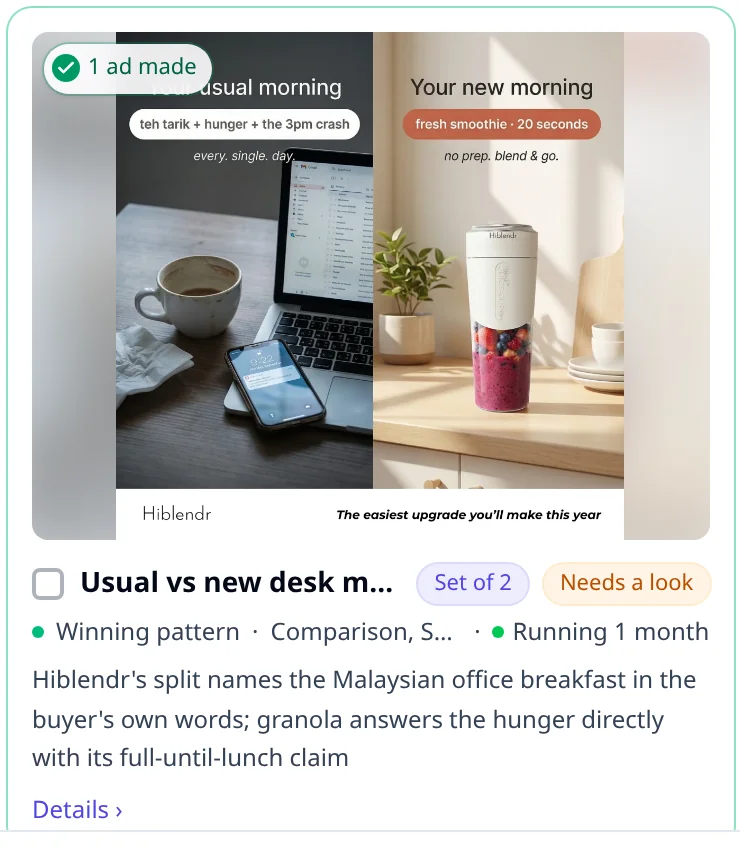
For research to find sets:
- Add your other products to Products & Services, each with a clear name and good photos.
- Use Image as the ad format. Set ideas are for image ads only.
Make a set ad
- On the ideas board, find a card marked Set of 2 or Set of 3. Press Details › to see the winning ad it is built on.
- Tick the idea and press the Generate button at the bottom.
- A window opens with the idea's name and the products for the picture. You see:
- your main product, locked, with "Main product, always in the ad"
- the partner product the research picked, already ticked and marked Suggested
- your other products, so you can tick a different partner
- Tick or untick partners. A set holds up to 3 products in total, so you can add up to 2 partners. If you have more than 5 products, use Search products to find one.
- Read the line under the list. It says, for example, "2 products in one picture. Up to 3."
- If the window asks for an offer, type the set offer, for example "Buy both, save RM 20".
- Press Generate 1 ad.
The ad tile on the Ads step shows the products in the set, joined with a "+". Each product's photos come from Products & Services, so keep those photos up to date.
Add a set offer when the window does not ask
Some set ideas are not built around an offer, so the window has no offer field. To add one anyway:
- Tick the set idea, but do not press Generate yet.
- Press Add proof or offer at the bottom. If you already added some, it reads Proof and offers with a number.
- Under your main product, type the set offer and press Add as offer.
- Press Done, then press Generate. The window opens again with the products and your offer. Press Generate 1 ad.
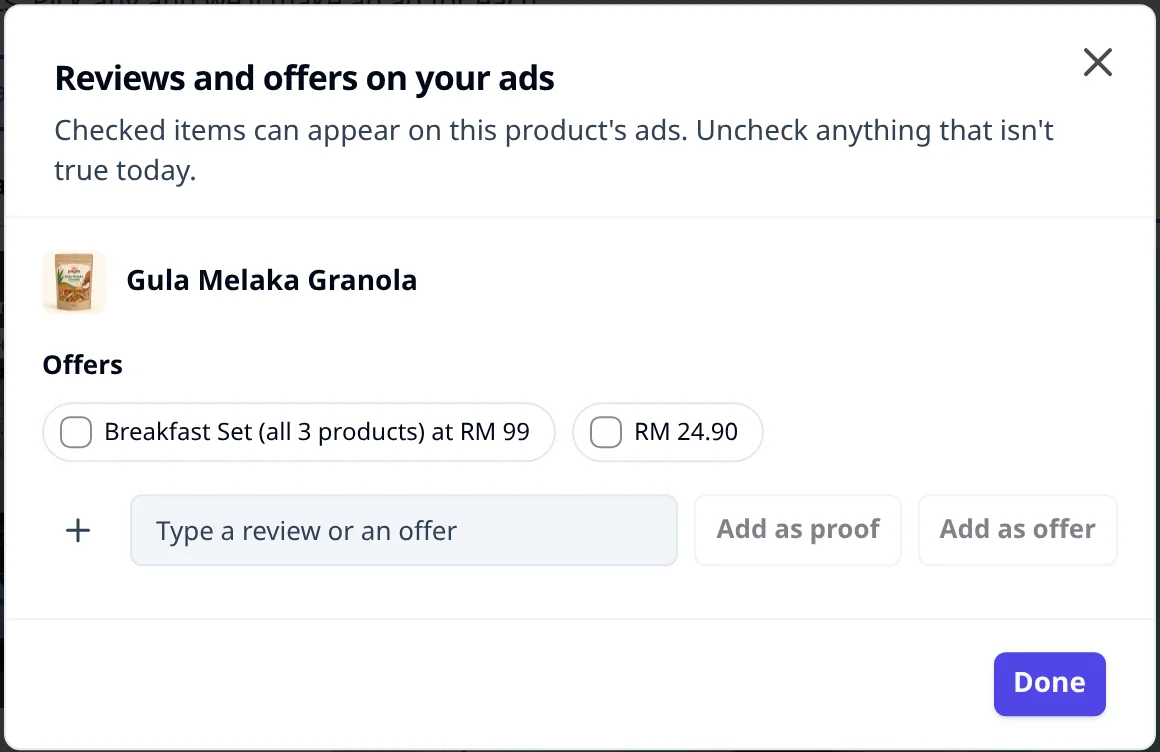
The offer stays on that set idea, not on the product. A later ad of the main product alone does not show "Buy both, save RM 20".
Tips
- Generate the set idea on its own. If you pick a set idea and a single-product idea of the same product together, an offer you type goes to the product, and every later ad for it may carry it.
- Only type an offer you are running. The ad shows it as you wrote it. Check the price adds up before the ad goes live. See Malaysian ad rules.
- Try a different partner. To make the set again with another product, tick the idea again and press Generate. In the window, change the partner and leave What to change empty, so the new ad starts fresh with the new products. The ideas board guide explains making an idea again.
- Sets suit sale days. A bundle gives buyers a reason to buy now on 11.11 or 12.12 without a deep discount on one product. For more on bundles and order value, read Increase average order value with Meta ads.
On the free trial
The trial researches one product. It can still show a set idea, because the partners come from your other products in Products & Services, not from a second research. The set ad counts as one of your 2 trial ads.
What to do next
Open the set ad and polish it with Ask AI. To plan the offer itself, see Offers that sell.
Frequently asked questions
Why do I not see any Set of 2 ideas?
Research only proposes a set when winning ads in your market show products together, and only from the other products you have in Products & Services. Add your other products there first. Set ideas are for image ads only.
Is a set the same as picking several products at Research?
No. Picking several products at Research gives each product its own research and its own tab of ideas, one product per ad. A set is one idea that puts two or three products in the same picture.
Will my set offer show on my other ads?
No, as long as you generate the set idea without a single-product idea of the same product. The offer then stays on that set idea, so a later ad of the main product alone does not carry it.
Can I turn a set idea into a single-product ad?
Yes. In the Generate window, untick every partner product. The line under the list then says the main product is on its own.
Keep exploring
Turn ad research into winning ads
See what 16,000 Malaysian brands advertise, then generate on-brand creative, all in one tool.
7-day free trial · No credit card required