
Launch and improve
Find your best ads and ideas in Insights
Insights shows which Meta ads and ad ideas bring your cheapest sales, what each verdict means, and how to make more ads like your winners in AdPlay.ai.
Updated November 2026 · AdPlay.ai Team
Insights shows how your Meta ads are doing and which ads and ideas bring your cheapest results. Pick a date range, read Spent, Sales and Cost each, then open What works to see a verdict for every ad and every idea. When an ad sells under your target, Make more like this puts a card in Copilot to make new ads like it (Pro and above). Insights is on every plan once your Meta ad account is connected.
Use Insights about a week after your ads start, then once a week. Campaigns tells you what to change today. Insights tells you what works over time: which ads sell, and which ideas behind them sell.
Open Insights
- Click Insights in the sidebar, under Launch.
- If Meta is not connected yet, you see "See which ads bring your sales" with a Connect button. It costs no credits. See Connect your Meta ad account.
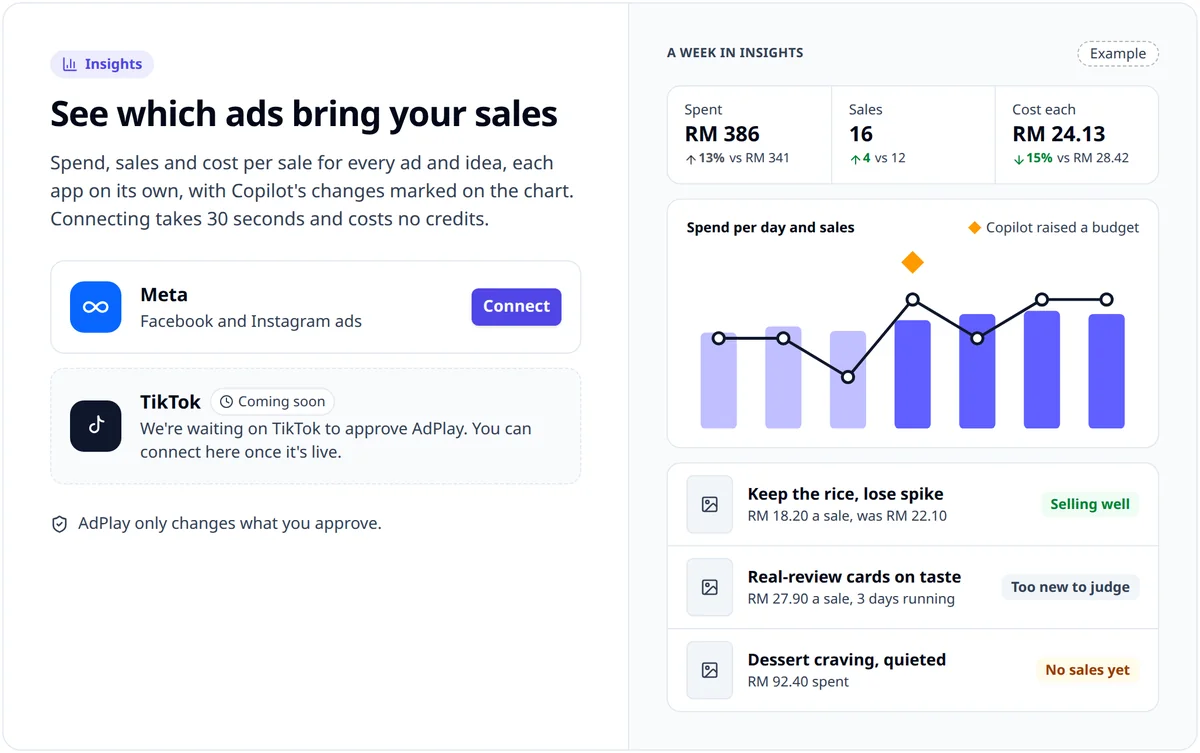
- On your first day you see "Your numbers are on their way". Numbers show once your ads have run a few days.
Read the top of the page
- Pick a date range: 7 days, 14 days, This month or 90 days. A line under it shows the days and what they are compared with.
- Read the four boxes:
- Spent: what you paid Meta in the range, and how it moved.
- Sales: the results for your goal. It reads Leads or Clicks if that is your goal.
- Cost each: spend divided by sales, next to your target. It reads Cost per lead or Cost per click for the other goals.
- Best idea: your cheapest idea, once one has 3 results under your target.
- Under Best ad this week, see your top ad and how it ranks Against your own ads. See its numbers opens its full numbers. This part does not show on This month.
- The chart, Spend per day and sales, marks the days Copilot changed something. Hover or tap a day for its numbers.
Use What works
What works has two tabs:
- Ads: one row per ad.
- Ideas: one row per idea, adding up every ad that carries it.
Each row shows the spend, your results, the cost of each, and a verdict under Copilot says. Click an idea to see only its ads.
Two rules sit above the table: "A verdict needs 3 sales" and "New ads get 7 days first". Early numbers move a lot: after launch, an ad set is in Meta's learning phase, and Meta says it needs about 50 results within about 7 days to leave it.
What the ad verdicts mean
| Verdict | What it means |
|---|---|
| Too new to judge | Live for under 7 days, or no spend yet |
| Selling well | 3 or more results, costing your target or less on average |
| Selling | 3 or more results, but costing more than your target (or no target is set) |
| No sales yet | Spent twice your target with no results |
| Not enough data | Fewer than 3 results, and not yet twice your target spent |
| In review | Meta is still checking the ad |
| Rejected by Meta | Meta turned it down |
| Paused | Copilot paused it. Undo is in Activity |
What the idea verdicts mean
| Verdict | What it means |
|---|---|
| Works | 3 or more results across its ads in 7 days, costing your target or less on average |
| Above target | 3 or more results, but costing more than your target (or no target is set) |
| Didn't work | No results in 14 days after spending three times your target |
| Being tested | All its ads are in a running test |
| Too new to judge | All its ads have run under 7 days |
| Rejected by Meta | Meta turned down all its ads |
| Not enough data yet | Too few results to call |
A Tiring tag can show next to an ad or idea: the ad is seen 2.5 times or more per person, and its clicks per view fell 20% or more on the week before. It is time for a fresh picture or hook. The course lesson on ad fatigue explains what to do.
Without a target, nothing can be Selling well or Works. Set it with Change goal on Campaigns.
Make more like your winners
An ad that is Selling well, an idea that Works, and your Best ad this week show a Make more like this button.
- Click Make more like this. AdPlay.ai adds a card to Copilot and opens Campaigns on it.
- Approve the card to make the ads. Nothing is made, and no credits are used, until you approve.
- When the ads are ready, a launch card waits in To do. Approve it to put them live.
Once a card is open, the button reads Card in Copilot. Below Pro the button is locked ("Making ads from your results is part of Pro."), so make new ads yourself with Create variant or the Ad Generator.
Tips
- Judge ideas, not pictures. If two ads on one idea both sell, the idea is the winner. Make new ads on it with a fresh picture or hook.
- Do not stop an ad on day two. Wait for a verdict. The course lesson on when to stop an ad gives the full rule.
- Ask about a number. On Starter and above, click Ask Copilot: "Why did my cost each go up this week?"
What to do next
Turn what you learned into your next ads. The course lesson Learn from Insights walks through a weekly review.
Frequently asked questions
Why does my new ad say Too new to judge?
Insights gives every ad 7 days before a verdict, and a verdict also needs 3 sales (or leads, or clicks, by your goal). Early numbers move a lot while Meta is still learning who to show the ad to.
What is an idea in Insights?
An idea is the reason to buy that an ad is built on. Ads made in AdPlay.ai keep the idea they came from, so Insights can add up every ad that shares it. The Ideas tab shows which idea brings your cheapest results, not only which picture.
Do I need Pro to use Insights?
No. Every plan with a connected Meta ad account sees its numbers and verdicts, and it costs no credits. Only Make more like this needs Pro or above.
Why does Insights show no sales when Ads Manager does?
Insights counts only the result that matches your goal: purchases, leads or link clicks. Check your goal with Change goal on Campaigns, and check that your pixel records purchases if your goal is Purchases.
Sources
Keep exploring
Turn ad research into winning ads
See what 16,000 Malaysian brands advertise, then generate on-brand creative, all in one tool.
7-day free trial · No credit card required