
Module 5 · Read the results
Learn from Insights: by ad and by idea
Use AdPlay.ai Insights to see which Meta ads and which ideas bring your cheapest sales, read the verdicts, and turn a winning idea into new ads.
Updated November 2026 · AdPlay.ai Team
Insights in AdPlay.ai shows your Meta results per ad and per idea, with a plain verdict for each. Read the Ideas tab first: an idea that sells under your target across several ads is a pattern you can repeat, while one lucky ad may not be. Then use Make more like this (on Pro) to have Copilot make new ads from the winner, and change one thing on the ideas that almost work.
Lesson 5.4 · 4 min read
The last three lessons taught you to read numbers and make calls on single ads. This lesson goes one step up. You will find out which ideas sell, not just which ads, and turn the best one into more ads.
You do this in Insights in AdPlay.ai. It reads your Meta ad account and shows each ad's spend, results and cost, with a verdict in plain words.
Why ideas beat single ads
One ad can win for a small reason: a lucky photo, a good week. An idea is the reason to buy behind the ad, like "real customer reviews" or "the Raya gift box". When an idea sells under your target across three different ads, that is a pattern. You can make it again and expect it to work.
So read results at two levels. By ad tells you what to keep or pause today. By idea tells you what to make next.
A worked example
Say you run a home bakery in Ipoh and sell kek lapis online. Your target is RM 18 per sale. Two weeks ago you made ads from three ideas on the Ad Generator's ideas board and launched them. Today the Ideas tab shows:
| Idea | Ads | Spent | Sales | Cost each | Copilot says |
|---|---|---|---|---|---|
| Real reviews | 3 | RM 240 | 20 | RM 12 | Works |
| Raya gift box | 2 | RM 150 | 6 | RM 25 | Above target |
| Made by hand | 2 | RM 90 | 0 | none | Didn't work |
What this tells you:
- Real reviews works on three ads. Make more of it.
- Raya gift box sells, but each sale costs more than your target. Tap its name to see its ads. If people click but few buy, try one change: a clearer price, or free delivery.
- Made by hand spent more than three times your target over 14 days with no sale. Stop it and keep the budget for the winners.
Your weekly review in AdPlay.ai
The guide Find your best ads and ideas in Insights explains every box and verdict on the page. For the weekly review, do this:
- Open Insights from the sidebar, under Launch. If Meta is not connected yet, connect it first (Connect Meta).
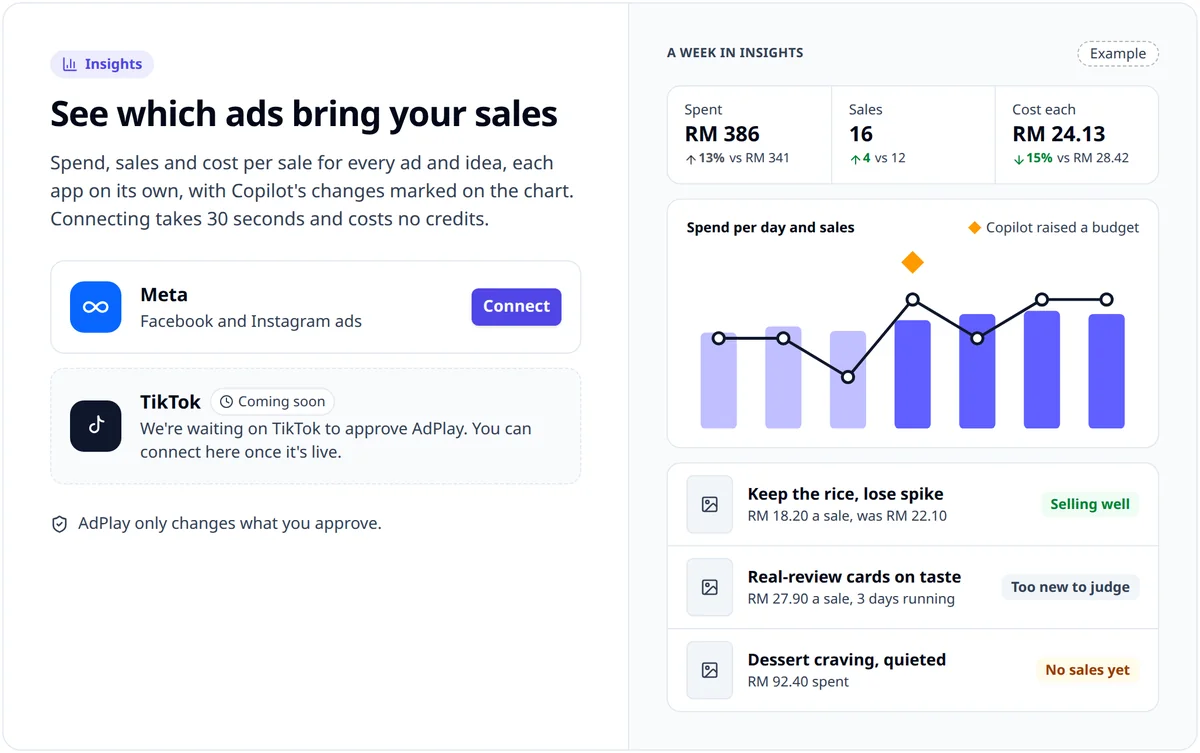
- Check your target. The Cost each box shows it, or No target yet. Without a target, nothing can be called a winner. Set it with Change goal on Campaigns.
- Pick 7 days. The verdicts always look at the last 7 full days.
- Read the Ideas tab first. Under What works, each idea shows its spend, results, cost each and a verdict under Copilot says. Tap an idea's name to see only its ads.
- Then the Ads tab, to decide what to keep or pause today.
An ad made in AdPlay.ai carries the idea it came from. Other ads in your account are grouped by the hook AdPlay.ai reads in them.
The verdicts that drive your decisions
- Works (idea) or Selling well (ad): 3 or more sales at or under your target. Make more.
- Above target (idea) or Selling (ad): it sells, but each sale costs too much. Change one thing.
- Didn't work (idea): no sale in 14 days after spending three times your target. Stop it.
- Tiring: seen 2.5 times or more per person, and clicks per view down 20% on the week before. Refresh it (Ad fatigue).
- Too new to judge or Not enough data: wait.
These follow the same rules as When to stop, keep or change an ad.
Make more like this
Next to an ad marked Selling well or an idea marked Works, tap Make more like this. AdPlay.ai adds a card to Copilot, under To do on Campaigns, with a title like: Make 3 more "Real reviews" ads: it's your cheapest idea on Meta. Nothing is made, and no credits are used, until you approve it. When the new ads are ready, a launch card waits in To do.
Making ads from your results is part of Pro. Below Pro, the button is greyed out. You can still act by hand: make new ads from the same idea in the Ad Generator, or open the winning ad from Ads and use Create variant to try a new hook with the same layout. See Create variant and Copilot.
Checklist
- Meta is connected and your target per sale is saved.
- You read the Ideas tab before the Ads tab.
- You know your one best idea this week.
- Every idea marked Above target has one change planned.
- Every idea marked Didn't work is paused.
Your homework
Open Insights and set the range to 7 days. On the Ideas tab, find the idea with the lowest cost each that is marked Works. If you are on Pro, tap Make more like this and approve the card in Copilot. If not, make one new ad from that idea by hand. Write down the idea's name, so next week you can check if the new ads sold too.
Frequently asked questions
Which plans can use Insights in AdPlay.ai?
Every plan, including the free trial, can see Insights once a Meta ad account is connected. Make more like this, which asks Copilot to make new ads from a winner, is part of Pro.
Why does Insights say Too new to judge?
New ads get 7 days before a verdict, and a verdict needs at least 3 results. Until then, early numbers jump around too much to trust.
Why don't I see Make more like this?
The button shows only on an ad marked Selling well or an idea marked Works. Both need a target, so save your Target per sale first. Below Pro, the button is greyed out, with a line that says making ads from your results is part of Pro.
Keep exploring
Turn ad research into winning ads
See what 16,000 Malaysian brands advertise, then generate on-brand creative, all in one tool.
7-day free trial · No credit card required