
Module 3 · Make the ads
Ad sizes and safe zones for Meta ads
Which shape to use for Facebook and Instagram ads (4:5, 1:1 or 9:16), where Meta covers your Stories and Reels ads, and how much text to put on the image.
Updated November 2026 · AdPlay.ai Team
Use 4:5 portrait for the Facebook and Instagram feeds, 9:16 for Stories and Reels, and 1:1 for carousel cards. On a 9:16 ad, Meta's own buttons and labels cover the top 14%, the bottom 35% and 6% on each side, so keep your hook, price and logo in the middle. Put less text on the image: one short hook and the offer is usually enough.
Lesson 3.5 · 5 min read
You have the angle and the words. The last step before launch is the shape. A great ad in the wrong shape loses half its screen, or hides its price under a button.
The three shapes you need
Meta shows ads in many places, but three shapes cover almost all of them:
| Shape | Meta's recommended size | Where it runs |
|---|---|---|
| 4:5 portrait | 1440 x 1800 | Facebook and Instagram feeds |
| 9:16 vertical | 1440 x 2560 | Stories and Reels, full screen |
| 1:1 square | 1440 x 1440 (carousel cards from 1080 x 1080) | Feeds and carousels |
Meta accepts smaller files, down to 600 pixels wide in the Facebook feed, but the recommended sizes look sharpest. The shape matters more than the exact size.
Start with 4:5. Meta takes 1:1 or 4:5 in the feed, and on a phone the taller 4:5 takes more of the screen. Square still works in the feed. In a carousel, every card must use the same shape, and 1:1 is the safe choice.
Add 9:16 for Stories and Reels. A feed ad placed in Stories can end up in the middle of the screen with space around it. A real 9:16 version fills the screen.
Safe zones: where Meta covers your ad
In Stories and Reels, Meta puts its own things on top of your ad: your page name at the top, and the caption, buttons, likes and the call-to-action button at the bottom. Since March 2026, Facebook and Instagram Stories and Reels share one safe zone. Keep these areas clear on a 9:16 ad:
- Top 14%, about 270 pixels on a 1920-pixel-tall ad.
- Bottom 35%, about 670 pixels.
- 6% on each side, about 65 pixels.
Everything important goes in the middle band: the hook, the price, the product and your logo. The background can run to the edges.
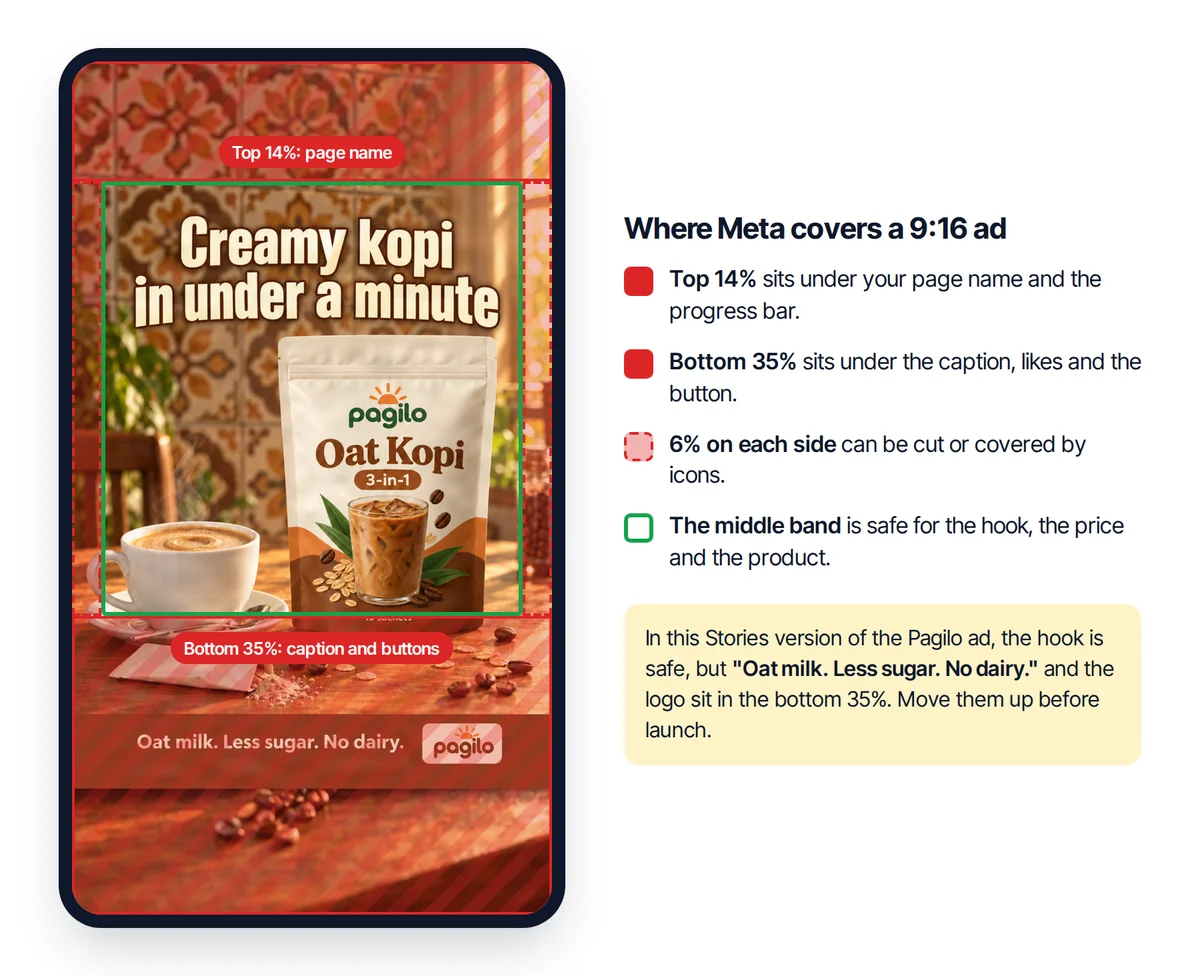
Two mistakes to avoid:
- Do not draw your own button at the bottom. Meta's real button lands on top of it, and the ad looks broken.
- Do not put the price in a bottom corner. That is exactly where the caption sits.
Feed ads have no published safe zone. They are cropped in some places rather than covered, so keep the product and the hook a little away from the edges.
How much text on the image?
Meta removed its old 20% text rule in September 2020, so a text-heavy image is no longer held back by a rule. But Meta still notes that images with less text tend to perform better.
A simple limit for small businesses:
- One hook line, big enough to read on a phone held at arm's length.
- The offer, if it is your angle ("3 jars for RM 45").
- Your logo, small.
Everything else goes in the post text. Strong contrast matters more than size: light text on a busy photo disappears.
A worked example
The home sambal business has a 4:5 feed ad: the jar on a plate of nasi lemak, the hook "Dinner in 10 minutes." at the top, and "3 jars for RM 45" in the bottom right corner.
For Stories, the owner makes a 9:16 version. In the taller frame, the hook would sit in the top 14% under the page name, and the price would sit in the bottom 35% under the caption and button. So both move into the middle band: hook just above the jar, price just below it. The plate and the background fill the top and bottom.
Now the same ad works in the feed and in Stories, and nothing important is covered.
Doing it in AdPlay.ai
Pick the shape before you make the ads. In the Ad Generator, Aspect ratio has three choices: 4:5 · Portrait (marked Recommended), 1:1 · Square and 9:16 · Story/Reel.
Add a Stories version to an ad you already have:
- On the Ads page, click the ad, then Open ad.
- In Ask AI, type "Make a Stories version".
- AdPlay.ai extends the picture to 9:16 (1080 x 1920) and saves it as a new ad, shown under Stories version. Your original ad stays as it is. Click Open it to see the new one. It uses 8 credits and needs a paid plan.
- The hook and price keep their place in the picture, with new space added above and below. Check them against the safe zone. If something sits too low, ask Ask AI on the new ad to move it ("Move the price up, away from the bottom"). For exact control, click Open in editor: in the AI Tools tab, Convert to editable file turns the flat image into text and shape layers you can move by hand. It uses credits and asks you first.
A carousel ad cannot get a Stories version, because AdPlay.ai carousel cards are square. See Polish an ad with Ask AI and Edit in the editor for more.
To see the safe zone drawn over each placement, use the free Facebook and Instagram ad size checker.
Checklist
- Feed ads in 4:5, Stories and Reels ads in 9:16.
- On 9:16, nothing important in the top 14%, the bottom 35% or 6% on the sides.
- No home-made button at the bottom.
- One hook line and the offer on the image, the rest in the post text.
- Text has strong contrast with the photo behind it.
Your homework
Take your best 4:5 ad and make a Stories version with Ask AI. (Stories versions need a paid plan. On the free trial, make one ad with 9:16 · Story/Reel in the Ad Generator instead.) Open the ad size checker, pick Stories or Reels, and compare: is the hook, the price and the logo inside the safe zone? Fix anything outside it in the editor. You now have a feed ad and a Stories ad, ready for module 4.
Frequently asked questions
Will Meta reject my ad if text sits in the unsafe zone?
No. Text in the unsafe zone is not against Meta's rules, so the ad still runs. Meta's labels and buttons cover that part. That is worse than a rejection, because you pay for an ad whose offer nobody can see.
Is the 20% text rule still in place?
No. Meta removed the 20% text rule in September 2020. Meta still notes that images with less text tend to perform better, so keep the words on the image short.
Can I run a 4:5 ad in Stories?
Meta can place it there, but it will not fill the screen. A proper 9:16 version uses the whole screen and lets you place the text inside the safe zone yourself.
Sources
- 1.Meta Business Help Center, About text and safe zones in Stories and Reels ads (2026)
- 2.Meta Ads Guide, Facebook and Instagram ad specifications (2026)
- 3.Meta Ads Guide, Carousel ad specifications (2026)
- 4.Lucid Media, Instagram and Facebook ad safe zones 2026 (2026)
- 5.Social Media Today, Facebook is removing its restrictions on text content in ad images (2020)
Keep exploring
Turn ad research into winning ads
See what 16,000 Malaysian brands advertise, then generate on-brand creative, all in one tool.
7-day free trial · No credit card required