
Make ads
Edit an ad by hand in the editor
Move text, change fonts and add your logo in the AdPlay.ai editor, then use the AI Tools tab to edit, expand, erase, cut out or sharpen the picture.
Updated November 2026 · AdPlay.ai Team
Press Open in editor on an ad's page to design it by hand: move and resize text, photos and shapes, and add your logo or product. The AI Tools tab adds Edit with AI, Expand, Inpaint, Magic Erase, Magic Cutout and Upscale. Editing by hand uses no credits. The AI tools use credits and need a paid plan.
Use the editor when you know exactly what you want and it is faster to do it yourself: move the price higher, swap a font, make the logo bigger, add a "Free delivery" badge. It works like the design tools you may know. You click a thing, then move, resize or retype it.
Open the editor
There are three ways in:
- From an ad's page. Press Open in editor at the top. If Ask AI has a change waiting, it asks first, because the editor opens the version you kept.
- From your Ads list. Open Ads, point at an ad and press its three-dot menu, then Edit. The editor opens in a new tab.
- From a blank page. In Ads, press New Ad, then Design in the editor. It starts from a blank canvas.
The editor is made for a computer. On a phone it shows a warning first, with Continue anyway.
Find your way around
The canvas sits in the middle. The tabs on the left hold what you can add:
| Tab | What it is for |
|---|---|
| AI Tools | Change the picture with AI (see below) |
| Add | Text, Elements, Emoji and Stock photos |
| Templates | Ready-made layouts to start from |
| Brands | The logos in your Brand Kit |
| Product | Photos of your products |
| Assets | Your uploaded photos and files |
Video ads show more tabs, such as Caption and Voiceover. This guide covers image ads.
Edit by hand
- Click a text box, photo or shape to select it. Drag to move it. Drag a corner to resize it.
- Double-click text to retype it. With text selected, the toolbar above the canvas changes its font, size and colour.
- Right-click an item for more: Bring forward, Send backward, Bring to front, Send to back, Duplicate, Delete and Set as background. Each item sits on its own layer, so this is how you put text in front of a photo.
- Made a mistake? Press the Undo arrow in the toolbar.
None of this uses credits.
Use the AI Tools tab
The AI tools work on the main picture of the page. At the top is Edit with AI:
- Type the change in the box, for example "Replace the plain background with a bright kitchen counter".
- To use a product photo or your logo, press + under the text and add it as a reference image (up to 5).
- Press Edit with AI. The price shows beside the button, from 15 credits.
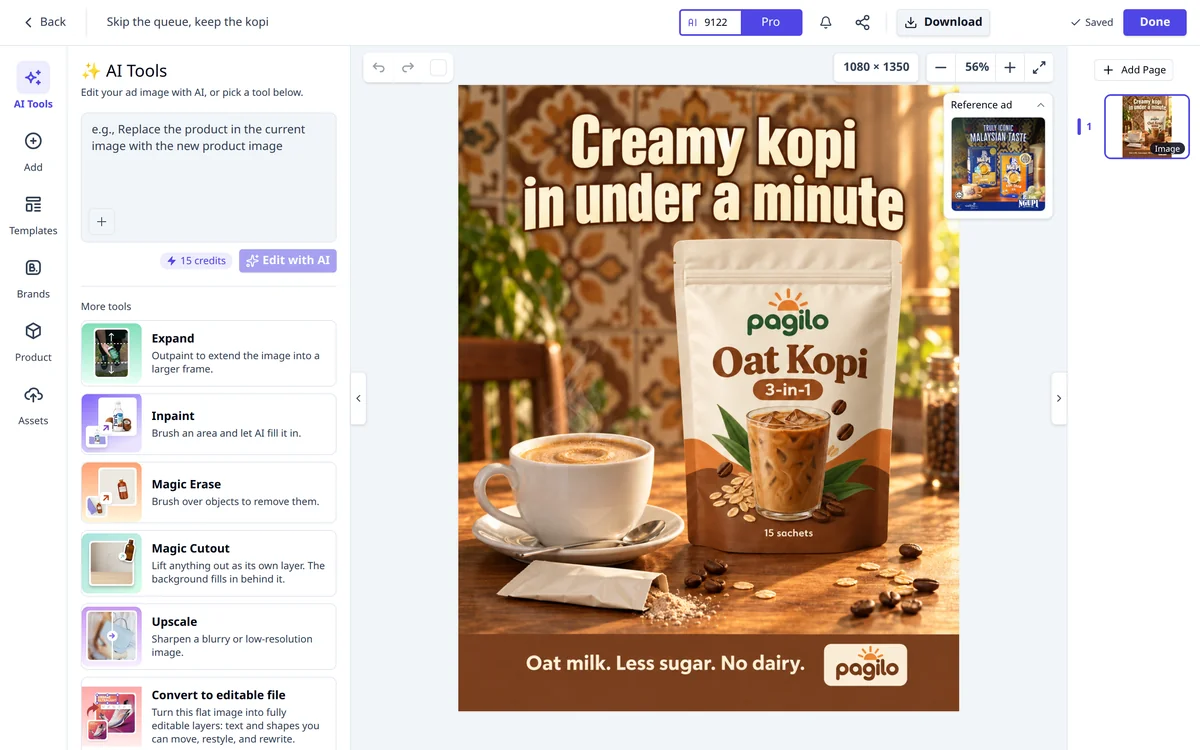
Under More tools:
| Tool | What it does | Credits |
|---|---|---|
| Expand | Makes the picture bigger to fill a larger frame | 8 |
| Inpaint | Brush an area and AI fills it in | 8 |
| Magic Erase | Brush over something to remove it | 8 |
| Magic Cutout | Lifts a thing out as its own layer and fills the gap behind it | 20 |
| Upscale | Sharpens a blurry or small picture | 10 |
| Convert to editable file | Turns a flat picture into text and shapes you can edit | 55 |
Convert to editable file only shows while the page is a single flat picture.
All the AI tools need a paid plan. On the free trial you can still edit by hand.
Save and finish
- The editor saves as you work. The top bar shows Saved when it is done.
- Press Download to save the picture to your computer.
- Press Done to save, update the ad's picture and go back.
Tips
- Keep words away from the edges. In Stories and Reels, Meta puts its own buttons and text over the top and bottom of the screen. The lesson Sizes and safe zones shows where text is safe.
- Fix words with Ask AI, layout with the editor. Rewriting a headline is quicker in Ask AI. Moving it is quicker here.
- Know what Ask AI does to your layers. If you later keep an Ask AI picture change on an ad you edited here, its layers merge into one picture. AdPlay.ai saves an editable design first, so your layers are not lost.
What to do next
Make a second version to test with Create variant, or launch your ads to Facebook and Instagram.
Frequently asked questions
Do I need a paid plan to use the editor?
No. Anyone can open the editor and design by hand. The AI tools (Edit with AI, Expand, Inpaint, Magic Erase, Magic Cutout, Upscale and Convert to editable file) need a paid plan and use credits.
Why can't I click the text on my AI-made ad?
An ad from the Ad Generator is one flat picture, with the words drawn in. In the AI Tools tab, press Convert to editable file to turn it into text and shapes you can move and retype. It costs 55 credits.
Should I use the editor or Ask AI?
Use Ask AI to change words or the look by describing what you want. Use the editor when you want exact control: where a line sits, which font, how big the logo is.
Is my work saved?
Yes. The editor saves as you work and shows Saved at the top. Press Done to save, update the ad's picture and go back.
Sources
Keep exploring
Turn ad research into winning ads
See what 16,000 Malaysian brands advertise, then generate on-brand creative, all in one tool.
7-day free trial · No credit card required