
Module 4 · Launch
Launch your test from AdPlay.ai
Launch a small Meta ads test from AdPlay.ai: connect your ad account once, pick your ads and budget, and go live. Or build the same test by hand in Ads Manager.
Updated November 2026 · AdPlay.ai Team
Connect your Meta ad account in AdPlay.ai once, under Settings and Integrations. On Pro, Copilot sets up the whole test as one card you approve. On any plan, Launch by hand gives you the full form with a Testing preset. For click-to-WhatsApp ads, download your ads and build the campaign in Meta Ads Manager.
Lesson 4.4 · 4 min read
This is the lesson where money starts to move. Everything before it was about picking well: the objective, a simple structure, a budget you can hold. Now you put 3 to 5 ads in front of real people and let Meta find out which one works.
Before you launch
Run down this list first. Each line is cheaper to fix now than after launch.
- Ads ready. 3 to 5 image ads, each with a different reason to buy. Run Ad check on each ad page in AdPlay.ai.
- Objective decided. See Pick the right campaign objective.
- Daily budget decided. A number you can hold for two weeks. See How much to spend on Meta ads, in ringgit.
- Pixel working if you picked Sales. See Pixel and Conversions API.
- Link and Page ready. The product page the ads send people to, and the Facebook Page the ads post from.
Step 1: connect Meta (once)
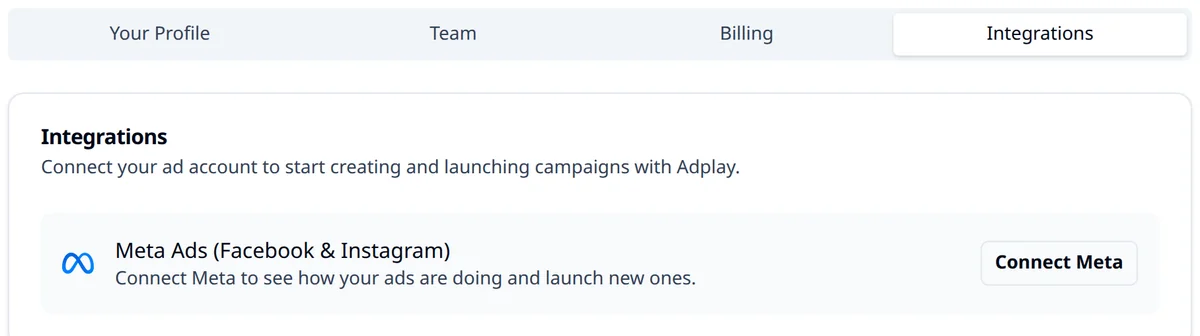
In AdPlay.ai, open Settings, go to the Integrations tab and click Connect Meta. Sign in, pick the ad account, then at What do you want from your ads? pick the goal from the last lessons and your target cost for one result. Connecting is free on every plan, and only an Owner, Admin or Ad Manager can do it. The guide Connect your Meta ad account shows each screen.
Step 2: pick how you launch
AdPlay.ai has two ways to send the test to Meta. The guide Launch your ads walks through every field. Here is what matters for a first test.
On Pro: launch with Copilot. Open Campaigns, click Launch ads, pick up to 5 ads and click Make a launch card. Check the daily budget under Edit settings, then click the button on the card. For a first launch, Copilot makes one new campaign with one ad set: a broad audience in your country, ages 18 to 65, and the budget on the ad set. That is the structure from A simple campaign structure for a small budget. The ads start paused and turn on together once all of them are on Meta. If you change your mind, Undo pauses the campaign.
On any plan: Launch by hand. Open an ad and click Launch (it works on the trial too). In the form, four choices shape the test:
- Preset: pick Testing. It gives one ad set with its own budget.
- Campaign & Ad set: pick Create new Testing campaign, so the test does not mix with older ads.
- Daily Budget: type your own number, the one you can hold for two weeks. Keep the location and ages broad.
- Go live immediately: leave it off if you want to check the ads in Ads Manager first. They start paused.
Or: by hand in Meta Ads Manager
You need this path for click-to-WhatsApp ads, because AdPlay.ai launches ads that send people to a website. Download each ad from its page in AdPlay.ai, then build one campaign with one ad set in Ads Manager. For WhatsApp, set the conversion location to messaging apps and pick WhatsApp. Ads you launch this way still show under All campaigns on the Campaigns page, because AdPlay.ai reads your whole connected ad account.
A worked example: the Melaka soap shop
Say you sell handmade soap online from Melaka, and you are on Pro. You made 4 image ads in the Ad Generator: a gift box offer, a customer review, a "made in small batches" story and a 3-bar bundle price.
- You connect Meta, pick Purchases and set a target of RM 12 a sale.
- On Campaigns, you click Launch ads, keep all 4 ads and click Make a launch card.
- In Edit settings, you set the daily budget to RM 40, a number you can hold for two weeks.
- You click Launch 4 ads. Meta reviews the ads, and they turn on together.
- You write the date 7 days later in your calendar, and you do not touch the ad set before then.
What happens next
First, Meta reviews each new ad. Meta says most ads are reviewed within 24 hours, though some take longer. If an ad is rejected, see Rejected ads.
Then the learning phase starts. Expect costs to jump around for about a week, and do not edit the ad set in that time (Budget and the learning phase). After that, read your numbers. Module 5 starts with The five numbers that matter.
Your homework
Launch a small test today. Use 3 to 5 ads with different reasons to buy, one ad set and a daily budget you can hold for two weeks. Use Copilot on Pro, Launch by hand on other plans, or Ads Manager for WhatsApp ads.
Then write the date 7 days after launch in your calendar. That is the first day you are allowed to judge it.
Frequently asked questions
Does launching from AdPlay.ai cost credits?
No. Launching ads you already made costs no credits. You pay Meta for the ad spend as usual, on your own ad account. The optional Set up with AI card on Launch by hand can use a few credits, but only when your ad account has no past results for it to read.
Can I launch on the free trial?
Yes. On the trial you can connect Meta and launch your trial ads with Launch by hand. After the trial ends, launching needs a plan.
Why can't I launch my ads?
Only team members with the Owner, Admin or Ad Manager role can launch ads or connect Meta. Ask your team owner to change your role in Settings, under Team.
Sources
Keep exploring
Turn ad research into winning ads
See what 16,000 Malaysian brands advertise, then generate on-brand creative, all in one tool.
7-day free trial · No credit card required