
Get help
Get help from the AdPlay.ai team
How to reach AdPlay.ai: send a message from the app, email support@adplay.ai or book a call, plus what to put in your message so we can sort it out.
Updated November 2026 · AdPlay.ai Team
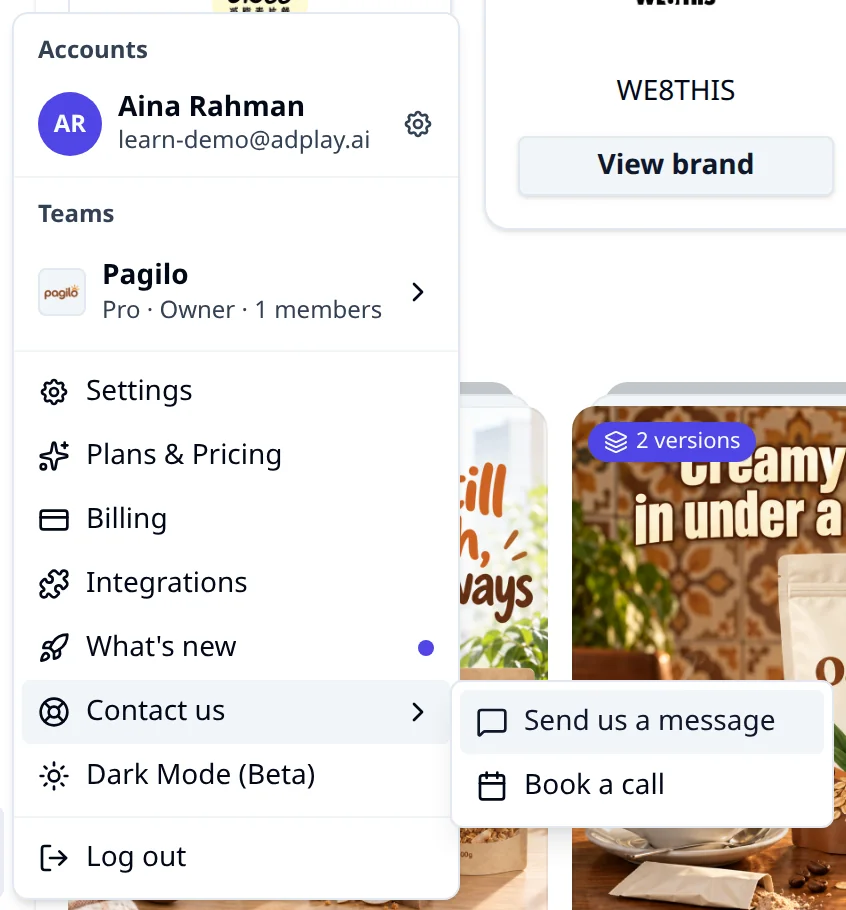
In the app, open the menu at the bottom of the sidebar, pick Contact us, then Send us a message. You can also email support@adplay.ai, or book a 30-minute call in Malaysia time. Tell us what you tried, what happened and on which page, and paste any error text.
Use this page when something in AdPlay.ai does not work, when a charge or a plan looks wrong, or when you want someone to walk you through the app.
Three ways to reach us
Send a message from the app
This is the best way, because your message arrives with the details we need.
- Go to the page where the problem happened, for example the ad or the ideas board.
- Open the menu at the bottom of the sidebar, where your team name and email show.
- Pick Contact us, then Send us a message.
- A window opens: "Hi there, how can we help?". Type in the Message box and tap Send.
You see "Thanks for writing to us. We'll get back to you by email soon." The reply goes to the email you log in with. Your name, team, plan and the page you were on go with the message, so you don't need to type them.
When an error message pops up with a Contact us button, use that button. Your message then also tells us what failed.
Email support@adplay.ai
Email support@adplay.ai when you can't log in, or when you want to attach screenshots or a screen recording. Write from the email you use for AdPlay.ai so we can find your account.
Book a call
Pick Contact us, then Book a call. The message window has a Book a call button too. A booking page opens with 30-minute calls in Malaysia time, with your name and email filled in.
A call helps when you want a first walkthrough, when you want to plan your first ads together, or when a problem is easier to show than to write.
The Agency plan also includes priority support and dedicated onboarding.
What to put in your message
A clear message gets a clear answer on the first reply. Include:
- What you were trying to do. "Make 3 image ads for my Raya hamper" helps more than "it doesn't work".
- What happened instead. Copy the exact error text, word for word.
- Where it happened. Paste the link from your browser's address bar for the ad, the ideas board or the campaign.
- When, and how often. The rough time, and whether it happens every time or once.
- What you already tried. For example, you refreshed the page or used another browser.
- For Meta problems: the ad account name, the ad name and Meta's own message.
- Screenshots, if you email us.
Keep the first line short. It becomes the subject of the email we get, so "Ad stuck on making since 2 pm" works well.
Never send your password, a full card number or a one-time login code. We never need them.
Before you write
Some answers are already on this site:
- An error message, or something will not load: Fix a problem
- Quick answers on the trial, paying and Meta: Questions and answers
- Not sure which tool to use: Which tool do I use?
- Credits, the free trial or your plan: Credits and plans
- Invoices, cancelling, refunds or deleting your account: Billing and your account
- Meta rejected an ad: Rejected ads
- Your ads are not spending: Ads not delivering
- Your ad account is restricted: Account restricted
- What changed in the app lately: What's new in the sidebar menu, or the updates page
What to do next
If your question is about getting started, go to Start here. It walks you from setting up your brand to your first ads.
Frequently asked questions
How fast does AdPlay.ai reply?
There is no fixed reply time. Replies come by email to the address you log in with. If a live campaign is affected, say so in the first line of your message.
Is there live chat?
No. Write to us with Send us a message in the app, email support@adplay.ai, or book a call.
I can't log in. How do I get help?
Email support@adplay.ai from the email address you use for AdPlay.ai, so we can find your account. Say how you signed up (Google or email) and what you see when you try to log in.
How do I ask for a refund?
Email support@adplay.ai within 30 days of your first plan payment. We refund the part of that payment you have not used, and the plan ends straight away. Renewals are not refunded.
Keep exploring
Turn ad research into winning ads
See what 16,000 Malaysian brands advertise, then generate on-brand creative, all in one tool.
7-day free trial · No credit card required