
Start here
Get started with AdPlay.ai
New to AdPlay.ai? See what it does and the path from brand setup to your first image ads, launching on Meta and learning what works.
Updated November 2026 · AdPlay.ai Team
AdPlay.ai helps you make Facebook and Instagram ads that follow what already works in your market. Set up your brand and products once, make image ads in the Ad Generator, launch them to your Meta ad account, then learn from the results. Start with your Brand Kit and one product.
Read this first if you are new to AdPlay.ai, or if you are not sure where to begin. It shows the path from an empty account to ads running on Facebook and Instagram, and where each step lives in the app.
What AdPlay.ai does
AdPlay.ai covers the work around a Meta ad:
- Research. Search real Facebook and Instagram ads in the Ad Library. Follow competitors in the Brand Tracker.
- Make. The Ad Generator studies winning ads in your market, suggests ideas, then makes image ads for your product.
- Polish. Change one ad with Ask AI, or design it by hand in the editor.
- Launch. Send your ads to your own Meta ad account.
- Improve. Insights shows which ads and ideas bring results. On Pro, Copilot checks your account every morning and suggests changes for you to approve.
The path, step by step
- Set up your brand. Onboarding asks for your website or Facebook page and fills in your Brand Kit: name, logo, colours and voice. Then add what you sell in Products & Services. Onboarding does not add products, so this step is yours. Every AI tool reads both. See Set up your brand.
- Make your first image ads. Open Ad Generator, pick one product and tap Research my market. You get an ideas board, each idea tied to a real ad. Tick the ideas you like and tap Generate. Your ads show on the Ads step when they are ready. See Make your first image ads.
- Polish the best ones. Open an ad. Use Ask AI to change the headline, the post text or the look. Each change is a try you keep or discard. See Polish an ad with Ask AI.
- Connect Meta and launch. In the account menu, open Integrations and tap Connect Meta. Then tap Launch on the ad page. You need the Owner, Admin or Ad Manager role to launch. See Connect Meta and Launch your ads.
- Read the results and make more. Once your ads have run for a few days, Insights shows which ads and ideas bring the cheapest results. Make more of what works and stop what does not. See Insights and Copilot.
Where things are in the app
| Sidebar | What it is for |
|---|---|
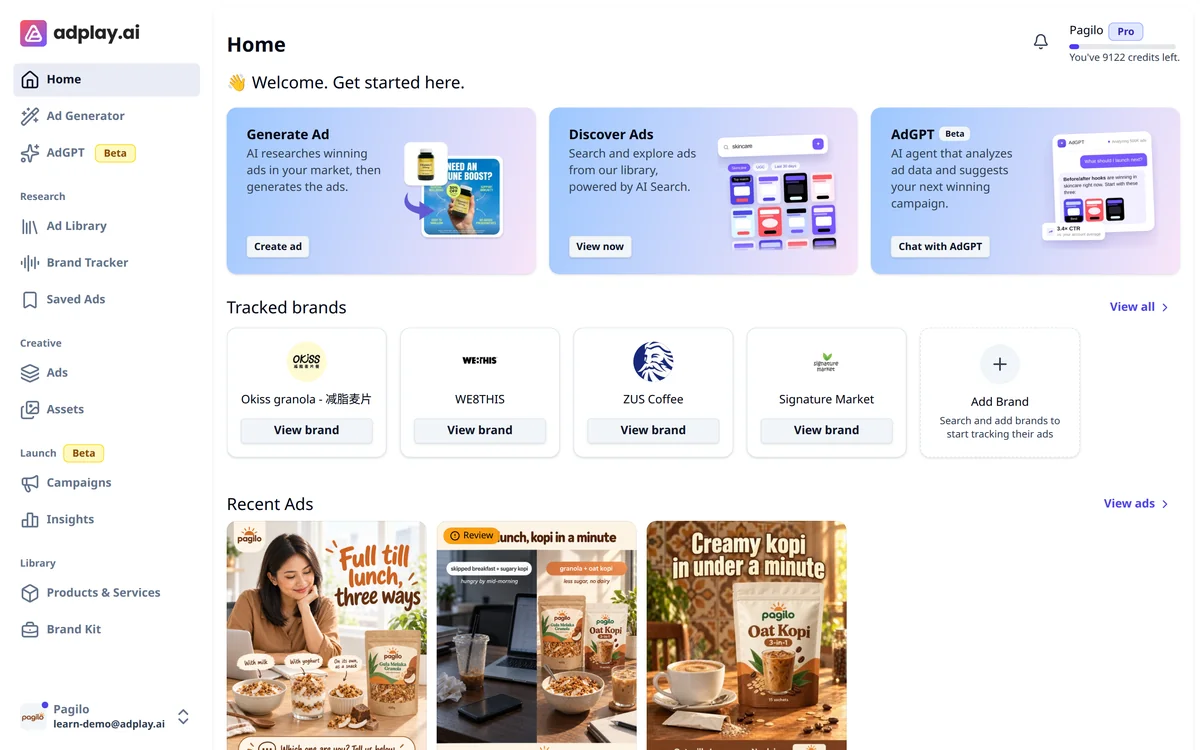
| Home | Shortcuts to the main tools, your tracked brands and your newest ads |
| Ad Generator | Research your market and make image ads for a product |
| AdGPT | A chat for questions, competitor research and one-off ads |
| Research: Ad Library, Brand Tracker, Saved Ads | Other brands' ads, the brands you follow, and the ads you keep |
| Creative: Ads, Assets | The ads you made, and your photos, clips and audio |
| Launch: Campaigns, Insights | Your Meta campaigns with Copilot, and what works |
| Library: Products & Services, Brand Kit | What you sell, and how your brand looks and sounds |
Settings, Plans & Pricing, Billing, Integrations, What's new and Contact us are in the account menu at the bottom of the sidebar.
Not sure which tool fits your job? Which tool do I use? answers that in one table.
Map of this learn section
- Start here: which tool to use, set up your brand, credits and plans.
- Make ads: your first image ads, the ideas board, set ads for bundles, Ask AI, Create variant, copy a winning ad, the editor.
- Ask AdGPT: what to ask AdGPT.
- Research your market: the Ad Library, track competitors.
- Launch and improve: connect Meta, launch your ads, Copilot, Insights.
- Work as a team: teams and sharing.
- Video ads (experimental): video ads, once your image ads work.
- Get help: contact us.
New to Meta ads themselves? The free Meta ads course starts with what Meta ads can do for a small business.
What the free trial covers
Every new account gets 7 days and 500 credits. You can search the Ad Library, chat with AdGPT, research one product and make 2 image ads. Making more ads needs a paid plan. Credits and plans has the full list.
Tips
- Start with one product. Pick the one you most want to sell this month. A bakery might pick its best-selling kuih set. A clinic might pick its most booked treatment.
- Keep your details current. Update prices and offers in Products & Services before a sale like 11.11. The AI writes from what you saved.
What to do next
Set up your Brand Kit and add your first product: Set up your brand.
Frequently asked questions
What is AdPlay.ai?
AdPlay.ai is an AI ad tool for businesses that advertise on Facebook and Instagram. It finds winning ads in your market, makes image ads for your products and launches them to your own Meta ad account. On Pro and Agency, Copilot also suggests what to change. It is not an ad network for showing ads inside your own app or website.
Who runs AdPlay.ai?
AdPlay.ai is run by ADPLAY AI SDN. BHD., a Malaysian company (Registration No. 202601016568). You can reach the team at support@adplay.ai.
Do I need a Meta ad account to start?
No. You can research your market and make ads first, even if you have never run an ad. You need to connect a Meta ad account to launch ads and see their results. Connecting is free on every plan, including the trial.
Which languages can AdPlay.ai write my ads in?
English, Bahasa Melayu, and Chinese in Simplified or Traditional script. Set your usual language in the Brand Kit. You can still change it for any ad.
Should I start with video ads?
No. Start with image ads. Video ads are experimental, and they open only after you make 3 image ads in the Ad Generator.
What can I do on the free trial?
For 7 days you get 500 credits. You can search the Ad Library, chat with AdGPT, research one product and make 2 image ads. Making more ads needs a paid plan.
Is AdPlay.ai only for businesses in Malaysia?
No. Malaysian accounts pay in ringgit and other accounts pay in US dollars. In the Ad Generator you pick the market your ads are for, such as Malaysia, Singapore or Indonesia.
Can I use AdPlay.ai on my phone?
Yes. AdPlay.ai works in the web browser on a computer or a phone. The editor is made for a computer, so on a phone it shows a warning first.
Do I need a website or an online shop to use AdPlay.ai?
No. You can fill in your Brand Kit from your Facebook page, and add a product by typing its details and uploading your own photos. To launch an ad on Meta, you need a web link for people to go to.
Do I need to know Meta ads before I start?
No. The free trial lets you research your market and make your first ads with no ads running. The free Meta ads course on adplay.ai/learn/course starts from the basics.
Keep exploring
Turn ad research into winning ads
See what 16,000 Malaysian brands advertise, then generate on-brand creative, all in one tool.
7-day free trial · No credit card required