
Click-to-WhatsApp Ads in Malaysia (2026)
How click-to-WhatsApp ads work in Malaysia: the WhatsApp Business and catalog setup, the 2026 Ads Manager build, the conversation-to-conversion flow, how to measure CTWA, Advantage+, and the common mistakes.
Updated August 2026 · Xanny Lee, CEO
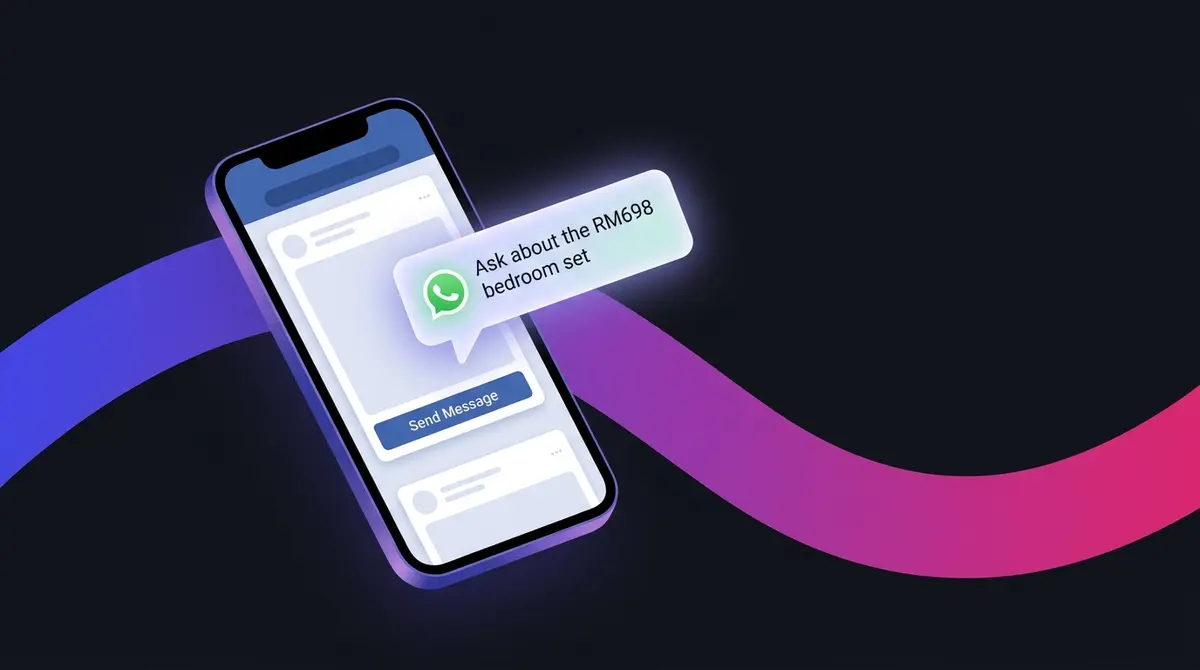
A click-to-WhatsApp (CTWA) ad runs on Facebook and Instagram, and when a Malaysian taps it, a WhatsApp chat with your business opens with a pre-filled message ready to send. In 2026 you build it under Meta's Engagement objective, then set the ad-set conversion location to messaging apps, tick WhatsApp, and pick a phone number linked to your WhatsApp Business Account. Before the ad, set up the free WhatsApp Business app (or the API at scale) and, if you sell products, a catalog of up to 500 items linked to that account. It fits Malaysia because WhatsApp is the default channel here: per DataReportal's Digital 2025 Malaysia, around 90.7% of internet users aged 16-64 use it monthly, the most of any platform. Cost is measured as cost per conversation started, priced in RM, and the close stays manual (DuitNow QR or transfer), because WhatsApp in-chat payment is not live in Malaysia. The pattern works for high-consideration buys like a facial consult or a furniture purchase, where the customer wants to ask before they commit.
A Malaysian shopper sees your ad, feels the pull, and reaches for the one app they already have open all day. Not your website, not a lead form, not an email field they will abandon. WhatsApp, where they message family, the kedai runcit, and their condo and school group chats. Click-to-WhatsApp ads meet that instinct head-on: the tap does not load a page, it opens a conversation. For sellers closing on questions rather than checkout pages, that is the difference between a curious scroll and a booked sale.
Why Malaysia closes on chat, not checkout pages
Walk through any pasar malam, scroll any Malaysian feed, and the pattern is the same: the conversation that ends in a sale happens on WhatsApp. The numbers behind that instinct are unusually lopsided. WhatsApp passed 3 billion global monthly active users in March 2025, per Statista, and nowhere leans on it harder than Malaysia. Per DataReportal's Digital 2025 Malaysia report, around 90.7% of internet users aged 16-64 reach for WhatsApp every month, and 26.8% name it their favourite social platform, ahead of every feed-based rival; Statista's separate ranking of the most-used platforms in Malaysia puts WhatsApp first too. With 34.9 million internet users at 97.7% penetration in January 2025, almost every customer you could advertise to already has a thread open right now.
That is the gap a click-to-WhatsApp ad closes. A standard ad sends a curious shopper to a landing page they may never load and a form they may abandon halfway. A click-to-WhatsApp ad drops them into the one app they trust for buying, asking, and haggling. For the purchases Malaysians like to talk through first, a furniture set, a facial package, a supplement they want reassurance about, the chat is not a detour. It is the close.
The commercial backdrop is large enough to take seriously. Malaysian e-commerce revenue reached RM937.5 billion in the first nine months of 2025, up 1.9% year on year, with the business-to-consumer slice at RM336.6 billion, per Department of Statistics Malaysia figures reported by The Star. Plenty of that spend never touches a public checkout cart: it moves through a chat where a seller answers a question, sends a QR, and confirms delivery.
What a click-to-WhatsApp ad actually is (and what it is not)
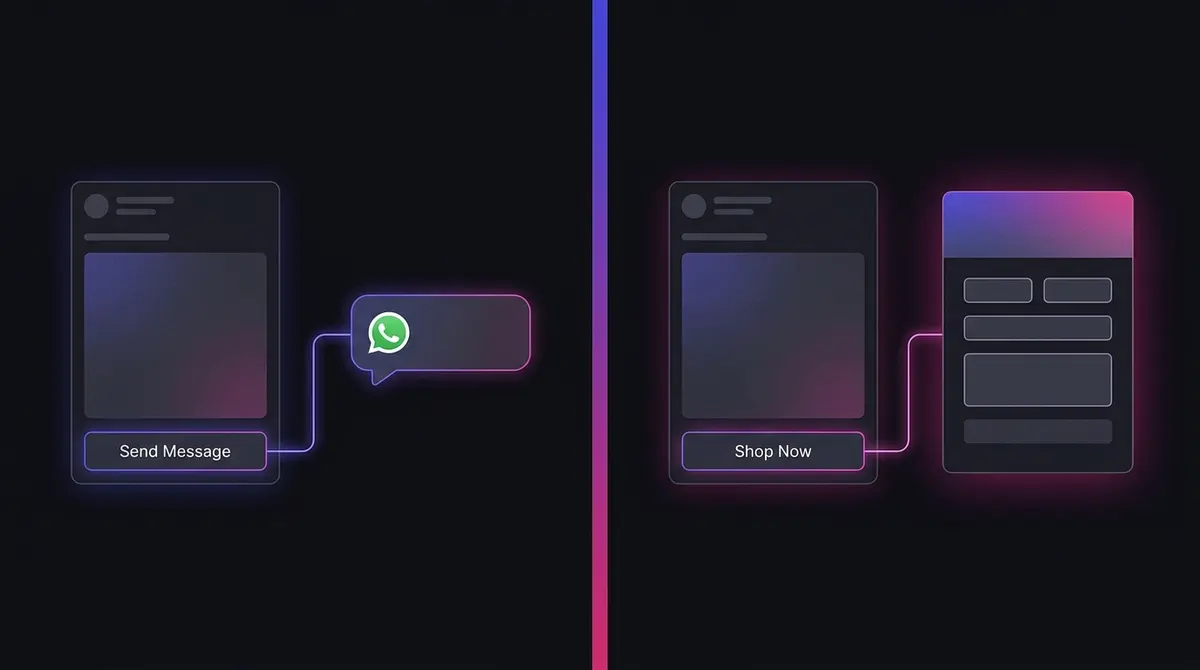
A click-to-WhatsApp (CTWA) ad is an ordinary ad in the Facebook or Instagram feed, Stories, or Reels. The only thing that sets it apart is the destination: tap the button and WhatsApp opens a chat with your business, a pre-written opener already typed and waiting. The creative lives on Meta's surfaces; the conversation lives in WhatsApp.
It is also worth separating from a different product that shares the word "WhatsApp." In June 2025 Meta announced ads inside WhatsApp itself, in the Updates tab (Status), as CNBC reported, a placement within the app. A click-to-WhatsApp ad is the reverse: it runs outside WhatsApp and opens a chat. When you plan a campaign, you are building the second thing; confusing the two leads to looking for the wrong setting and wondering why it is not there.
Meta has made no secret of how fast this format is growing. On its Q3 2025 earnings call it reported click-to-WhatsApp ad revenue up 60% year over year (per Storyboard18), with Q4 2025 carrying the momentum on, US click-to-message revenue up 50% and paid business messaging past a US$2 billion run rate (per Marketing Brew). Read these as Meta-reported earnings figures, directional rather than independently audited, but the direction is not in doubt.
Set up WhatsApp Business and your catalog first
The ad is step two. Before you open Ads Manager, the WhatsApp side has to be ready, because a chat that lands on an empty profile or a slow inbox wastes the click you paid for. Start with the free WhatsApp Business app (a separate download from the personal app) on the number you want chats to reach, and fill in the business profile so a new chatter sees a real shop, not a stranger's phone.
If you sell physical products, build a catalog. Per the WhatsApp Help Center, a single catalog holds up to 500 items, each carrying a name, price, description, product code, and website link. Build it inside the WhatsApp Business app for a small range, or in Meta Commerce Manager for a larger one, then link it to your WhatsApp Business Account so the products surface in chat. The payoff for a CTWA campaign is direct: with a linked catalog you can send a product card straight into the conversation, so when a customer asks "got the grey one?" you reply with item, price, and photo in one tap. The Meta product catalog setup guide covers the Commerce Manager side in detail.
Service businesses, a salon, a clinic, a tuition centre, often skip the catalog and run a single-offer ad, which is completely fine; the catalog is for sellers with a range to browse. Either way the groundwork is the same: a complete profile, a number you actually monitor, and a plan for who answers. The free app suits a small team replying by hand; you graduate to the WhatsApp Business API (through a provider) when volume outgrows manual replies and you need automated templates, multiple agents on one number, and chatbot flows. Start on the app, move to the API when reply speed starts slipping.
The 2026 Ads Manager setup, step by step
The build is short once you know the path, and the path changed when Meta consolidated its objectives. Here is the current route, with the caveat that menu labels drift, so trust the live screen.
| Step | Where | What to do |
|---|---|---|
| 1. Link the WABA | Business Settings, Accounts, WhatsApp Accounts | Connect your WhatsApp Business Account to the same Business Manager as your ad account. Without this, Ads Manager will not save the campaign. |
| 2. Pick the objective | Campaign level | Choose Engagement. The old standalone Messages objective now lives inside it. |
| 3. Set the conversion location | Ad-set level | Set the conversion location to messaging apps, then tick WhatsApp. |
| 4. Choose the number | Ad-set level | Select the WhatsApp business phone number you want chats to land on. Picking the wrong number is a common silent break. |
| 5. Build the creative | Ad level | Design the ad as normal, then write the pre-filled opener the user sends with one tap. |
Two settings deserve extra care. First, the conversion location: Meta surfaces messaging apps as the place you choose WhatsApp, not as a separate objective, so a "WhatsApp objective" does not exist to find. Second, do not reach for Traffic because it sounds related: it optimises for link taps and low-intent chats, while Engagement optimises for conversations started, the outcome you are paying for. For the scaffolding before the conversion location, see how to structure the campaign and the full beginner walkthrough for launching any Meta ad.
Engagement is the default, not the only option. Ads that click to WhatsApp can also run under Leads, Sales, or Awareness, each pointing the algorithm at a different goal. Most Malaysian sellers should start on Engagement optimising for conversations, because it buys the most chats; once volume and tracking are in place, Leads pushes Meta toward people likely to answer qualifying questions. A lead-form ad is the close cousin worth knowing: it captures a name and number inside Meta rather than opening a live chat, for teams that follow up later.
One honest caveat: Meta has been reshuffling these labels for a while. You may still see a "Messages" or "Click to message" shortcut depending on your account, and detailed targeting now runs through Advantage+ audience rather than the legacy interest names. Build to the principle (Engagement, messaging apps, WhatsApp, linked number) and verify the exact wording as you go.
Let Advantage+ do the targeting heavy lifting
Meta's AI is now better at finding likely messagers than most hand-built audiences, and for a messaging goal that matters more than usual. Three Advantage+ settings carry the weight. Advantage+ audience tells Meta to find people likely to message you from a broad pool, using your pixel, past chatters, and the ad itself as signals, rather than you stacking interests by hand. For a chat objective this tends to beat narrow targeting, because "likely to start a conversation" is exactly the prediction Meta's system is built to make; if you want to steer it, broad versus detailed targeting lays out the choice. Advantage+ placements then lets the ad run wherever conversations come cheapest, across feed, Stories, Reels, and Marketplace on both apps; restricting them by hand usually just raises your cost per conversation.
For budget structure, a campaign-level budget Meta shares across ad sets or an ad-set-level one both work for a simple one-audience messaging campaign; the trade-offs sit in the CBO versus ABO comparison. Whichever you pick, respect the learning phase: per Meta's Business Help Center, an ad set needs around 50 optimisation events within 7 days to stabilise and exit learning, so resist tweaking the audience, budget, or creative for roughly the first week while the algorithm works out who messages, because editing resets that clock. The full mechanics are in the learning-phase guide.
The conversation is the funnel: opener, qualify, close
A click-to-WhatsApp ad does not end at the tap. It hands you a live conversation, and that is where the money is made or lost. The journey runs from the opener through qualifying, objections, and the price to a confirmed order, and the free WhatsApp Business app runs it at speed even when twenty chats land at once.
The opener does the first job, so write it like part of the ad: it sets the tone, tells your team which ad drove the chat, and lowers the friction of starting. Leave it blank or a generic "Hello" and reply rate drops, because the customer has to think of what to say. Tie it to the exact offer instead. A modest-fashion label running a hard Raya offer, three hijabs for RM100, gets an opener that writes itself ("I want the RM100 bundle"); a furniture seller advertising a bedroom set on 0% instalment can use "Ask about delivery and instalment" to invite the questions that lead to a yes. Then qualify fast: one question ("for yourself or a gift?", "which size?") sorts a real buyer from a tyre-kicker, so a popular ad does not bury the team under junk chats.
Speed is the lever that matters most: the buyer is in a buying mood the moment they tap, and an hour later they have scrolled on. Vendor research repeatedly claims replies inside a few minutes convert several times better than replies an hour or more later (treat the exact multipliers as directional, not hard fact). The native tools make fast replies possible:
- Quick replies. Per the WhatsApp Help Center, the free app stores up to 50 quick replies, each triggered by a "/shortcut" and able to carry text plus media. Save your most-asked answers (price list, delivery cost, location) so a one-keystroke reply goes out instantly.
- Greeting message. An automated first-touch message fires when a new customer opens a chat, so the buyer sees a warm, on-brand hello before a human reaches the thread.
- Away message. A scheduled auto-reply outside business hours sets expectations ("we reply from 9am") so an after-midnight chat does not feel ignored.
- Labels. Tag each chat by stage, new, pending, paid, VIP, so you see at a glance who needs a follow-up and stop losing warm leads.
Where the format allows, add suggested quick-reply buttons so the customer picks an intent in one tap. The goal of the whole flow is simple: turn a paid tap into a qualified, answered, ready-to-buy chat before the buyer's attention moves on. A scroll-stopping hook still has to earn the click first, and the hook craft guide covers writing one.
Closing the sale: the Malaysian chat-to-payment flow
Here is the honest part most generic guides skip. In some countries the customer can pay inside the chat. In Malaysia they cannot: per the WhatsApp Help Center's participating-countries list, in-chat WhatsApp payment is not available here, so there is no tap-to-pay button in the thread. The close stays manual, which is completely normal for Malaysian sellers.
The flow looks like this. You confirm the order in the chat, send a DuitNow QR or bank-transfer details, the customer pays and sends the receipt, and you confirm delivery or the booking slot. For a higher-ticket item you negotiate instalment in the same conversation, say a RM68 two-session facial split across two visits. None of this needs a payment integration; it runs on the rails Malaysians already use. Build your flow around that manual close.
When chat beats a landing page (and when it does not)
Click-to-WhatsApp is not a universal upgrade; it is the right tool for a specific job. It shines on considered, question-heavy purchases and on bookings, where a human reply removes the doubt that kills a form-fill. A supplement brand running a founder-on-camera joint-pain ad sees buyers ask the same things every time: dosage, safety, how long until it works. Routing those questions into WhatsApp lets the brand answer and convert in the same thread.
Landing pages still win where the buyer wants to self-serve: instant payment, a wide catalogue, an impulse buy that needs no conversation. The smart move for most Malaysian sellers is to run both, chat for high-question items and checkout for impulse buys, then compare cost per sale. Treat the table below as a hypothesis to test, not a rule.
| Signal | Lean click-to-WhatsApp | Lean landing page |
|---|---|---|
| Purchase type | Considered, high-ticket, service booking | Impulse, low-ticket, self-serve |
| Buyer behaviour | Wants to ask before paying | Ready to checkout now |
| Payment | Manual (QR, transfer, instalment chat) | Instant online card or wallet |
| Catalogue | One offer or a short menu | Wide range to browse |
What it costs, and why the free entry point matters
There is no published "Malaysian CTWA rate," and any blog that quotes one is guessing. Meta reports the headline metric as cost per conversation started, set by the same live auction that prices every Meta ad and denominated in RM. Malaysian delivery runs cheaper than saturated markets like the United States or the UAE, but budget against your own cost per conversation and, more importantly, your cost per sale. The Meta ads cost in RM in Malaysia guide goes deeper.
The part that genuinely changes the maths is the billing window. WhatsApp Business Platform pricing moved to per-message billing on 1 July 2025, replacing the older conversation-based model. Template messages are charged by category, marketing, utility, and authentication, while service messages inside an open customer-service window are free. The exact RM rate shifts over time and by market, so treat Meta's developer pricing page as the source of truth rather than hard-coding a number.
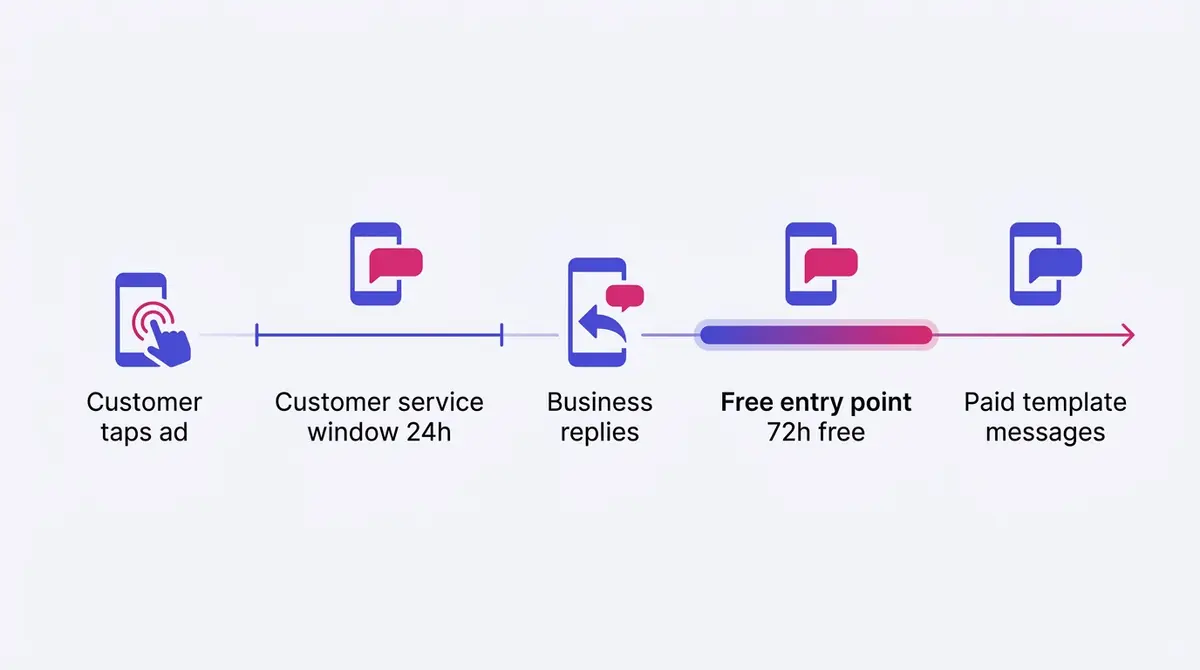
For ads specifically, there is a built-in discount worth understanding. When a Malaysian messages you from a click-to-WhatsApp ad, a 24-hour customer service window opens; reply within it and a 72-hour Free Entry Point window opens, during which any message you send is free. Once the customer-service window closes, you can only send paid template messages until the user writes back. The lesson is operational, not technical: a team that answers within minutes keeps most of its post-tap conversation inside free windows; a team that lets chats sit overnight pays template fees to reopen a dialogue it already had.
Measure CTWA properly: from cost per conversation to cost per sale
The trap with messaging ads is judging them on the cheap metric. Cost per conversation started is the delivery number, and it has a wrinkle worth understanding: a conversation only counts once the user actually presses send on the pre-filled opener, not the instant they tap the ad. So your link taps can sit higher than conversations started, and a wide gap is a signal, not noise: it usually means the opener is putting people off or the profile looks unconvincing. Read that gap before you blame the audience.
From there, climb the ladder to the metrics that pay the bills:
| Metric | What it tells you | Where it lives |
|---|---|---|
| Cost per conversation started | Delivery efficiency, the cheap top-line number | Ads Manager |
| Chat-initiation rate | Of the taps, how many became real conversations | Ads Manager (taps vs conversations) |
| Cost per qualified chat | What a real, on-topic buyer costs | Your inbox, via labels |
| Cost per sale | The number that decides the campaign | Your records, tied back manually |
The reporting blind spot is the important one: the sale closes inside WhatsApp, where Meta cannot see it. Ads Manager knows the conversation started; it does not know the customer paid a RM68 deposit two messages later. So attribution lives with you: tag each chat with labels (paid, no-sale, follow-up), note the order value, and tie it back to the ad, or feed it into a simple CRM. A flood of RM-cheap conversations that never buy is more expensive than a smaller batch that converts, so read the chat outcomes, not just the chat count, and read whether the click-through into the chat is even healthy first.
Before you write a single opener, study the live click-to-WhatsApp creative in your category in the free Meta Ad Library, so you build from evidence. Then time those pushes to when Malaysians are primed to buy: the Malaysian sale seasons and the chat-led offers for the 11.11 mega sale are when a fast-reply team turns a spike in chats into a spike in sales.
Common click-to-WhatsApp mistakes
Most CTWA campaigns that fail do not fail in Ads Manager; they fail in the inbox, or on one wrong setting. Here are the recurring ones, roughly in order of how much they cost:
- Replying too slowly. The single biggest lever. A chat answered in minutes converts; the same chat answered tomorrow is dead, and slow replies also push you out of the free messaging window. Staff for speed during the hours your ad runs.
- A blank or generic opener. "Hello" makes the customer think of what to say, so many do not. Tie the opener to the exact offer ("I want the RM100 bundle") and the tap-to-send becomes automatic.
- Picking Traffic instead of Engagement. Traffic buys cheap link taps and low-intent chats; Engagement optimising for conversations buys the outcome you actually want. The cheaper cost-per-click is a trap.
- The wrong linked phone number. A silent break: the campaign saves and spends, but chats land on a number nobody watches, or the wrong WhatsApp account. Check it before you launch.
- No qualifying question. A popular ad without a "for yourself or a gift?" filter drowns the team in junk chats and buries the real buyers.
- Treating WhatsApp as a support inbox. A passive "how can I help?" wastes a buying-mood lead. The chat is a sales conversation: qualify, recommend, move toward the close.
- Stale creative. When the same ad runs too long, chats dry up as the audience tunes it out. Refresh the hook and the offer; the guide on reading a healthy click-through rate helps you spot the decline early.
Plan it as one motion
That full sequence, research the winning local angle, generate the on-brand creative, then launch it to Meta, is one workflow, and a platform like AdPlay.ai keeps it in a single tab so the conversation that closes the sale starts from the ad built to earn it. The habit underneath matters most: find the angle that already works, set up the WhatsApp side so a chat lands on a ready profile, write an opener the customer can send in one tap, and answer fast enough to stay inside the free window. Do that, and the most-used app in Malaysia becomes your shortest path from scroll to sale.
By the numbers
Frequently asked questions
What are click-to-WhatsApp ads and how do they work in Malaysia?
A click-to-WhatsApp ad is a normal-looking ad in the Facebook or Instagram feed, Stories, or Reels, with a button such as Send Message instead of Shop Now. When a Malaysian taps it, WhatsApp opens a chat with your business and a pre-filled opener sits ready to send. From there you answer questions, share photos, and close the sale inside the conversation. The ad runs on Facebook and Instagram; only the chat happens in WhatsApp.
Do I need a product catalog to run click-to-WhatsApp ads in Malaysia?
No, you can run a click-to-WhatsApp ad with a normal image or video and no catalog at all, which is what most service businesses do. A catalog helps if you sell physical products: per the WhatsApp Help Center you can list up to 500 items, each with a name, price, description, and link, build it in Meta Commerce Manager, and link it to your WhatsApp Business Account so you can drop a product card straight into the chat. For a single-offer ad, like a facial package or one furniture set, you do not need one.
What is the difference between the free WhatsApp Business app and the WhatsApp Business API for CTWA ads?
The free WhatsApp Business app runs on a phone and covers a small team well: manual replies, up to 50 quick replies, labels, a greeting message, and away messages. It is enough to start. The WhatsApp Business API (used through a provider) adds automated template messages, multiple agents on one number, and chatbot flows, which you need once chat volume outgrows a couple of people answering by hand. Both work with a click-to-WhatsApp ad; start on the app and move to the API when reply speed starts slipping.
How fast do I need to reply to a WhatsApp ad lead?
As fast as you can, and ideally within minutes. Response speed is the single biggest lever on whether a chat becomes a sale, because the buyer is in a buying mood the moment they tap. Vendor studies widely claim that replies inside a few minutes convert several times better than replies an hour or more later; treat those exact multipliers as directional, not hard fact, but the direction is real. Fast replies also keep your conversation inside WhatsApp's free messaging windows, so speed protects both the sale and your billing.
Should I use Advantage+ audience and placements for a click-to-WhatsApp campaign?
Usually yes. Advantage+ audience lets Meta's AI find the people most likely to message you from a broad pool, which beats hand-stacking interests for a messaging goal, and Advantage+ placements spreads the ad across feed, Stories, Reels, and Marketplace so the auction finds cheap conversations wherever they are. Set a clear opener and qualifying questions, then leave the ad set alone for roughly the first week while the system learns who messages, the same learning-phase patience any Meta campaign needs.
Can customers pay inside WhatsApp after clicking my ad in Malaysia?
Not through WhatsApp itself. In-chat WhatsApp payment is not available in Malaysia, so there is no tap-to-pay button in the conversation. You close manually: send a DuitNow QR or bank-transfer details, confirm the order and delivery, and arrange any instalment in the chat. This is normal here and works fine, the conversation does the selling and the payment happens through the rails Malaysians already use. Plan your flow around a manual close, not an in-app checkout.
What are the most common mistakes that make click-to-WhatsApp ads fail?
The big ones: replying too slowly, a blank or generic opener like Hello, choosing the Traffic objective for cheap taps instead of Engagement for real conversations, picking the wrong linked phone number, no qualifying questions so the team drowns in junk chats, treating WhatsApp as a passive support inbox rather than a sales conversation, and running stale creative until chats dry up. Most of these are operational, not technical, which is good news: they are all fixable without rebuilding the campaign.
Daily or lifetime budget for a click-to-WhatsApp campaign in Malaysia?
Use a daily budget for an always-on campaign you want running every day at a steady pace, which suits most service businesses and general-product sellers. Use a lifetime budget for a fixed seasonal push, like a 11.11 or Raya promotion that starts and ends on set dates, when you want Meta to spend more on the high-intent days and less on the quiet ones. Either way, give the campaign about a week to settle before judging it.
Sources
- 1.DataReportal, Digital 2025: Malaysia (internet, social, platform usage) (2025)
- 2.Statista, Most-Used Social Media Platforms in Malaysia (WhatsApp first) (2025)
- 3.Statista, WhatsApp Number of Monthly Active Users (2025)
- 4.The Star, Malaysia's E-Commerce Revenue Hits RM937.5bil in 9M25 (DOSM) (2025)
- 5.BERNAMA, Malaysia's E-Commerce Revenue Hits RM937.5 Bln in 9M2025 (DOSM) (2025)
- 6.Marketing Brew, Meta Ad Revenue Climbs Amid AI Capex (Q4/FY2025 Results) (2026)
- 7.Storyboard18, Meta's Click-to-WhatsApp Ads Surge 60% YoY in Q3 2025 (2025)
- 8.Meta Business Help Center, Create Ads That Click to WhatsApp in Ads Manager (2026)
- 9.Meta Business Help Center, About the Learning Phase (2026)
- 10.Meta for Developers, Pricing on the WhatsApp Business Platform (2025)
- 11.Meta for Developers, Conversation-Based Pricing (Deprecated) (2025)
- 12.WhatsApp Help Center, About Catalog (product limit and fields) (2026)
- 13.WhatsApp Help Center, How to Use Quick Replies (2026)
- 14.WhatsApp Help Center, Learn More About Participating Countries (WhatsApp Payments) (2026)
- 15.CNBC, Meta Is Finally Bringing Ads to WhatsApp (June 2025) (2025)
Keep exploring
Turn ad research into winning ads
See what 16,000 Malaysian brands advertise, then generate on-brand creative, all in one tool.
7-day free trial · No credit card required